Questions

4 Marks Quetions

🎯

Test yourself on this topic

13 questions · timed · auto-graded

Question 14 Marks
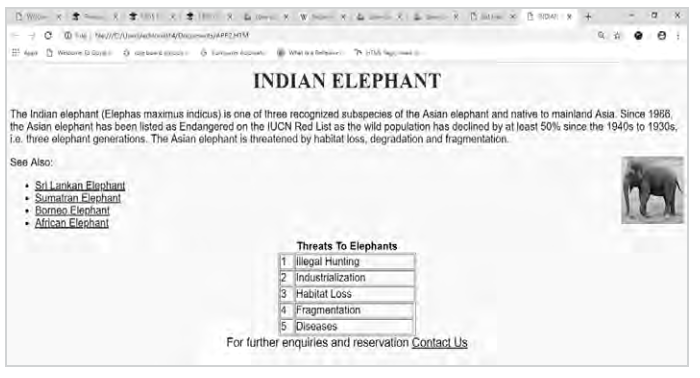
Observe the following web page and write HTML code to generate it:
Image
Note the following points while generating the Webpage:
Link colour is black, background colour is yellow and visited link colour is green.
→ Title of the page is "wild life in India".
→ Heading of the page is maroon.
→ Image used is "elephant.png",
→ Caption of table is blue.
→ Table border is blue and of size 2.
→ The 4 links are one.html, two.html, three.html and four.html.
→ The email id for contact us is abc@xyz.com.
Answer
$<$HTML$>$
$<$HEAD$>$
$<$/HEAD$>$
$<$TITLE$>$Wild life in India
$<$/TITLE$>$
$<$H1 align="center"$>$$<$FONT color="maroon" $>$INDIAN ELEPHANT$<$/EONT$>$
$<$/ H1$>$
$<$BODY bgcolor="yellow" link="black" vlink="green"$>$
$<$FONT face="Arial"$>$
$<$P align="left"$>$The Indian elephant (Elephas maximus indicus) is one of three recognized subspecies of the Asian elephant and native to mainland Asia. Since 1986, the Asian elephant has been listed as Endangered on the IUCN Red List as the wild population has declined by at least 50% since the 1940s to 1930s, i.e. three elephant generations. The Asian elephant is threatened by habitat loss, degradation and fragmentation.
$<$/P$>$
$<$IMG src="elephant.png" align="right" height="100" width="100"$>$
$<$P$>$
See Also:
$<$UL type=disc$>$
$<$LI$>$$<$A href="one.html"$>$$<$U$>$Sri Lankan Elephant $<$/U$>$$<$/A$>$$<$/LI$>$;
$<$LI$>$$<$B href="two.html"$>$$<$U$>$Sumatran Elephant$<$/U$>$$<$/A$>$$<$/LI$>$ $<$LI$>$
$<$A href="three.html"$>$$<$U$>$Borneo Elephant$<$/U$>$$<$/A$>$$<$/LI$>$ $<$LI$>$
$<$A href-"four.HTML"$>$$<$U$>$African Elephant$<$/U$>$$<$/A$>$$<$/LI$>$
$<$/UL$>$
$<$/P$>$
$<$Font color-blue$>$
$<$Center$>$$<$b$>$ Threats To Elephants$<$/b$>$
$<$/center$>$$<$/font$>$ $<$TABLE BORDER="2px" width="220" ALIGN="center" Cellspacing="1"
Bordercolor="Blue"$>$
$<$TR$>$
$<$TD$>$1
$<$/TD$>$
$<$TD$>$
Illegal Hunting $<$/TD$>$
$<$TR$>$ $<$
TD$>$2
$<$/TD$>$
$<$TD$>$Industrialization $<$/TD$>$
$<$/TR$>$
$<$TR$>$
$<$TD$>$3
$<$/TD$>$
$<$TD$>$Habitat Loss $<$/TD$>$
$<$/TR$>$
$<$TR$>$
$<$TD$>$4$<$/TD$>$
$<$TD$>$ Fragmentation $<$/TD$>$
$<$/TR$>$
$<$TR$>$
$<$TD$>$5$<$/TD$>$
$<$TD$>$ Diseases $<$/TD$>$
$<$/TR$>$
$<$/TABLE$>$
$<$/center$>$
$<$center$>$$<$FONT size="4" align="center"$>$
For further enquiries and reservation
$<$A href-"mailto:abc@xyz.com"$>$Contact Us$<$/A$>$$<$/FONT$>$
$<$/center$>$
$<$/FONT$>$
$<$/BODY$>$
$<$/HTML$>$
View full question & answer
Question 24 Marks
Differentiate between the Rowspan and Colspan in table HTML.
Answer
The rowspan attribute specifies the number of rows a cell should span.
$<$html$>$
$<$head$>$
$<$/head$>$
$<$body$>$
$<$table border= "2"$>$
$<$tr$>$
$<$th$>$Name$<$/th$>$
$<$th$>$Age$<$/th$>$
$<$th$>$Student$<$/th$>$
$<$/tr$>$
$<$tr$>$
$<$td$>$Nishi$<$/td$>$
$<$td$>$18$<$/td$>$
$<$td rowspan="2"$>$2$<$/td$>$
$<$/tr$>$
$<$tr$>$
$<$td$>$Kartik$<$/td$>$
$<$td$>$17$<$/td$>$
$<$/tr$>$
$<$/table$>$
$<$/body$>$
$<$/html$>$
The colspan attribute defines the number of columns a table cell should span.
$<$html$>$
$<$head$>$
$<$/head$>$
$<$body$>$
$<$table$>$
$<$tr$>$
$<$th$>$Month$<$/th$>$
$<$th$>$Savings$<$/th$>$
$<$/tr$>$
$<$tr$>$
$<$td$>$January$<$/td$>$
$<$td$>$Rs100$<$/td$>$
$<$/tr$>$
$<$tr$>$
$<$td$>$February$<$/td$>$
$<$td$>$Rs80$<$/td$>$
$<$/tr$>$
$<$tr$>$
$<$td colspan="2"$>$Sum: Rs180$<$/td$>$
$<$/tr$>$
$<$/table$>$
$<$/body$>$
$<$/html$>$
View full question & answer
Question 34 Marks
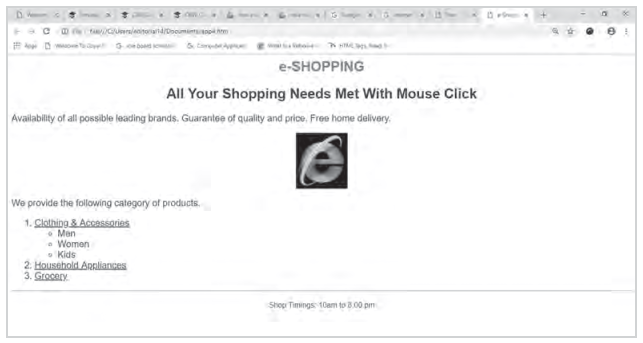
Observe the following output and write the HTML code to generate it:
Image
Consider the following points while generating the web page:
→ The title of the page is "e-Shopping"
→ The heading is in red colour
→ Text colour is maroon<
→ Font of the entire document is Arial
→ Image used is "images.jpg"
→ The pages linked are:
→ Clothing & Accessories to "cloth.html"..
→ Household Appliances to "house.html",
→ Grocery to "grocery.html".
→ Bottom message is of size 2.
Answer
$<$html$>$
$<$head$>$
$<$title$>$e-Shopping$<$/title$>$
$<$/head$>$
$<$body text="maroon"$>$
$<$font face="Arial"$>$
$<$h2$>$
$<$center$>$$<$font color="red"e-SHOPPING$>$$<$/font$>$$<$/center$>$
$<$/h2$>$
$<$h2$>$
$<$center$>$All Your Shopping Needs Met With Mouse Click
$<$/center$>$
$<$/h2$>$
$<$p$>$Availability of all possible leading brands. Guarantee of quality and price. Free home delivery.
$<$center$>$$<$img src="image.png"$>$$<$/center$>$
$<$p$>$We provide the following category of products.
$<$ol$>$
$<$li$>$
$<$a href="cloth.html"$>$Clothing & Accessories$<$/a$>$
$<$ul type="circle"$>$
$<$li$>$Men
$<$li$>$Women 
$<$li$>$Kids
$<$/ul$>$
$<$li$>$$<$a href-"House.html"$>$Household Appliances$<$/a$>$
$<$li$>$$<$a href-"Grocery.html"$>$Grocery$<$/a$>$
$<$/ol$>$
$<$hr$>$
$<$p$>$
<center>
<font size="2">Shop Timings: 10am to 8.00 pm</font>
</center>
$<$/p$>$
$<$/font$>$
$<$/body$>$
$<$/html$>$
View full question & answer
Question 44 Marks
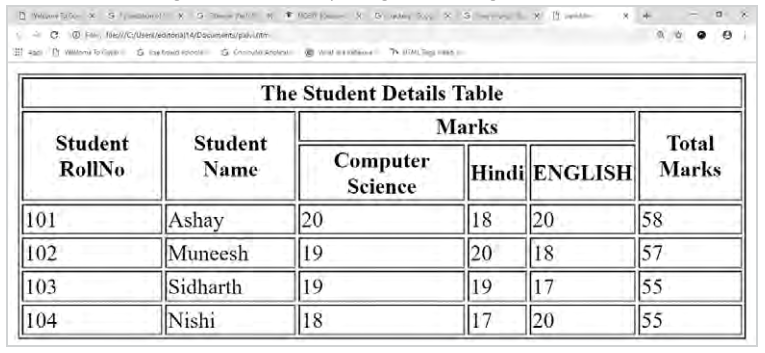
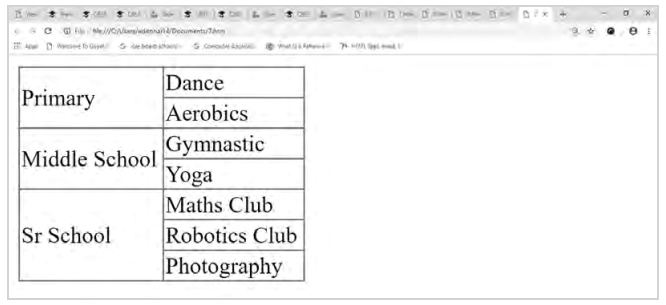
Observe the following table and write the HTML code to generate it:
Image
Answer
$<$HTML$>$
$<$HEAD$>$
$<$/HEAD$>$
$<$BODY$>$
$<$TABLE BORDER= "3" FRAME= "BORDER" RULES= "ALL" WIDTH= "200"$>$
$<$TR$>$
$<$TD ROWSPAN="2"$>$ Primary$<$/TD$>$
$<$TD$>$ Dance$<$/TD$>$
$<$/TR$>$
$<$TR$>$
$<$TD$>$Aerobics$<$/TD$>$
$<$/TR$>$
$<$TR$>$
$<$TD ROWSPAN="2"$>$ Middle School$<$/TD$>$
$<$TD$>$Gymnastic$<$/TD$>$
$<$/TR$>$
$<$TR$>$
$<$TD$>$ Yoga$<$/TD$>$
$<$/TR$>$
$<$TR$>$
$<$TD ROWSPAN="3"$>$ Sr School$<$/TD$>$
$<$TD$>$Maths Club$<$/TD$>$
$<$/TR$>$
$<$TR$>$
$<$TD$>$Robotics Club$<$/TD$>$
$<$/TR$>$
$<$TR$>$
$<$TD$>$Photography$<$/TD$>$
$<$/TR$>$
$<$/TABLE$>$
$<$/BODY$>$
$<$/HTML$>$
View full question & answer
Question 54 Marks
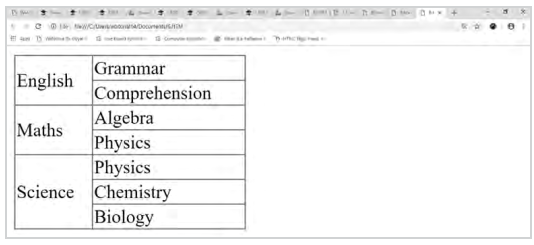
Observe the following table and write the HTML code to generate it:
Image
Answer
$<$HTML$>$
$<$HEAD$>$
$<$/HEAD$>$
$<$BODY$>$
$<$TABLE "BORDER" = "1" WIDTH= "200" cellspacing= "22"$>$
$<$TR$>$
$<$TD ROWSPAN="2"$>$English$<$/TD$>$;
$<$TD$>$ Grammar$<$/TD$>$
$<$/TR$>$
$<$TR$>$
$<$TD$>$ Comprehension$<$/TD$>$
$<$/TR$>$
$<$TR$>$
$<$TD ROWSPAN="2"$>$ Maths$<$/TD$>$
$<$TD$>$Algebra$<$/TD$>$
$<$/TR$>$
$<$TR$>$
$<$TD$>$ Physics$<$/TD$>$
$<$/TR$>$
$<$TR$>$
$<$TD ROWSPAN="3"$>$Science$<$/TD$>$
$<$TD$>$Physics$<$/TD$>$
$<$/TR$>$
$<$TR$>$
$<$TD$>$Chemistry$<$/TD$>$
$<$/TR$>$
$<$TR$>$
$<$TD$>$Biology$<$/TD$>$
$<$/TR$>$
$<$/TABLE$>$
$<$/BODY$>$
$<$/HTML$>$
View full question & answer
Question 64 Marks
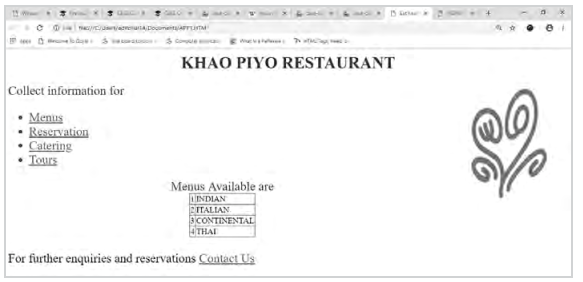
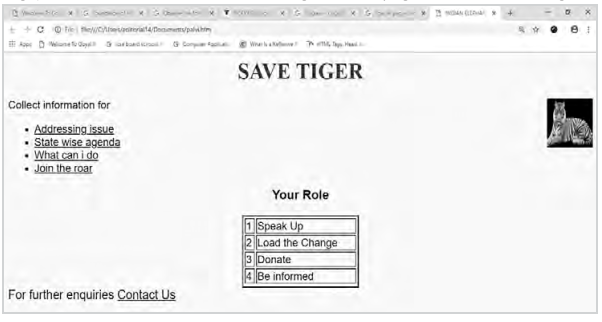
Write the HTML code to generate the following output:
Image
Note the following points while generating the webpage:
→ Link colour is green, active link colour is blue and visited link colour is red.
→ Title of the page is "eat healthy live healthy".
→ Heading of the page is maroon.
→ Image used is "Restaurant.jpg".
→ Caption of table is blue.
→ Table border is blue and of size 2.
→ The 4 links are one.html, two.html, three.html and four.html.
→ The email id for contact us is abc@xyz.com.
Answer
$<$HTML$>$
$<$HEAD$>$
$<$TITLE$>$Eat healthy and live healthy$<$/TITLE$>$
$<$/HEAD$>$
$<$BODY LINK="Green" ALINK="Blue" VLINK="Red"$>$
$<$CENTER$>$
$<$H1$>$
$<$FONT COLOR="maroon"$>$KHAO PIYO RESTAURANT$<$/FONT$>$
$<$/H1$>$
$<$/CENTER$>$
$<$IMG SRC="Restaurant.jpg" ALIGN="right" HEIGHT="225" WIDTH="250"$>$
$<$FONT COLOR="purple" SIZE="5"$>$
Collect information for
$<$UL$>$
$<$LI$>$$<$A HREF="one.html"$>$Menus$<$/A$>$
$<$LI$>$$<$A HREF="two.html"$>$Reservation$<$/A$>$
$<$LI$>$$<$A HREF="three.html"$>$Catering$<$/A$>$
$<$LI$>$$<$A HREF="four.html"$>$Tours$<$/A$>$
$<$/UL$>$
$<$/font$>$
$<$font size ="5"$>$
$<$CENTER$>$
$<$TABLE BORDER="2" BORDERCOLOR="blue" FRAME="border" RULES= "all"$>$
$<$font color ="blue"$>$$<$Center$>$ Menus Available are$<$/Center$>$$<$/font$>$
$<$TR$>$
$<$TD$>$ 1
$<$TD$>$INDIAN
$<$TR$>$
$<$TD$>$ 2
$<$TD$>$ITALIAN
$<$TR$>$
$<$TD$>$ 3
$<$TD$>$ CONTINENTAL
$<$TR$>$
$<$TD$>$4
$<$TD$>$THAI
$<$/TABLE$>$
$<$/CENTER$>$
$<$BR$>$
For further enquiries and reservations $<$A HREF="mailto:abc@xyz. com"$>$Contact Us$<$/A$>$
$<$/font$>$
$<$/BODY$>$
$<$/HTML$>$
View full question & answer
Question 74 Marks
Observe following output and write the HTML code to generate it:
Image
Consider the following points while generating the web page:
→ The title of the page is "FOOTBALL CLUB".
→ The heading is blue color.
→ Font of entire documents is Arial.
→ Image Used is "football.png",
→ The page is linking to:
→ Proud history to "history.html".
→ Bottom message is of size 2
Answer
$<$HTML$>$
$<$BODY$>$
$<$HEAD$>$
$<$TITLE$>$FOOTBALL CLUB$<$/TITLE$>$
$<$/HEAD$>$
$<$BODY$>$
$<$FONT FACE="Arial"$>$
$<$CENTER$>$
$<$H1$>$$<$FONT COLOR- "Blue" $>$FOOTBALL CLUB$<$/H1$>$
$<$/FONT$>$
$<$BR$>$
$<$IMG SRC="football.png" $>$
$<$/CENTER$>$
$<$B$>$
Welcome to the website of the Manchester Football Club
$<$/B$>$
$<$BR$>$
The Manchester Football Club is based in United States of America and has a long and
$<$A HREF="history.html"$>$proud history$<$/A$>$.
We have several teams in various age groups from kids to Grown- ups so there is a team to suit any player
$<$BR$>$$<$BR$>$
$<$U$>$This year's motto:$<$/U$>$
$<$BR$>$
$<$I$>$We are the BEST: $<$/I$>$
$<$HR$>$
$<$B$>$If you have any questions about us, send us a mail at manr@ football.us$<$/B$>$
$<$BR$>$
$<$FONT SIZE=2$>$
$<$P ALIGN="Right"$>$ &copy; ManchesterFootball Club Last updated 30$<$SUP$>$th$<$/SUP$>$ July 2017
$<$/P$>$
$<$/FONT$>$
$<$/FONT$>$
$<$/BODY$>$
$<$/HTML$>$
View full question & answer
Question 84 Marks
Answer
The code to generate the web page is given as:
$<$HTML$>$
$<$HEAD$>$
$<$TITLE$>$Application based question$<$/TITLE$>$
$<$STYLE TYPE-"text/css"$>$
BODY{
Background-color:aqua; }
H1 {
Font-family: Arial;
Font-size: 18pt;
Text-decoration; Blink;
Color: Red;
Text-align: Center}
P{
Font-size: 16pt;
Font-style:Normal;
Font-weight:bold;
Text-align:Center;
Background-color:Pink;
Font-style: Italic}
H4 {
Text-transform: Uppercase;
Text-align :Center;
Font-size: 14pt; }
H3 {
Text-align: Left;
Font-style: Italic;}
$<$/STYLE$>$
$<$/HEAD$>$
$<$BODY$>$
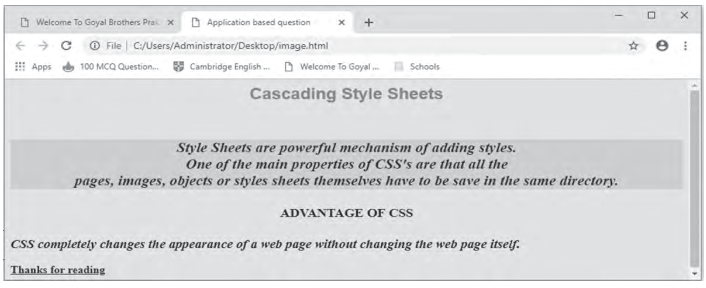
$<$H1$>$ Cascading Style Sheets$<$/H1$>$
$<$BR$>$
$<$P$>$ Style Sheets are powerful mechanism of adding styles.$<$BR$>$One of the main properties of CSS's are that all the$<$BR$>$ pages, images, objects or
styles sheets themselves have to be save in the same directory.$<$/P$>$
$<$H4$>$Advantage of CSS$<$/H4$>$
$<$H3$>$CSS completely changes the appearance of a web page without
changing the web page itself.$<$/H3$>$
$<$B$>$
$<$U$>$ Thanks for reading $<$/U$>$$<$/B$>$
$<$/BODY$>$
$<$/HTML$>$
View full question & answer
Question 94 Marks
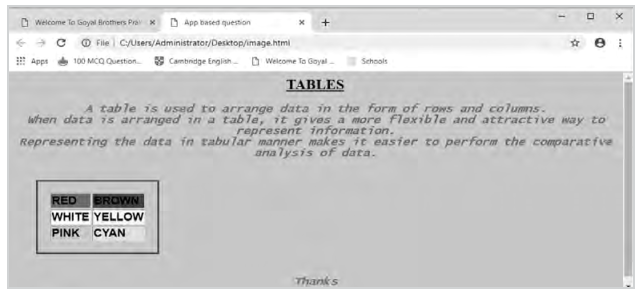
Write the HTML and CSS code to generate the following web page.
Image
Special Notes:
a. Title of the web page is 'App based question.
b. Background color of the web page is cyan.
c. The first level of heading has font size 32 with center alignment and underline.
d. The paragraph has font as Lucida Console, font size as 18,font color as red with bold, italic and center alignment.
e. The table has border color as red, margin as 1cm, border as groove and padding as 1cm.
f. Each row of the table has font as sans-serif, font size as 32pt with bolder look.
g. Save the web page as 'App_based_ques1.html".
Answer
The code to generate the given web page is:
$<$HTML$>$
$<$Head$>$$<$TITLE$>$App based question$<$/TITLE$>$
$<$STYLE TYPE="text/css"$>$
BODY{Background-Color:Pink}
H1 {Text-Decoration:Underline;Font-Size:18pt;Text-Align:Center}
P(Font-style:Italic;Font-family:Lucida Console;Font-
weight:Bold;Font-size:14pt;Color:Red}
Table{Border:Groove;Margin:1cm;Border-color:Red;Padding;.5cm;Al ign:Center}
TR(Font-family:Sans-Serif;Font-weight:Bolder;Font-
size:14pt;Border:Groove}
P(Text-align:Center;}
$<$/STYLE$>$
$<$BODY$>$
$<$H1$>$TABLES$<$/H1$>$
$<$P$>$A table is used to arrange data in the form of rows and
columns.$<$BR$>$
When data is arranged in a table, it gives a more flexible and attractive way to represent information.$<$BR$>$
Representing the data in tabular manner makes it easier to perform the comparative analysis of data.$<$BR$>$
$<$TABLE BORDER=1$>$
$<$TR$>$
$<$TD BGCOLOR=RED$>$RED$<$/TD$>$
$<$TD BGCOLOR=BROWN$>$BROWN$<$/TD$>$
$<$/TR$>$
$<$TR$>$
$<$TD BGCOLOR=WHITE$>$WHITE$<$/TD$>$
$<$TD BGCOLOR-YELLOW$>$YELLOW$<$/TD$>$
$<$/TR$>$
$<$TR$>$
$<$TD BGCOLOR=PINK$>$PINK$<$/TD$>$
$<$TD BGCOLOR=CYAN$>$CYAN$<$/TD$>$
$<$/TR$>$
$<$/TABLE$>$
$<$P$>$Thanks $<$/P$>$
$<$/BODY$>$
$<$/HTML$>$
View full question & answer
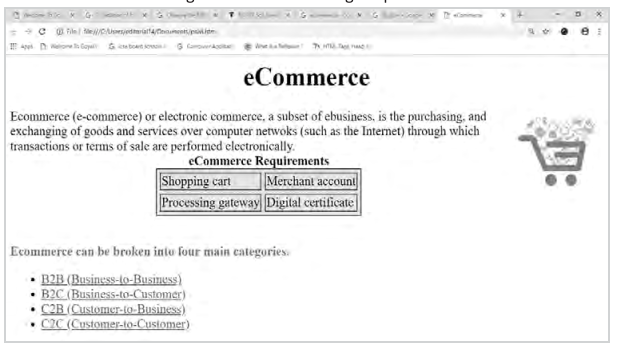
Question 114 Marks
Write the HTML code to generate the following output:
Image
Note the following points while generating the Web page:
→ Link color is green, active link color is blue, and visited link color is red.
→ Title of the page is "eCommerce".
→ Color of the heading of the page is maroon,
→ Image used is "ecommerce.jpg"
→ Caption of table is blue.
→ Background of table is "cyan".
→ Table border is blue and of size 2.
→ The 4 links are one.html, two.html, three.html, and four.html.
→ Link Heading is red.
Answer
self
View full question & answer
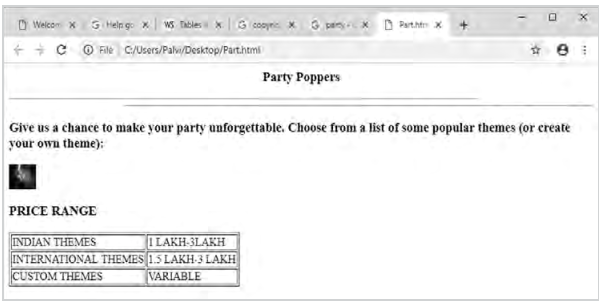
Question 124 Marks
Carefully study the web page given below. Identify 10 tags (structural as well as formatting tags) that have been utilised in creating this web page and write the usage of each of them.
Image
Answer
self
View full question & answer
Question 134 Marks
Carefully study the web page given below. Identify 10 tags (structural as well as formatting tags) that have been utilised in creating this web page and write the usage of each of them.
Image
Answer
self
View full question & answer