Questions

4 Marks Quetions

🎯

Test yourself on this topic

5 questions · timed · auto-graded

Question 14 Marks
Pinky had heard about the words types of networks. She had some doubts. Answer to her queries to clear her doubts.
(i) What is PAN?
(ii) Define the term WAN.
(iii) Define the term MAN.
(iv) Write a disadvantage of both LAN and WAN.
Answer
(i) A Personal Area Network (PAN) is a computer network for interconnecting electronic devices within a person’s workspace.
(ii) A Wide Area Network (WAN) is the one which covers a broad area. It consists of two or more local area networks. A WAN is used by government organizations and businesses.
(iii) A Metropolitan Area Network (MAN) is a computer network in which two or more computers that are geographically distributed but in the same metropolitan city are connected. Its geographic scope falls between a WAN and a LAN.
(iv) Disadvantage of LAN: Even though LAN saves a lot of money in terms of resource sharing, the initial cost involved in setting up the network is quite high.
Disadvantage of WAN: It is difficult to maintain the WAN network. It requires skilled technicians and network administrators.
View full question & answer
Question 24 Marks
Define the following types of integrity:
(i) Entity integrity
(ii) Domain integrity
(iii) Referential integrity
(iv) User-defined integrity
Answer
(i) Entity Integrity: It defines the primary key of a table. Entity integrity rule on a column does not allow duplicate and null values.
(ii) Domain Integrity: It defines the type, range, and format of data allowed in a column. Domain integrity states that all values in a column must be of the same type.
(iii) Referential Integrity: It defines the foreign key concepts. Referential integrity ensures that data in related tables remains accurate and consistent before and after changes.
(iv) User-Defined Integrity: If some business requirements do not fit any above data integrity then the user can create their integrity, which is called user-defined integrity.
View full question & answer
Question 34 Marks
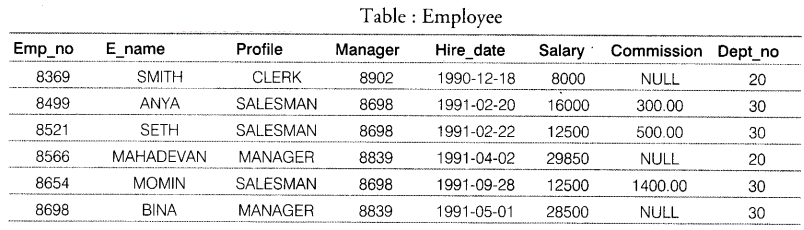
Consider the following table: Employee
Image
(a) How many fields and records are there in the table Employee?
(b) Write the SQL queries for the following:
(i) Display E name and Salary of those employees whose Salary is greater than or equal to 22000.
(ii) Display details of employees who are not getting commission.
(iii) Display all the details of the employee profile ‘SALESMAN’.
Answer
(a) There are 8 fields and 6 records in the table Employee.
(b) (i) SELECT E name, Salary FROM Employee WHERE Salary> = 22000;
(ii) SELECT* FROM Employee WHERE Commission IS NULL;
(iii) SELECT *FROM EMPLOYEE WHERE Profile=’’SALESMAN’;
View full question & answer
Question 44 Marks
Ojas had prepared a Table of Contents of the project work he had done in a word processor application.
(a) Tell him the different steps to update the TOC.
(b) Tell him the different steps to delete the TOC.
Answer
The writer does not update the table of contents automatically, so after any changes to the headings, you must update it manually.
(a) To update a table of contents when changes are made to the document:
(i) Right-click anywhere in the TOC.
(ii) From the pop-up menu, choose Update Index/Table. The writer updates the table of contents to reflect the changes in the document.
You can also update the index from the Navigator by right-clicking on Indexes → Table of Contents and choosing Index → Update from the pop-up menu.
(b) To delete the table of contents from a document:
(i) Right-click anywhere in the TOC.
(ii) From the pop-up menu, choose Delete Index/Table. The writer deletes the table of contents.
View full question & answer
Question 54 Marks
What is sorting? How to use ascending or descending sort which depends on one column?
Answer
Sorting is a common spreadsheet task that allows users to easily re-order the data. The most common type of sorting is alphabetical ordering which you can do in ascending or descending order.
To use ascending or descending sort which depends on one column, follow the given steps:
Highlight the cells to be sorted, then select Data → Sort to open the Sort dialog, or click the Sort Ascending or Sort Descending toolbar buttons. Using the dialog, you can sort the selected cells using up to three columns, in either ascending (A-Z, 1-9) or descending (Z-A, 9-1) order.
View full question & answer
4 Marks Quetions - Information Technology STD 10 Questions - Vidyadip