Questions

4 Marks Quetions

🎯

Test yourself on this topic

5 questions · timed · auto-graded

Question 14 Marks
How to clear web history on the Mozilla Firefox browser?
Answer
Follow the steps below to clear the web history on the Mozilla Firefox browser:
  • Step 1: Click on the menu button = on the upper right of the browser toolbar to open the menu panel.
  • Step 2: Click History.
  • Step 3: Click Clear Recent History.
  • Step 4: Select how much history you want to clear:
    • click the drop-down menu next to Time Range to clear to choose how much of your history Firefox will clear (the last hour, the last 2 hours, the last 4 hours, the current day, or everything)
    • use checkboxes to select what information you want to clear from your history (like Browsing and download History, active logins, forms & search history, cookies and cache offline website data, and site preferences)
  • Step 5: Click on the ‘Clear Now’ Button the window will close and the items you’ve selected will be cleared from your history.
View full question & answer
Question 24 Marks
What do you mean by data control language? Also, give its types.
Answer
Data Control Language (DCL) deals with the commands used in SQL that permit a user to access, modify, or work on the different privileges in order to control the database. It allows the database owner to give access, revoke access, and change the given permissions as and when required. DCL is basically used for enforcing data security. The DCL commands present in SQL are
  • GRANT: It is used to grant (give access to) security priviledges to specific database users. It is mostly used to INSERT, DELETE, SELECT, UPDATE, EXECUTE, ALTER, or to provide priviledges to user’s data.
    Syntax: GRANT <priviledges> ON <object name> To <user/roles>
  • Revoke: It is used to revoke or withdraw the permissions/access that was granted via the GRANT command.
    Syntax: REVOKE <priviledges> ON <object name> FROM <user/roles>
View full question & answer
Question 34 Marks
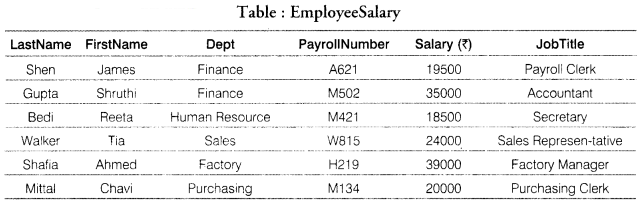
Consider the following table: Employee Salary. 
Image
(i) How many fields and records are in the table EmployeeSalary?
(ii) Write the SQL queries for the following:
(a) List all data of table EmployeeSalary.
(b) Display all the records whose salary’ is less than 25000.
(c) Display the FirstName and JobTitle of employees having Dept ‘Finance’.
Answer
(i) There are 6 fields and 6 records in the table EmployeeSalary.
(ii) (a) SELECT * FROM EmployeeSalary;
(b) SELECT * FROM EmployeeSalary WHERE Salary<25000;
(c) SELECT FirstName, JobTitle FROM EmployeeSalary WHERE Dept=’Finance’;
View full question & answer
Question 44 Marks
Write the steps for text fitting inside a shape in a word processor document. Also, describe its options.
Answer
Assume you want to create some shapes which have text in them. Some of the text might wrap within the shape. To do this, you have to right-click and choose Text and go back to the Text Tab, and check the option Word wrap Text in Shape. In this way, the text gets wrapped inside a shape. You can also resize the shape to fit the text.
To format the text in a shape: Select the object to which the text was added. Select Format → Text or right-click on the shape and select Text from the pop-up menu. The Text dialog is displayed.
View full question & answer
Question 54 Marks
Ishita is a teacher. She had entered the marks of all the students and also calculated the total of the students. Now, she wants to sort the data so that she can find the names of the students according to their marks in descending order. Tell her the different steps to sort the data.
Answer
Ishita can highlight the cells to be sorted, then select Data Sort to open the Sort dialog or click the Sort Ascending or Sort Descending toolbar buttons. Using the dialog, you can sort the selected cells using up to three columns, in either ascending (A-Z, 1-9) or descending (Z-A, 9-1) order.
View full question & answer