Degree is the number of columns in a table.
Eg: Consider the following tables:
Supposing Table : Account contains 3 rows and 2 columns.
Cardinality of Account table is : 3
Degree of Account table is :2
15 questions · timed · auto-graded
Degree is the number of columns in a table.
Eg: Consider the following tables:
Supposing Table : Account contains 3 rows and 2 columns.
Cardinality of Account table is : 3
Degree of Account table is :2
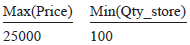
Table: Product
| Pno | Name | Qty | PurchaseDate |
| 101 | Pen | 102 | 12-12-2011 |
| 102 | Pencil | 201 | 21-02-2013 |
| 103 | Eraser | 90 | 09-08-2010 |
| 109 | Sharpener | 90 | 31-08-2012 |
| 113 | Clips | 900 | 12-12-2011 |
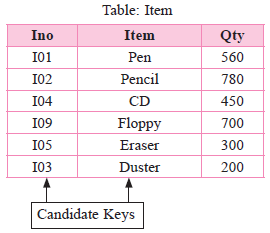
(a) Write the names of most appropriate columns, which can be considered as candidate keys.
(b) What is the degree and cardinality of the above table?
Degree:4
Cardinality:5
Differentiate between DDL &DMLcommands. Identify DDL &DML commands from the following:
(UPDATE, SELECT, ALTER, DROP)
DDL stands for Data Definition language and comprises of commands which will change the structure of database object.
DML stands for Data Manipulation Language and comprises of commands which are used to insert, edit, view &delete the data stored in a database object.
DDL Commands are: ALTER, DROP
DML Commands are: UPDATE, SELECT
Alternate Key: A candidate key that is not selected as a primary key is called an Alternate Key.
TABLE: WATCHES
| Watchid | Watch_name | Price | Type | Qty_store |
| W001 | High time | 10000 | Unisex | 100 |
| W002 | Life time | 15000 | Ladies | 150 |
| W003 | Wave | 20000 | Gents | 200 |
| W004 | High fashion | 7000 | Unisex | 250 |
| W005 | Golden time | 25000 | Gents | 100 |
TABLE: SALE
| Watchid | Qty_Sold | Quarter |
| W001 | 10 | 1 |
| W003 | 5 | 1 |
| W002 | 20 | 2 |
| W003 | 10 | 2 |
| W001 | 15 | 3 |
| W002 | 20 | 3 |
| W005 | 10 | 3 |
| W003 | 15 | 4 |
(a) To display all the details of those watches whose name ends with ‘time’
(b) To display watch’s name andprice of those watches which have price range between 5000-15000
(c) To display total quantity in store of unisex type watches
(d) To display watch name and their quantity sold in first quarter
(e) Select max(price),min(qty_store) from watches;
(f) Select quarter, sum(qty_sold) from sale group by quarter;
(g) Select watch_name,price,type from watches w, sale s where w.watchid=s.watchid;
(h) Select watch_name, qty_store, sum(qty_sold),qty_store
(i) W.watch=s.watchid group by s.watchid;
(b) select Watch_name, Price from Watches where price between 5000 and 15000;
OR
Select Watch_name, Price from Watches where Price>=5000 and Price<=15000;
(c) Select sum(Price) from Watches where Type=’UNISEX’;
(d) Select Watch_name, Qty_sold from Watches, Sale where Watches. Watchid = Sale. Watchid and Quarter = 1;
(e)
(f)
| quarter | sum(qty_sold) |
| 1 | 15 |
| 2 | 30 |
| 3 | 45 |
| 4 | 15 |
| watch_name | price | type |
| HighFashion | 7000 | Unisex |
| watch_name | qty_store | qty_sold | Stock |
| HighTime | 100 | 25 | 75 |
| LifeTime | 150 | 40 | 110 |
| Wave | 200 | 30 | 170 |
| GoldenTime | 100 | 10 | 900 |
Table: Trainer
| TID | Tname | City | HireDate | Salary |
| 101 | Sunaina | Mumbai | 1998-10-15 | 90000 |
| 102 | Anamika | Delhi | 1994-12-24 | 80000 |
| 103 | Deepti | Chandigarh | 2001-12-21 | 82000 |
| 104 | Meenakshi | Delhi | 2002-12-25 | 78000 |
| 105 | Richa | Mumbai | 1996-01-12 | 95000 |
| 106 | Maniprabha | Chennai | 2001-12-12 | 69000 |
Table: Course
| CID | CNAME | FEES | STARTDATE | TID |
| C201 | AGDCA | 12000 | 2018-07-02 | 101 |
| C202 | ADCA | 15000 | 2018-07-15 | 103 |
| C203 | DCA | 10000 | 2018-10-01 | 102 |
| C203 | DDTP | 9000 | 2018-09-15 | 104 |
| C205 | DHN | 20000 | 2018-08-01 | 101 |
| C206 | O LEVEL | 18000 | 2018-07-25 | 105 |
(a) Display the Trainer Name, City and Salary in descending order of their hire date.
(b) To display the TNAME and CITY of Trainer of joined the institute in the month of December 2001.
(c) To display TNAME, HIREDATE,CNAME, STARTDATE from tables TRAINER and COURSE whose FEES is less than or equal to 10000
(d) To display number of trainer from each city
(e) select tid, tname,from trainer where city not in(‘delhi’,’mumbai’);
(f) select distinct tid from course;
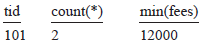
(g) select tid , count (*), min(fees) from course group by tid having count(*)>1;
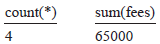
(h) Select count(*),sum(fees) from course where startdate <’2018-09-15’;
(b) Select tname, city from trainer where hiredate between ‘2001-12-01’ and ‘2001-12-31’;
OR
Select tname, city from trainer where hiredate >= ‘2001-12-01’ and hiredate<=‘2001-12-31’;
OR
Select tname, city from trainer where hiredate like ‘2001-12%’;
(c) Select tname, hiredate, cname, startdate from trainer, course where trainer.tid=course.tid and fees<=10000;
(d) Select city, count(*) from trainer group by city;
(e) Select tid, tname, from trainer where city not in(‘delhi’, ‘mumbai’);
(f) Distinct tid
101
103
102
104
105
(g)
(h)
TABLE: SALESPERSON
| CODE | NAME | SALARY | ITCODE |
| 1001 | TANDEEP JHA | 60000 | I2 |
| 1002 | YOGRAJ SINHA | 70000 | I5 |
| 1003 | TENZIN JACK | 45000 | I2 |
| 1005 | ANOKHI RAJ | 50000 | I7 |
| 1004 | TARANA SEN | 55000 | I7 |
TABLE: ITEM
| ITCODE | ITEMTYPE | TURNOVER |
| I5 | STATIONARY | 3400000 |
| I7 | HOISTERY | 6500000 |
| I2 | BAKERY | 10090000 |
(a) To display the CODE and NAME of all salesperson having “I7” item Type Code from the table SALESPERSON.
(b) To display all details from table SALESPERSON in descending order of SALARY.
(c) To display the number of SALESPERSON dealing in each TYPE of ITEM.(Use ITCODE for the same)
(d) To display NAME of all the salesperson table along with their corresponding ITEMTYPE from the ITEM table.
(e) Select max(salary) from salesperson;
(f) Select distinct itcode from salesperson;
(g) select code,name,i.itcode from sales persons, item i where s.itcode=i.itcode and turnover>=7000000;
(h) Select sum (salary)from salesperson where itcode=”i2”;
Write SOL queries for (i) to (iv) and find outputs for SQL queries (v) to (viii) which are based on the tables.
TABLE : CUSTOMERS
| NO | CNAME | ADDRESS |
| 101 | Richa jain | Delhi |
| 101 | Surbhi Sinha | Chennai |
| 103 | Lisa Thomas | Bangalore |
| 104 | Imran Ali | Delhi |
| 105 | Roshan Singh | Chennai |
TABLE : TRANSACTION
| TRNO | CNO | AMOUNT | TYPE | DOT |
| T001 | 101 | 1500 | Credit | 2017-11-23 |
| T002 | 103 | 2000 | Debit | 2017-05-12 |
| T003 | 102 | 3000 | Credit | 2017-06-10 |
| T004 | 103 | 12000 | Credit | 2017-09-12 |
| T004 | 101 | 1000 | Debit | 2017-09-05 |
(a) To display details of all transactions of TYPE Credit from Table TRANSACTION.
(b) To display the CNO and AMOUNT of all transactions done in the month September 2017 from the table TRANSACTION.
(c) To display the last date of transaction (DOT) from the table TRANSACTION for the customer having CNO as 103.
(d) To display all CNO,CNAME and DOT (date of transaction) of those CUSTOMERS from tables CUSTOMERS and TRANSACTION who have done transactions more than or equal to 2000.
(e) Select count(*), avg(amount) from transaction where dot>= ‘2017-06-01’;
(f) Select cno, count(*), max (amount) from transaction group by cno having count(*)> 1;
(g) Select cno, cname from customer where address not in (‘Delhi, ‘Bangalore’);
(h) Select distinct cno from transaction;
Given the following relation: STUDENT
Table: STUDENT
| No. | Name | Age | Department | Dateofadm | Fee | Sex |
| 1 | Pankaj | 24 | Computer | 10/01/97 | 120 | M |
| 2 | Shalini | 21 | History | 24/03/98 | 200 | F |
| 3 | Sanjay | 22 | Hindi | 12/12/96 | 300 | M |
| 4 | Sudha | 25 | History | 01/07/99 | 400 | F |
| 5 | Rakesh | 22 | Hindi | 05/09/97 | 250 | M |
| 6 | Shakeel | 30 | History | 27/06/98 | 300 | M |
| 7 | Surya | 34 | Computer | 25/02/97 | 210 | M |
| 8 | Shikha | 23 | Hindi | 31/07/97 | 200 | F |
Write SQL commands for the following queries
(a) To show all information about the students of History department.
(b) To list the names of female students who are in Hindi department.
(c) To list the names of all students with their date of admission in ascending order.
(d) To display student’s name, fee, age for male students only.
(e) To count the number of students with Age>23.
Consider the following table Student & Stream.
Table: Student
| Admno | Sname | Class | Sec | Fee | Mobile | Area | S_ID |
| 1001 | RAMESH | XII | A | 2500 | 987654321 | Madipur | 10 |
| 1078 | KRISHNA | XII | B | 2400 | 999911111 | Jawala Heri | 30 |
| 1006 | FARDEEN | XII | C | 2600 | 987654321 | Paschim Puri | 40 |
| 1004 | SUBHAM | XII | A | 2500 | 963025874 | Madipur | 20 |
| 1029 | KRITIKA | XI | C | 2700 | 987456210 | Madipur | 30 |
| 1008 | SAMEEKSHA | XII | A | 2450 | 987123456 | Mangol Puri | 20 |
| 1025 | SALMA | XII | B | 2580 | 998877445 | Madipur | 30 |
| 1036 | AMANDEEP | XII | B | 2600 | 999333555 | Khyala | 40 |
| 1037 | TEJAS | XI | C | 2650 | 987951357 | Paschim Puri | 40 |
| 1029 | HIMANSHU | XII | A | 2750 | 951369874 | Jawala Heri | 10 |
Table : Stream
| S_ID | Stream_name |
| 10 | MEDILCAL |
| 20 | NON MEDICAL |
| 30 | COMMERCE WITH MATH |
| 40 | COMMERCE WITH IP |
| 50 | HUMANITIES |
Write SQL commands for the statements (a) to (h) on the table: Student and Stream
(a) Display class and total fee collected from each class.
(b) Display admission no, students name and stream name.
(c) Display all the student details who have taken Commerce Stream.
(d) Count number of students who have opted for HUMANITIES stream.
(e) Display information of commerce with ip students whose name start with ‘S’. Arrange the record by admission number.
(f) Display details of all students who are in the MEDICAL stream.
(g) Display total fee of ‘Non-Medical’ Student.
(h) Change the name of the Column Sname to Student_Name.
Table: Student
| Admno | Sname | Class | Sec | Fee | Mobile | Area | S_ID |
| 1001 | RAMESH | XII | A | 2500 | 987654321 | Madipur | 10 |
| 1078 | KRISHNA | XII | B | 2400 | 999911111 | Jawala Heri | 30 |
| 1006 | FARDEEN | XII | C | 2600 | 987654321 | Paschim Puri | 40 |
| 1004 | SUBHAM | XII | A | 2500 | 963025874 | Madipur | 20 |
| 1029 | KRITIKA | XI | C | 2700 | 987456210 | Madipur | 30 |
| 1008 | SAMEEKSHA | XII | A | 2450 | 987123456 | Mangol Puri | 20 |
| 1025 | SALMA | XII | B | 2580 | 998877445 | Madipur | 30 |
| 1036 | AMANDEEP | XII | B | 2600 | 999333555 | Khyala | 40 |
| 1037 | TEJAS | XI | C | 2650 | 987951357 | Paschim Puri | 40 |
| 1029 | HIMANSHU | XII | A | 2750 | 951369874 | Jawala Heri | 10 |
Table : Stream
| S_ID | Stream_name |
| 10 | MEDILCAL |
| 20 | NON MEDICAL |
| 30 | COMMERCE WITH MATH |
| 40 | COMMERCE WITH IP |
| 50 | HUMANITIES |
Write SQL commands for the statements (a) to (h) on the above table: Student and Stream
(a) Identify Primary Keys and Foreign Key in the table student and primary key in Stream table given above.
(b) Display stream id and stream-wise total fee collected.
(c) Count no of students from each area.
(d) Display all the student details those who belongs to Madipur Area.
(e) Increase the fees of all students by10%.
(f) Display unique area from the student table.
(g) Display details of those students whose area contains ‘Puri’.
(h) Display the information of those students who are in class XII and section is either B or C.
Consider the following table Bank.
Table: Bank
| AccNo | Cust_name | FD_Amount | Months | Int_Rate | FD_Date |
| 1001 | Arti Gupta | 30000 | 36 | 6.00 | 2018-07-01 |
| 1002 | Dilip Lal | 50000 | 48 | 6.75 | 2018-03-22 |
| 1003 | Navin Gupta | 30000 | 36 | NULL | 2018-03-01 |
| 1004 | D.P. Yadav | 80000 | 60 | 8.25 | 2017-06-12 |
| 1005 | Jyoti Sharma | 20000 | 36 | 6.50 | 2017-01-31 |
| 1006 | Rakesh Kumar | 70000 | 60 | 8.25 | 2018-06-15 |
| 1007 | K.D. Singh | 50000 | 48 | NULL | 2018-07-05 |
| 1008 | Anjali Sharma | 60000 | 48 | 6.75 | 2017-04-02 |
| 1009 | Swati Garg | 40000 | 42 | 6.50 | 2018-06-15 |
| 1010 | Rupinder Kaur | 25000 | 36 | 6.50 | 2018-09-27 |
Write SQL commands for the statements (a) to (h) on the table Bank
(a) Display the details of all FD whose rate of interest is in the range 6% to 7%.
(b) Display the Customer Name and FD Amount for all the loans for which the number of Months is 24, 36, or 48(using IN operator).
(c) Display the Account Number, Customer Name and FD Amount for all the FD for which the Customer Name
ends with “Sharma”.
(d) Delete the records of “Rupinder Kaur”.
(e) Add another column Maturity_Amt of type Integer in the Bank table.
(f) To find the average FD amount. Label the column as “Average FD Amount”.
(g) To find the total FD amount which started in the year 2018?
(h) Update Maturity Amount of all bank customers.
a. Maturity Amount = (FD_Amount*Months* Int_rate)/(12*100)
Consider the following table Bank.
Table: Bank
| AccNo | Cust_name | FD_Amount | Months | Int_Rate | FD_Date |
| 1001 | Arti Gupta | 30000 | 36 | 6.00 | 2018-07-01 |
| 1002 | Dilip Lal | 50000 | 48 | 6.75 | 2018-03-22 |
| 1003 | Navin Gupta | 30000 | 36 | NULL | 2018-03-01 |
| 1004 | D.P. Yadav | 80000 | 60 | 8.25 | 2017-06-12 |
| 1005 | Jyoti Sharma | 20000 | 36 | 6.50 | 2017-01-31 |
| 1006 | Rakesh Kumar | 70000 | 60 | 8.25 | 2018-06-15 |
| 1007 | K.D. Singh | 50000 | 48 | NULL | 2018-07-05 |
| 1008 | Anjali Sharma | 60000 | 48 | 6.75 | 2017-04-02 |
| 1009 | Swati Garg | 40000 | 42 | 6.50 | 2018-06-15 |
| 1010 | Rupinder Kaur | 25000 | 36 | 6.50 | 2018-09-27 |
Write SQL commands for the statements (a) to (g) on the table BANK
(a) Display details of all the FD whose rate of interest is NOT NULL.
(b) Display amounts of various FD from the table Bank. An FD Amount should appear only once.
(c) Display the number of months of various loans from the table Bank. A month should appear only once.
(d) Display the Customer Name and FD Amount for all the Bank which do not have a number of months is 36.
(e) Display the Customer Name and FD Amount for which the FD amount is less than 500000 or int_rate is more than 7.
(f) Display the details of all FD which started in the year 2018.
(g) Display the details of all FD whose FD_Amount is in the range 40000 to 50000.
| AccNo | Cust_name | FD_Amount | Months | Int_Rate | FD_Date |
| 1001 | Arti Gupta | 30000 | 36 | 6.00 | 2018-07-01 |
| 1002 | Dilip Lal | 50000 | 48 | 6.75 | 2018-03-22 |
| 1003 | Navin Gupta | 30000 | 36 | NULL | 2018-03-01 |
| 1004 | D.P. Yadav | 80000 | 60 | 8.25 | 2017-06-12 |
| 1005 | Jyoti Sharma | 20000 | 36 | 6.50 | 2017-01-31 |
| 1006 | Rakesh Kumar | 70000 | 60 | 8.25 | 2018-06-15 |
| 1007 | K.D. Singh | 50000 | 48 | NULL | 2018-07-05 |
| 1008 | Anjali Sharma | 60000 | 48 | 6.75 | 2017-04-02 |
| 1009 | Swati Garg | 40000 | 42 | 6.50 | 2018-06-15 |
| 1010 | Rupinder Kaur | 25000 | 36 | 6.50 | 2018-09-27 |
Write SQL commands for the statements (a) to (g) on the table BANK
(a) To create the table Bank (Primary Key: AccNo)
(b) Display the structure of the table Bank.
(c) Display the details of all the bank.
(d) Display the AccNo, Cust_Name, and FD_Amount.
(e) Display the details of all the FD’s having maturity time is less than 40 months.
(f) Display the AccNo and FD amount which started before 01-04-2018.
(g) Display details of all FD whose rate of interest are NULL.
| (a) | Crate table Bank ( | |
| AccNo | Int(4) Primary Key, | |
| Cust_Name | Varchar(15), | |
| FD_Amount | int, | |
| Months | int(3), | |
| Int_Rate | decimal(5,2), | |
| FD_Date | date ); |
(b) Desc Bank;
(c) Select * from Bank;
(d) SelectAccNo,Cust_Name, FD_Amount from Bank;
(e) Select * from Bank where Months < 40
(f) Select Acc_No, FD_Amount from Bank where FD_Date<’2018-04-01’;
(g) Select * from Bank where Int_rate IS NULL;