Delete command is used to remove table.
Question types
Database Query Using–SQL question types
79 questions across 8 question groups — pick any mix to generate a Computer Science paper with step-by-step answer keys.
79
Questions
8
Question groups
5
Question types
01
True-False
5 Q→02M.C.Q
10 Q→03Fill In The Blanks
10 Q→041 Marks Each
14 Q→052 Marks Each
9 Q→063 Marks Each
7 Q→075 Marks Each
16 Q→084 Marks Each
8 Q→Sample Questions
Database Query Using–SQL questions
One sample from each question group in this chapter. Select any group above to see the full set with answer keys.
View full solution →
Number of columns in a table is known as Degree.
SQL stands for Structured Query Language.
COUNT() will count NULL values.
DELETE is DDL command.
A Table customer contains 5 rows and 7 columns. What will be its cardinality and degree?
- ✓Degree 7, Cardinality 5.
- BDegree 5, Cardinality 7.
- CDegree 5, Cardinality 7.
- DCardinality 7, Degree 7.
Answer: A.
View full solution →Which clause is used to group the column$(s)$ with aggregate function?
- AOrder by
- BLike
- CWhere
- ✓Group by
Answer: D.
View full solution →Number of rows in a relation is known as
- ADegree
- ✓Cardinality
- CCartesian Product
- DAttribute
Answer: B.
View full solution →Which command is used to modify rows in a table.
- ADelete
- ✓Update
- CAlter
- DModify
Answer: B.
View full solution →Which command is used to close the MySQL Software/application?
- ✓exit();
- BClose();
- CClose;
- Dexit;
Answer: A.
View full solution →____________ is undefined/ unavailable/ missing value/ No value.
____________ command is used to view the structure of the table.
Select * from student where state (‘Delhi’,’MP’,’Tamil Nadu’);.
Select * from student where admno between 1101 _______ 1199;.
Alter is _______________ command.
Name the two wild card characters.
A table course has its degree as 7 and cardinality as 18. Write the number rows and columns in the table.
Write the full form of SQL.
A table student consists of 5 rows and 7 columns. Later on 3 columns added and 2 rows deleted. After some time 5 new students added. What will be the degree and cardinality?
A table Item and Store have one common column Item-Id. Item table consists of 5 rows and 3 columns while the store table consists of 7 rows and 5 columns.
What will be the degree and cardinality of these tables in the cartesian product?
Differentiate between Candidate Key and Primary Key in context of RDBMS.
What is the importance of a Primary Key in a table? Explain with a suitable example.
Differentiate between the terms primary key and alternate key.
Write the full form of DDL and DML?
What is an Alternate Key?
Differentiate between cardinality and degree of a table with the help of an example.
Observe the following table and answer the parts (i) and (ii) accordingly
Table: Product
| Pno | Name | Qty | PurchaseDate |
| 101 | Pen | 102 | 12-12-2011 |
| 102 | Pencil | 201 | 21-02-2013 |
| 103 | Eraser | 90 | 09-08-2010 |
| 109 | Sharpener | 90 | 31-08-2012 |
| 113 | Clips | 900 | 12-12-2011 |
(a) Write the names of most appropriate columns, which can be considered as candidate keys.
(b) What is the degree and cardinality of the above table?
What are candidate keys in a table? Give a suitable example of candidate keys in a table.
Differentiate between DDL & DMLcommands. Identify DDL & DML commands from the following:
(UPDATE, SELECT, ALTER, DROP)
Differentiate between Candidate Key and Alternate Key in context of RDBMS.
Consider the following DEPT and WORKER tables. Write SQL queries for (i) to (iv) and find outputs for SQL queries (v) to (viii): [Delhi 2015]
Table: DEPT
| DCODE | DEPARTMENT | CITY |
| D01 | MEDIA | DELHI |
| D02 | MARKETING | DELHI |
| D03 | INFRASTRUCTURE | MUMBAI |
| D05 | FINANCE | KOLKATA |
| D04 | HUMAN RESOURCE | MUMBAI |
Table: WORKER
| WNO | NAME | DOJ | DOB | GENDER | DCODE |
| 1001 | George K | 2013-09-02 | 1991-09-01 | MALE | D01 |
| 1002 | Ryma Sen | 2012-12-11 | 1990-12-15 | FEMALE | D03 |
| 1003 | Mohitesh | 2013-02-03 | 1987-09-04 | MALE | D05 |
| 1007 | Anil Jha | 2014-01-17 | 1984-10-19 | MALE | D04 |
| 1004 | Manila Sahai | 2012-12-09 | 1986-11-14 | FEMALE | D01 |
| 1005 | R SAHAY | 2013-11-18 | 1987-03-31 | MALE | D02 |
| 1006 | Jaya Priya | 2014-06-09 | 1985-06-23 | FEMALE | D05 |
Note: DOJ refers to date of joining and DOB refers to date of Birth of workers.
(i) To display Wno, Name, Gender from the table WORKER in descending order of Wno.
(ii) To display the Name of all the FEMALE workers from the table WORKER.
(iii) To display the Wno and Name of those workers from the table WORKER who are born between ‘1987-01-01’ and ‘1991-12-01’.
(iv) To count and display MALE workers who have joined after ‘1986-01-01’.
(v) SELECT COUNT(*), DCODE FROM WORKER GROUP BY DCODE HAVING COUNT(*)>1;
(vi) SELECT DISTINCT DEPARTMENT FROM DEPT;
(vii) SELECT NAME, DEPARTMENT, CITY FROM WORKER W,DEPT D WHERE W.DCODE=D.DCODE AND WNO<1003;
(viii) SELECT MAX(DOJ), MIN(DOB) FROM WORKER;
Answer the (a) and (b) on the basis of the following tables STORE and ITEM: [Delhi 2014]
Table: STORE
| SNo | SName | AREA |
| S01 | ABC Computronics | GK II |
| S02 | All Infotech Media | CP |
| S03 | Tech Shoppe | Nehru Place |
| S05 | Hitech Tech Store | CP |
Table: ITEM
| INo | IName | Price | SNo |
| T01 | Mother Board | 12000 | S01 |
| T02 | Hard Disk | 5000 | S01 |
| T03 | Keyboard | 500 | S02 |
| T04 | Mouse | 300 | S01 |
| T05 | Mother Board | 13000 | S02 |
| T06 | Key Board | 400 | S03 |
| T07 | LCD | 6000 | S04 |
| T08 | LCD | 5500 | S05 |
| T09 | Mouse | 350 | S05 |
| T10 | Hard disk | 4500 | S03 |
(a) Write the SQL queries (1 to 4):
(i) To display IName and Price of all the items in the ascending order of their Price.
(ii) To display the SNo and SName or all stores located in CP.
(iii) To display the minimum and maximum price of each IName from the table Item.
(iv) To display the IName, price of all items and their respective SName where they are available.
(b) Write the output of the following SQL commands (i) to (iv):
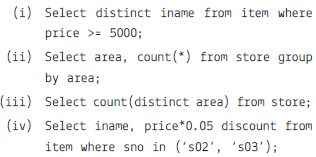
Consider the following tables CARHUB and CUSTOMER and answer (a) and (b) parts of this question: [Delhi 2012]
Table: CARHUB
| Vcode | Vehicle Name | Make | Color | Capacity | Charges |
| 100 | Innova | Toyota | WHITE | 7 | 15 |
| 102 | SX4 | Suzuki | BLUE | 4 | 14 |
| 104 | C Class | Mercedes | RED | 4 | 35 |
| 105 | A-Star | Suzuki | WHITE | 3 | 14 |
| 108 | Indigo | Tata | SILVER | 3 | 12 |
Table: CUSTOMER
| CCode | CName | VCode |
| 1 | Hemant Sahu | 101 |
| 2 | Raj Lal | 108 |
| 3 | Feroza Shah | 105 |
| 4 | Ketan Dhal | 104 |
(a) Write SQL commands for the following statements:
(i) To display the names of all white colored vehicles
(ii) To display name of vehicle, make and capacity of vehicles in ascending order of their sitting capacity
(iii) To display the highest charges at which a vehicle can be hired from CARHUB.
(iv) To display the customer name and the corresponding name of the vehicle hired by them.
(b) Give the output of the following SQL queries:
(i) Select count(distinct make) from cabhub;
(ii) Select max(charges), min(charges) from carhub;
(iii) Select count(*), make from carhub;
(iv) Select vehiclename from carhub where capacity = 4;
Consider the following tables WORKER and PAYLEVEL and answer (a) and (b) parts of this question:
[Delhi 2011]
Relation: WORKER
| ECODE | NAME | DESIG | PAYLEVEL | DOJ | DOB |
| 11 | Radhey Shyam | Supervisor | P001 | 13-Sep-2004 | 23-Aug-1981 |
| 12 | Chander Nath | Operator | P003 | 22-Feb-2010 | 12-Jul-1987 |
| 13 | Fizza | Operator | P003 | 14-June-2009 | 14-Oct-1983 |
| 15 | Ameen Ahmed | Mechanic | P002 | 21-Aug-2006 | 13-Mar-1984 |
| 18 | Sanya | Clerk | P002 | 19-Dec-2005 | 09-June-1983 |
Relation: PAYLEVEL
| PAYLEVEL | PAY | ALLOWANCE |
| P001 | 26000 | 12000 |
| P002 | 22000 | 10000 |
| P003 | 12000 | 6000 |
(a) Write SQL commands for the following statements:
(i) To display the details of all WORKERs in descending order of DOB.
(ii) To display NAME and DESIG of those WORKERs whose PLEVEL is either P001 or P002.
(iii) To display the content of all the WORKERs table, whose DOB is in between ’19-JAN-1984’ and ’18-JAN-1987’.
(iv) To add a new row with the following:
19, ‘Daya kishore’, ‘Operator’, ‘P003’, ’19-Jun-2008’, ’11-Jul-1984’
(b) Give the output of the following SQL queries:
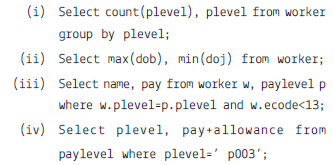
Write SQL queries for (a) to (d) and find outputs for SQL queries (e) to (h), which are based on the tables. [CBSE Sample Paper 2017]
TABLE: WATCHES
| Watchid | Watch_name | Price | Type | Qty_store |
| W001 | High time | 10000 | Unisex | 100 |
| W002 | Life time | 15000 | Ladies | 150 |
| W003 | Wave | 20000 | Gents | 200 |
| W004 | High fashion | 7000 | Unisex | 250 |
| W005 | Golden time | 25000 | Gents | 100 |
TABLE: SALE
| Watchid | Qty_Sold | Quarter |
| W001 | 10 | 1 |
| W003 | 5 | 1 |
| W002 | 20 | 2 |
| W003 | 10 | 2 |
| W001 | 15 | 3 |
| W002 | 20 | 3 |
| W005 | 10 | 3 |
| W003 | 15 | 4 |
(a) To display all the details of those watches whose name ends with ‘time’
(b) To display watch’s name and price of those watches which have price range between 5000-15000
(c) To display total quantity in store of unisex type watches
(d) To display watch name and their quantity sold in first quarter
(e) Select max(price),min(qty_store) from watches;
(f) Select quarter, sum(qty_sold) from sale group by quarter;
(g) Select watch_name,price,type from watches w, sale s where w.watchid=s.watchid;
(h) Select watch_name, qty_store, sum(qty_sold),qty_store
Write the SQL query questions from (i) to (iv) and write the output of SQL command for questions from (v) to (vii) given below:
| EMPID | FIRST NAME | LAST NAME | ADDRESS | CITY |
| 010 | George | Smith | 83 First Street | Howard |
| 105 | Mary | Jones | 842 Vine Ave. | Losantiville |
| 152 | Sam | Tones | 33 Elm St. | Paris |
| 215 | Sarah | Ackerman | 440 U.S. 110 | Upton |
| 244 | Manila | Sengupta | 24 Friends Street | New Delhi |
| 300 | Robert | Samuel | 9 Fifth Cross | Washington |
| 335 | Henry | Williams | 12 Moore Street | Boston |
| 400 | Rachel | Lee | 121 Harrison St. | New York |
| 441 | Peter | Thompson | 11 Red Road | Paris |
Table: EMPSalary
| EMPID | SALARY | BENEFITS | DESIGNATION |
| 010 | 75000 | 15000 | Manager |
| 105 | 65000 | 15000 | Manager |
| 152 | 80000 | 25000 | Director |
| 215 | 75000 | 12500 | Manager |
| 244 | 50000 | 12000 | Clerk |
| 300 | 45000 | 10000 | Clerk |
| 355 | 40000 | 10000 | Clerk |
| 4000 | 32000 | 7500 | Salesman |
| 441 | 28000 | 7500 | Salesman |
Write the SQL commands for the following :
(i) To show firstname, lastname, address and city of all employees living in paris.
(ii) To display the content of Employees table in ascending order of Firstname.
(iii) To display the firstname,lastname and total salary of all managers from the tables employee and empsalary, where total salary is calculated as
salary+benefits.
(iv) To display the maximum salary among managers and clerks from the table Empsalary.
Give the Output of following SQL commands:
(v) Select firstname, salary from employees, empsalary where designation = ‘Salesman’ and Employees.
empid=Empsalary.empid;
(vi) Select count(distinct designation) from empsalary;
(vii) Select designation, sum(salary) from empsalary group by designation having count(*) >2;
Consider the following table Bank.
Table: Bank
| AccNo | Cust_name | FD_Amount | Months | Int_Rate | FD_Date |
| 1001 | Arti Gupta | 30000 | 36 | 6.00 | 2018-07-01 |
| 1002 | Dilip Lal | 50000 | 48 | 6.75 | 2018-03-22 |
| 1003 | Navin Gupta | 30000 | 36 | NULL | 2018-03-01 |
| 1004 | D.P. Yadav | 80000 | 60 | 8.25 | 2017-06-12 |
| 1005 | Jyoti Sharma | 20000 | 36 | 6.50 | 2017-01-31 |
| 1006 | Rakesh Kumar | 70000 | 60 | 8.25 | 2018-06-15 |
| 1007 | K.D. Singh | 50000 | 48 | NULL | 2018-07-05 |
| 1008 | Anjali Sharma | 60000 | 48 | 6.75 | 2017-04-02 |
| 1009 | Swati Garg | 40000 | 42 | 6.50 | 2018-06-15 |
| 1010 | Rupinder Kaur | 25000 | 36 | 6.50 | 2018-09-27 |
Write SQL commands for the statements (a) to (h) on the table Bank
(a) Display the details of all FD whose rate of interest is in the range 6% to 7%.
(b) Display the Customer Name and FD Amount for all the loans for which the number of Months is 24, 36, or 48(using IN operator).
(c) Display the Account Number, Customer Name and FD Amount for all the FD for which the Customer Name ends with “Sharma”.
(d) Delete the records of “Rupinder Kaur”.
(e) Add another column Maturity_Amt of type Integer in the Bank table.
(f) To find the average FD amount. Label the column as “Average FD Amount”.
(g) To find the total FD amount which started in the year 2018?
(h) Update Maturity Amount of all bank customers.
a. Maturity Amount = (FD_Amount*Months* Int_rate)/(12*100)
Consider the following table Bank.
Table: Bank
| AccNo | Cust_name | FD_Amount | Months | Int_Rate | FD_Date |
| 1001 | Arti Gupta | 30000 | 36 | 6.00 | 2018-07-01 |
| 1002 | Dilip Lal | 50000 | 48 | 6.75 | 2018-03-22 |
| 1003 | Navin Gupta | 30000 | 36 | NULL | 2018-03-01 |
| 1004 | D.P. Yadav | 80000 | 60 | 8.25 | 2017-06-12 |
| 1005 | Jyoti Sharma | 20000 | 36 | 6.50 | 2017-01-31 |
| 1006 | Rakesh Kumar | 70000 | 60 | 8.25 | 2018-06-15 |
| 1007 | K.D. Singh | 50000 | 48 | NULL | 2018-07-05 |
| 1008 | Anjali Sharma | 60000 | 48 | 6.75 | 2017-04-02 |
| 1009 | Swati Garg | 40000 | 42 | 6.50 | 2018-06-15 |
| 1010 | Rupinder Kaur | 25000 | 36 | 6.50 | 2018-09-27 |
Write SQL commands for the statements (a) to (g) on the table BANK
(a) Display details of all the FD whose rate of interest is NOT NULL.
(b) Display amounts of various FD from the table Bank. An FD Amount should appear only once.
(c) Display the number of months of various loans from the table Bank. A month should appear only once.
(d) Display the Customer Name and FD Amount for all the Bank which do not have a number of months is 36.
(e) Display the Customer Name and FD Amount for which the FD amount is less than 500000 or int_rate is more than 7.
(f) Display the details of all FD which started in the year 2018.
(g) Display the details of all FD whose FD_Amount is in the range 40000 to 50000.
Consider the following table Bank.
Table: Bank
| AccNo | Cust_name | FD_Amount | Months | Int_Rate | FD_Date |
| 1001 | Arti Gupta | 30000 | 36 | 6.00 | 2018-07-01 |
| 1002 | Dilip Lal | 50000 | 48 | 6.75 | 2018-03-22 |
| 1003 | Navin Gupta | 30000 | 36 | NULL | 2018-03-01 |
| 1004 | D.P. Yadav | 80000 | 60 | 8.25 | 2017-06-12 |
| 1005 | Jyoti Sharma | 20000 | 36 | 6.50 | 2017-01-31 |
| 1006 | Rakesh Kumar | 70000 | 60 | 8.25 | 2018-06-15 |
| 1007 | K.D. Singh | 50000 | 48 | NULL | 2018-07-05 |
| 1008 | Anjali Sharma | 60000 | 48 | 6.75 | 2017-04-02 |
| 1009 | Swati Garg | 40000 | 42 | 6.50 | 2018-06-15 |
| 1010 | Rupinder Kaur | 25000 | 36 | 6.50 | 2018-09-27 |
Write SQL commands for the statements (a) to (g) on the table BANK
(a) To create the table Bank (Primary Key: AccNo)
(b) Display the structure of the table Bank.
(c) Display the details of all the bank.
(d) Display the AccNo, Cust_Name, and FD_Amount.
(e) Display the details of all the FD’s having maturity time is less than 40 months.
(f) Display the AccNo and FD amount which started before 01-04-2018.
(g) Display details of all FD whose rate of interest are NULL.
Write SQL commands for the statements (a) to (h) on the table HOSPITAL
(a) To insert a new row in the HOSPITAL table with the following data: 11,’ Kasif’, 37,’ENT’,’2018-02-25’, 300, ’M’.
(b) To set charges to NULL for all the patients in the Surgery department.
(c) To display patient details who are giving charges in the range 300 and 400 (both inclusive).
(d) To display the details of that patient whose name second character contains ‘a’.
(e) To display total charges of ENT Department.
(f) To display details of the patients who admitted in the year 2019.
(g) To display the structure of the table hospital.
(h) Write the command to create the above table.
Generate a Database Query Using–SQL paper free
Pick question groups from the list above, set marks and difficulty, and export a branded PDF with step-by-step answer keys. First 3 chapters free — no signup.