Questions

[2 Mark Questions]

🎯

Test yourself on this topic

14 questions · timed · auto-graded

Question 12 Marks
Neha Mittal wants to store data of her montly expenditure for a period of two year and also wants to perform some calculation and analysis. Which Microsoft application, will you suggest Neha should use for this purpose and why?
Answer
Microsoft Excel should be used because it cannot only be used for storing data, but also be used to perform calculations and analysis of the data.
View full question & answer
Question 22 Marks
  1. Arihant stationery keeps stock of various stationeries in his shop. The proprietor wants to maintain a stock value and reorder level for following items as given in a spreadsheet. Write formulas for the operations (i) to (iii) and answer the questions (iv) and (v) based on the spreadsheet given below alongwith the relevant cell address:
    1. To calculate the Stock Value as product of ‘Quantity in Stock1 and ‘Rate’ for each item present in the spreadsheet.
    2. To calculate the ‘Quantity to Order’ as ‘Minimum Stock Quantity’-‘Quantity in Stock’ for each item.
    3. To calculate the ‘Order Value’ as product of ‘Quantity to Order’ and ‘Rate’ for the items if ‘Quantity to Order’>=0, else assign the value as 0.
    4. Proprietor wants to graphically represent his stationery stock. Suggest him the most appropriate feature of MS-Excel.
    5. If Quantity in Stock’s value changes, will have to redo all the calculations for that particular column? Explain.
Answer
  1. At cell F2, type = D2*E2 and then copy this formula using Fill handle in range F3 : F5.
  2. At cell G2, type = C2 – D2 and then copy this formula using Fill handle in range G3 : G5.
  3. At cell H2, type = IF (G2 > = 0, G2*E2, 0) and copy this formula using Fill handle in the range H3 : H5.
  4. He should create chart of any type to graphically represent his data.
  5. No the recalculation is not again required because the formula and functions that are given changes according to the values in the cells.
View full question & answer
Question 32 Marks
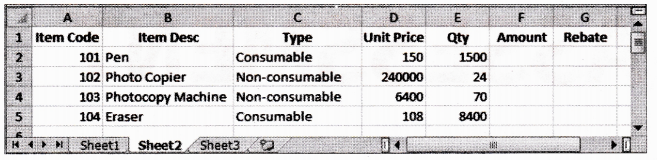
  1. Write command for the operations (i) to (iii) based on the spreadsheet below:
Image
  1. To calculate the Amount as Unit Price*Qty for each item in Column F.
  2. To calculate the Rebate as 7% of Amount if Type is consumable, else calculate Rebate as 11% of Amount in Column G.
  3. To calculate total Rebate across all items in cell G6
Answer
  1. At cell F2, type =D2*E2 and then copy this formula using mouse Fill handle onto range F3 : F5.
  2. At cell G2, type =IF(C2=”Consumable”, F2*0.07, F2*0.11) and then copy this formula using mouse Fill handle onto range G3 : G5.
  3. At cell G6, type =SUM(G2 : G5)
View full question & answer
Question 42 Marks
Describe, how the owner of the restaurant could use the spreadsheet for financial modeling?
Answer
  1. Decide on a total purchasing need for next night/week/month/year.
  2. Change figures in spreadsheet.
  3. Raise/lower/add/delete any value.
  4. Compare results with predicted/total needed/target results.
  5. To general use for budgeting like to calculate profit
View full question & answer
Question 52 Marks
In a worksheet, cell K12 has a value. A formula is to be entered in cell K15, such that if the value in cell K12 is more than 300, the value in cell K15 would be 1.33 times the value of cell K12. Otherwise, the value in cell K15 would be 1.5 times the value in cell K12. Explain the formula that you use to achieve this.
Answer
In cell K15, enter the conditional statement as: = IF (K12 > 300, K12 *1.33, K12 * 1.5). Here, IF condition checks the value at K12, that is, if it is greater than 300, then calculate 1.33 of K12, otherwise 1.5 of K12.
View full question & answer
Question 62 Marks
For what purpose pie charts are useful?
Answer
Pie charts are useful for the following purposes:
  1. They convey approximate propositional relationship at a point in time.
  2. They compare part of a whole at a given point in time.
  3. Exploded portion of a pie chart emphasize a small proportion of parts.
View full question & answer
Question 72 Marks
What is the use of the COUNT() function in Excel?
Answer
Excel’s COUNT() function can be used to total the number of cells in a selected range. The COUNT() function will add up the number of cells in a selected range that contains numbers.
View full question & answer
Question 82 Marks
Sana has entered 49+30 in a cell. The worksheet is not displaying 79 in the cell. Instead, 49+30 is getting displayed. Help, Sana in rectifying the problem.
Answer
In Excel, every formula must start with an = (equal) sign. Since, Sana has not put = sign before 49+30, thus she is not able to see the desired result will be displayed if she will use = (49 + 30) formula.
View full question & answer
Question 92 Marks
Suggest the appropriate function for the following situations:
  1. Selecting the maximum value out of a range A1 to B20.
  2. Calculating average of marks entered in cells E5, F5, G5, H5 and 15.
  3. Determining whether the student has passed (if scored > = 40) or not from the marks stored in cell J10.
Answer
$\text { 1. }=\operatorname{MAX}(A 1: B 20)$
$\text { 2. }=A V G(E 5: 15)$
$\text { 3. }=\mid F(J 10>=40, \text { "Pass", "Fail" })$
View full question & answer
Question 102 Marks
Suggest the appropriate functions for the following situations:
  1. For returning the minimum value out of a range $A1$ to $C5.$
  2. For determining whether the customer is eligible for discount or not from the bill amount stored in cell $D5. A$ customer is eligible for discount if bill amount $>5,000.$
Answer
$\text { 1. }=\operatorname{MIN}(A 1: C 5)$
$\text { 2. }=\operatorname{IF}(D 5>5,000, \text { "Discount", "NoDiscount") }$
View full question & answer
Question 112 Marks
Define the meaning of formula.
Answer
Formula plays a major role in spreadsheet making. If we all needed to do is to put text and numbers in rows and columns, just about any Word processing program would fill the bill. Formula allows us to perform calculations using values from any cells to have the result appear in the formula cell.
View full question & answer
Question 122 Marks
Is it possible to remove a worksheet? State the process of doing it.
Answer
Yes, it is possible to remove a worksheet. To remove a worksheet right-click on the Sheets tab of the sheet that you want to delete and choose Delete from pop-up menu, or choose Delete Sheet from the pop-up menu of Delete option on cells group under Home tab.
View full question & answer
Question 132 Marks
Write down the significance of electronic spreadsheets.
Answer
Using electronic spreadsheets, large volume of data can be stored in worksheets. Worksheets can be managed, edited, viewed, retrieved and printed easily in desired format. Electronic spreadsheets support charts, which represent data pictorically.
View full question & answer
Question 142 Marks
What is the difference between a workbook and a worksheet?
Answer
  1. Differences between workbook and worksheet are as follows:
    WorkbookWorksheet
    A workbook is an Excel file with one or more worksheets.A worksheet is a single spreadsheet of data.
    A workbook would be the entire binder, with everything in it.A worksheet would be like one section in that binder
View full question & answer
[2 Mark Questions] - Information Technology STD 9 Questions - Vidyadip