Questions

[2 Mark Questions]

🎯

Test yourself on this topic

14 questions · timed · auto-graded

Question 12 Marks
Manu wants to replace the word ‘organise1 with ‘organize’ in a whole document.
  1. Name the feature which is used by Manu.
  2. Write down the labels in order to show how he could replace the word?
    • (a) In Find what: box, type organise
    • (b) Click Home tab —> Replace in the Editing group.
    • (c) Click the Replace All button.
    • (d) In Replace with: box, type organize.
    • (e) Find and Replace dialog box with Replace tab will appear.
Answer
  • Mama can replace the word using Find and Replace feature.
  • Label: b e a d c
View full question & answer
Question 22 Marks
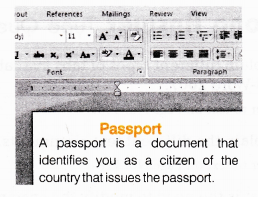
The following figure shows a small part of a Word document. Identify different formatting features that are applied to it.
Image
Answer
  • Center alignment of title
  • Bold and color font of title
  • Font type it changed for title
  • Line spacing in paragraph
  • Justified alignment for paragraph
View full question & answer
Question 32 Marks
    1. A Tablet company sells Tablets and accessories. The head of the company’s marketing department has created the following leaflet by using a Word processor. The leaflet will be distributed to all the retail shops, main markets and malls.
      ABC Ltd. Special Offers
      To celebrate the completion of our five years in business, we are offering these special deals:
      • Purchase a new mobile in June and get 50% off on MRP
      • Purchase 4 handsets and get one free.
      To get more details, please contact to Mr. Naveen on 180010400.
      Which of the following two options can improve the layout of the leaflet?
      • Line spacing
      • Search facility
      • Mail merging
      • Center alignments
      • Hyperlink
Answer
Line spacing, Center alignments.
View full question & answer
Question 42 Marks
  1. Sona wants to add her pictures in a Word document.
    1. Which tab she should use?
    2. Which command she should use to open Insert Picture dialog box?
    3. Can she resize the image?
    4. Is it possible to wrap text around an image?
Answer
  1. Insert tab
  2. Picture command in the Illustrations group.
  3. Yes
  4. Yes
View full question & answer
Question 52 Marks
  1. Following are some descriptors describing some terms. Identify the terms/features these refer to
    1. It is a pre-designed document that you can use to create new documents with the same formatting.
    2. It is a tool that you can use to produce professional looking documents.
    3. It is a new feature of 2007 Office suite that allows you to see changes in your document before you actually select an item.
Answer
  1. Template
  2. Themes
  3. Live Preview
View full question & answer
Question 62 Marks
Previous versions of Word looked similar and operated in many of the same ways. They had menus, toolbars, task pane and a ‘Familiar’ feeling design.
In MS-Word 2007, all these things are replaced with a new navigation system and many new features.
  1. What is MS-Word 2007?
  2. List new features of MS-Word 2007
Answer
  1. MS-Word 2007 is the Word processing software in the Microsoft 2007 Office suite.
  2. Some new features of MS-Word 2007 are as follows:
    • The Ribbon System
    • Themes
    • Quick Styles
    • Pictures
    • Live Preview
    • Shapes
    • ClipArt
    • Charts
    • SmartArt
View full question & answer
Question 72 Marks
What is the need to modify the spacing of the lines or paragraph of your text?
Answer
  • An important part of creating effective documents lies in the document design. Line spacing or paragraph spacing is measured in lines or points, which is referred to as leading.
    As a part of designing the document and making formatting decisions, you will need to know how to modify the spacing, just as you can format spacing between lines in your document, you can also choose spacing options between each paragraph.
    Typically, extra spaces are added between paragraphs, headings or subheadings. Extra spacing between paragraphs adds emphasis and makes a document easier to read. When you reduce the leading, you automatically bring the lines of text closer together. Increasing the leading will space the lines out, allowing for improved readability.
View full question & answer
Question 82 Marks
How can you change the shape of a picture?
Answer
Change the Shape of a Picture
Steps to change the shape of a picture in a document are as follows:
  • Step 1: Select the picture.
  • Step 2: Click the Picture Tools Format tab.
  • Step 3: Click the Picture Shape. A Picture Shape menu will appear.
    Step 4: Choose any shape as per the requirement.
View full question & answer
Question 92 Marks
What is the difference between the Save and Save As option?
Answer
“Save” means the file gets saved under its current name, in whatever folder it was saved before or in the default folder of that computer whereas “Save As” gives you the opportunity to save the file under a different name and in another folder.
“Save As” allows you to name the updated version with a new name and at the same time preserving the old version.
View full question & answer
Question 102 Marks
How to save a document as a PDF document?
Answer
Steps to save a document as PDF or XPS are as follows:
  • Step 1: Download the PDF extension
    • Click the Microsoft Office button.
    • Select Save As —> Find add-ins for other file formats. This will open your web browser to the Microsoft site.
    • Follow the given instructions on the Microsoft site for downloading the PDF extension.
  • Step 2: Click the Microsoft Office button.
  • Step 3: Select Save As —> PDF or XPS. The Publish as PDF or XPS dialog box will appear.
  • Step 4: Select the location, where you want to save the document using the drop down menu.
  • Step 5: Enter the name of the document in File name: box.
  • Step 6: Click the Publish button.
View full question & answer
Question 112 Marks
How to save a document as Word 97-2003?
Answer
Steps to save a document as a Word 97-2003 are as follows:
  • Step 1: Click the Microsoft Office button.
  • Step 2: Select Save As —> Word 97-2003 Document. The Save As dialog box will appear.
  • Step 3: Select the location, where you want to save a document using the drop down menu.
  • Step 4: Enter a name for the document in File name: box.
  • Step 5: Click the Save button.
View full question & answer
Question 122 Marks
Write the steps to create a new document.
Answer
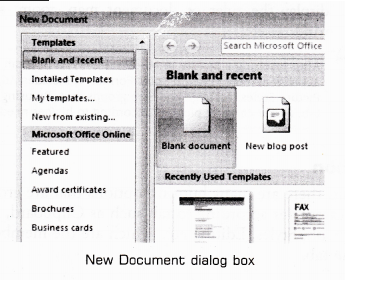
Steps to create a new blank document are as follows:
  • Step 1: Click the Microsoft Office button.
  • Step 2: Select New, the New Document dialog box will appear as shown below:
Image
  • Step 3: Select Blank document under the Blank and recent section (It will be highlighted by default).
  • Step 4: Click Create button, a new blank document will appear.
View full question & answer
Question 132 Marks
What do you mean by ruler?
Answer
Ruler appears on the top and on the left side of the document window. It allows to format the horizontal or vertical alignment of text in a document.
Two types of rulers are available in MS-Word 2007 as follows:
  • Horizontal ruler indicates the width of the document.
  • Vertical ruler indicates the height of the document.
View full question & answer
Question 142 Marks
Define MS-Word 2007.
Answer
MS-Word 2007 is a Word processing software package, which allows you to easily create a variety of professional looking documents like letters, reports and other documents using features such as Themes, Styles, SmartArt and more. It is a powerful tool chat you can use to create effective documents.
View full question & answer
[2 Mark Questions] - Information Technology STD 9 Questions - Vidyadip