Question
Consider the following table Student & Stream.

Table: Student

Admno Sname Class Sec Fee Mobile Area S_ID
1001 RAMESH XII A 2500 987654321 Madipur 10
1078 KRISHNA XII B 2400 999911111 Jawala Heri 30
1006 FARDEEN XII C 2600 987654321 Paschim Puri 40
1004 SUBHAM XII A 2500 963025874 Madipur 20
1029 KRITIKA XI C 2700 987456210 Madipur 30
1008 SAMEEKSHA XII A 2450 987123456 Mangol Puri 20
1025 SALMA XII B 2580 998877445 Madipur 30
1036 AMANDEEP XII B 2600 999333555 Khyala 40
1037 TEJAS XI C 2650 987951357 Paschim Puri 40
1029 HIMANSHU XII A 2750 951369874 Jawala Heri 10

Table : Stream

S_ID Stream_name
10 MEDILCAL
20 NON MEDICAL
30 COMMERCE WITH MATH
40 COMMERCE WITH IP
50 HUMANITIES

Write SQL commands for the statements (a) to (h) on the table: Student and Stream

(a) Display class and total fee collected from each class.

(b) Display admission no, students name and stream name.

(c) Display all the student details who have taken Commerce Stream.

(d) Count number of students who have opted for HUMANITIES stream.

(e) Display information of commerce with ip students whose name start with ‘S’. Arrange the record by admission number.

(f) Display details of all students who are in the MEDICAL stream.

(g) Display total fee of ‘Non-Medical’ Student.

(h) Change the name of the Column Sname to Student_Name.
Answer

Get the step-by-step solution for this question inside the Vidyadip app.

Get the answer in the app

Need a full question paper?

Generate a complete, print-ready paper with questions like this in minutes — across 16+ boards, with answer keys.

Start Generating Free

Similar questions

Consider the table LOANS given below:

Table: LOANS

AccNo Name Loan Amt EMI IntRate Start Date Interest
1001 R.K. Gupta 300000 36 12.00 19-07-2009 1200
1002 S. P. Shanna 500000 48 10.00 22-03-2008 1800
1003 K.P. Jain 300000 36 NULL 08-03-2007 1600
1004 M.P. Yadav 800000 60 10.00 06-12-2008 2250
1005 S.P. Sinlia 200000 36 12.50 03-01-2010 4500
1006 P. Shanna 700000 60 12.50 05-06-2008 3500
1007 K.S. Dhall 500000 48 NULL 05-03-2008 3800

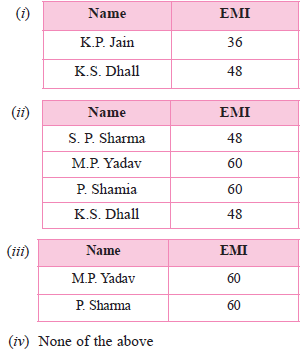
(a) State the command that will give the output as:

Name
S. P. Shanna
K.S. Dhall
M.P. Yadav
P. Shanna
K.S. Dhall

(i) Select name from LOANS where Name >‘D ’;

(ii) Select name from LOANS where AccNo >1001;

(iii) Select name from LOANS where Loan_Amt >= 500000;

(iv) Select name from LOANS where Loan_Amt >500000 order Loan_AmtDESC;

(b) What will be the output of the following command:

Select name, EMI from LOANS where Loan_Amt >500000 and Int_Rate is NULL;

(c) John has given the following command to display the count of all loan holders whose name ends with “Sharma ”:

Select count() from LOANS where Name like ‘Sharma%’;

But he is not getting the desired result. Help him by finding out the correct command fromthe followings:

(i) Select count(*) from LOANS where name Like ‘Sharma%’;

(ii) Select count(*) from LOANS where name Like ‘%Sharma ’;

(iii) Select count( ) from LOANS where name like ‘%sharma ’;

(iv) Select count(Name) from LOANS where name ‘Sharma%’;

(d) State the command to display the maximum Loan_Amt and Cust_Name :-

(i) Select Max(Cust_Name, Loan_Amt) from LOANS;

(ii) Select Cust_Name, max(LoanAmt) from LOANS;

(iii) Select Cust_Name, max(Loan_Amount) from LOANS;

(iv) Select Cust_name, max(Loan_Amt) from LOANS;

(e) Help Ramesh to display the count of all loan holders whose interest is NULL.

(i) Select Count(*) from LOANS where Int_Rate is NULL.

(ii) Select Count() from LOANS where Interest is NULL.

(iii) Select Count(*) from LOANS where Int_rate = NULL;

(iv) Select Count( ) from LOANS where Interest = NULL;

(a) Create the Dictionary Student with the following key and add the 5 values. Dictionary will be created from 4 different list:

Column Name Key
Student Number sno
Student Name sname
E-mail mail
Marks mark

(b) Create the data frame for the above specification containing index parameter along with column.

(c) Add a new column grade into above Data Frame with at least 3 methods.

(d) Insert the 2 rows.

(e) Create another Data Frame with two rows named DF2.

(f) Add this data frame to your existing data frame.

(g) Display the alternate rows.

(h) Display the name and marks of the students whose marks is greater than equal to 90.

(i) Fill all NaN in the data.

(j) Increase the marks by 10.

Search Engines allow us to filter the tons of information available on the internet and get the most accurate results. And while most people don’t pay too much attention to search engines, they immensely contribute to the accuracy of results and the experience you enjoy while scouring through the internet.

Besides being the most popular search engine covering over 90% of the worldwide market, Google boasts outstanding features that make it the best search engine in the market. It boasts cutting-edge algorithms, easy-to-use interface, and personalized user experience The platform is renowned for continually updating its search engine results and features to give users the best experience

(a) Search engines are:

(i)Software systems that are designed to search for information on the world wide web

(ii)Used to search documents.

(iii)Used to search videos.

(iv)All of the above

(b) We get a list of sites after typing a word in search bar called:

(i)Single word(ii)Key phrase

(iii)Site(iv)All of the above

(c) The search results are shown in a line of results. This is called:

(i)Search engine pages

(ii)Categories

(iii)Search engine result pages

(iv)Tag list

(d) Search engines are able to search _____ type of information.

(i)Videos(ii)Images

(iii)Documents(iv)All of the above

(e) Web search engines store information about web pages with the help of:

(i)Web router(ii)Web crawler

(iii)Web indexer(iv)Web organizer

How can we contribute to a greener environment?
Write the few points for the healthy use of technology.

Answer the following questions:

id Feature1 Feature2
0 1 A B
1 2 C D
2 3 E F
3 4 G H
4 5 I J


id Feature1 Feature2
0 1 K L
1 2 M N
2 6 O P
3 7 Q R
4 8 S T

(i) To create the data frame for the above dataset.

(ii) To join the data frames.

(iii) To count the the rows in new data frame.

(iv) To reset the index.

Write SOL queries for (i) to (iv) and find outputs for SQL queries (v) to (viii) which are based on the tables. [Delhi 2019(C)]

TABLE : CUSTOMERS

NO CNAME ADDRESS
101 Richa jain Delhi
101 Surbhi Sinha Chennai
103 Lisa Thomas Bangalore
104 Imran Ali Delhi
105 Roshan Singh Chennai

TABLE : TRANSACTION

TRNO CNO AMOUNT TYPE DOT
T001 101 1500 Credit 2017-11-23
T002 103 2000 Debit 2017-05-12
T003 102 3000 Credit 2017-06-10
T004 103 12000 Credit 2017-09-12
T004 101 1000 Debit 2017-09-05

(a) To display details of all transactions of TYPE Credit from Table TRANSACTION.

(b) To display the CNO and AMOUNT of all transactions done in the month September 2017 from the table TRANSACTION.

(c) To display the last date of transaction (DOT) from the table TRANSACTION for the customer having CNO as 103.

(d) To display all CNO,CNAME and DOT (date of transaction) of those CUSTOMERS from tables CUSTOMERS and TRANSACTION who have done transactions more than or equal to 2000.

(e) Select count(*), avg(amount) from transaction where dot>= ‘2017-06-01’;

(f) Select cno, count(*), max (amount) from transaction group by cno having count(*)> 1;

(g) Select cno, cname from customer where address not in (‘Delhi, ‘Bangalore’);

(h) Select distinct cno from transaction;

Consider the following tables CARHUB and CUSTOMER and answer (a) and (b) parts of this question: [Delhi 2012]

Table: CARHUB

Vcode Vehicle Name Make Color Capacity Charges
100 Innova Toyota WHITE 7 15
102 SX4 Suzuki BLUE 4 14
104 C Class Mercedes RED 4 35
105 A-Star Suzuki WHITE 3 14
108 Indigo Tata SILVER 3 12

Table: CUSTOMER

CCode CName VCode
1 Hemant Sahu 101
2 Raj Lal 108
3 Feroza Shah 105
4 Ketan Dhal 104

(a) Write SQL commands for the following statements:

(i) To display the names of all white colored vehicles

(ii) To display name of vehicle, make and capacity of vehicles in ascending order of their sitting capacity

(iii) To display the highest charges at which a vehicle can be hired from CARHUB.

(iv) To display the customer name and the corresponding name of the vehicle hired by them.

(b) Give the output of the following SQL queries:

(i) Select count(distinct make) from cabhub;

(ii) Select max(charges), min(charges) from carhub;

(iii) Select count(*), make from carhub;

(iv) Select vehiclename from carhub where capacity = 4;

Write the statements to create the Series and answer the questions below:

(a) To create 2 Lists i.e. First list is Month list which will store month name and another series day which will store the number of days in a month.

(b) To print the first 5 records from the Series.

(c) To print the last 2 records.

(d) To print the output of the commands:

(i) s2[1:]

(ii) s2[1:]

(iii) s2[::2]

(iv) s2[::-1]

(v) s2[-1]

(vi) s2['feb':'mar']

Consider the following tables Product and Client. Write SQL commands for the statements (i) to (iv) and give outputs for SQL queries (v) to (vii)

TABLE: PRODUCT

P_ID Product Name Manufacturer Price
TP01 Talcom Powder LAK 40
FW05 FaceWash ABC 45
BS01 Bath Soap ABC 55
SH06 Shampoo XYZ 120
FW12 Face Wash XYZ 95

TABLE: CLIENT

C_ID ClientName City P_ID
01 Cosmetic Shop Delhi FW05
06 Total Health Mumbai BS01
12 Live Life Delhi SH06
15 Pretty Woman Delhi FW12
16 Dreams Bangalore TP01

(i) To display the details of those Clients whose City is Delhi

(ii) To display the details of Products whose Price is in the range of 50 to 100 (Both values included)

(iii) To display the ClientName, City from Table Client, and ProductName and Price from table Product, with their corresponding matching P_ID

(iv) To increase the Price of all Products by 10

(v) SELECT DISTINCT CITY FROM Client;

(vi) SELECT Manufacturer, MAX(Price), Min(Price), Count(*) FROM Product GROUP BY Manufacturer;

(vii) SELECT ClientName, ManufacturerName FROM Product, Client WHERE Client.Prod_Id = Product.P_Id;