Question
Describe in steps the design view method to create a query in MS Access?

Answer

To create a query using design view method, the following steps are followed
Step1: Select ‘Queries’ from the object list given on the left hand side of the database window.
Double click at ‘Create Query by using Design View’ given on the right hand side.
Step 2: With this, a ‘Select Query’ and ‘Show Tables’ window is displayed. The ‘Select Query’ window is divided into two panes namely, the upper pane (displays the data sources) and the lower pane also known as Query by Example (QBE) (displays column and row). The column of the lower pane displays the data sources. The row of the lower pane displays the field name, table (or query), sort order, whether the selected field is shown in the query results or not and also the criteria that have been applied to the fields to restrict the query results.
Step 3: Click at the ‘View’ item of the Menu Bar % Total and then % Table Names.
Step 4: Click at the ‘Field Row’ of the first column of the QBE and select the fields to be included in the query. The process is repeated for the subsequent columns of the QBE to include more fields in the query. This process of selection contains the data items that are to be displayed by the SELECT clause of the SQL statement.
Step 5: Now, in accordance to the selection of the fields, the name of the table or query is displayed. Such tables or queries constitute the data sources shown after the FROM clause of the SQL statement.
Step 6: Click at ‘Row of the low pane’ to specify the group by clause and aggregate functions to create a summary of the query is created.
Step 7: Click at ‘Row of the low pane’ to specify the sort order (Ascending or descending). The selected fields for sort order are shown after ORDER BY clause of the SQL statement in which ascending order is a default choice.
Step 8: Click at row to display the selected field in the query result.
  1. Click at row of the grid to specify the criteria to limit the records to be displayed by the query being created. The specified criteria result is shown after the WHERE clause of the SQL statement.
  2. Click File % Save (or Press Ctrl + S) to save the query. Now, a dialog box appears that asks the user to specify the name of the query being created.
Need a full question paper?

Generate a complete, print-ready paper with questions like this in minutes — across 16+ boards, with answer keys.

Start Generating Free

Similar questions

What are the different classes of errors? Which of them do not affect a Trial Balance?
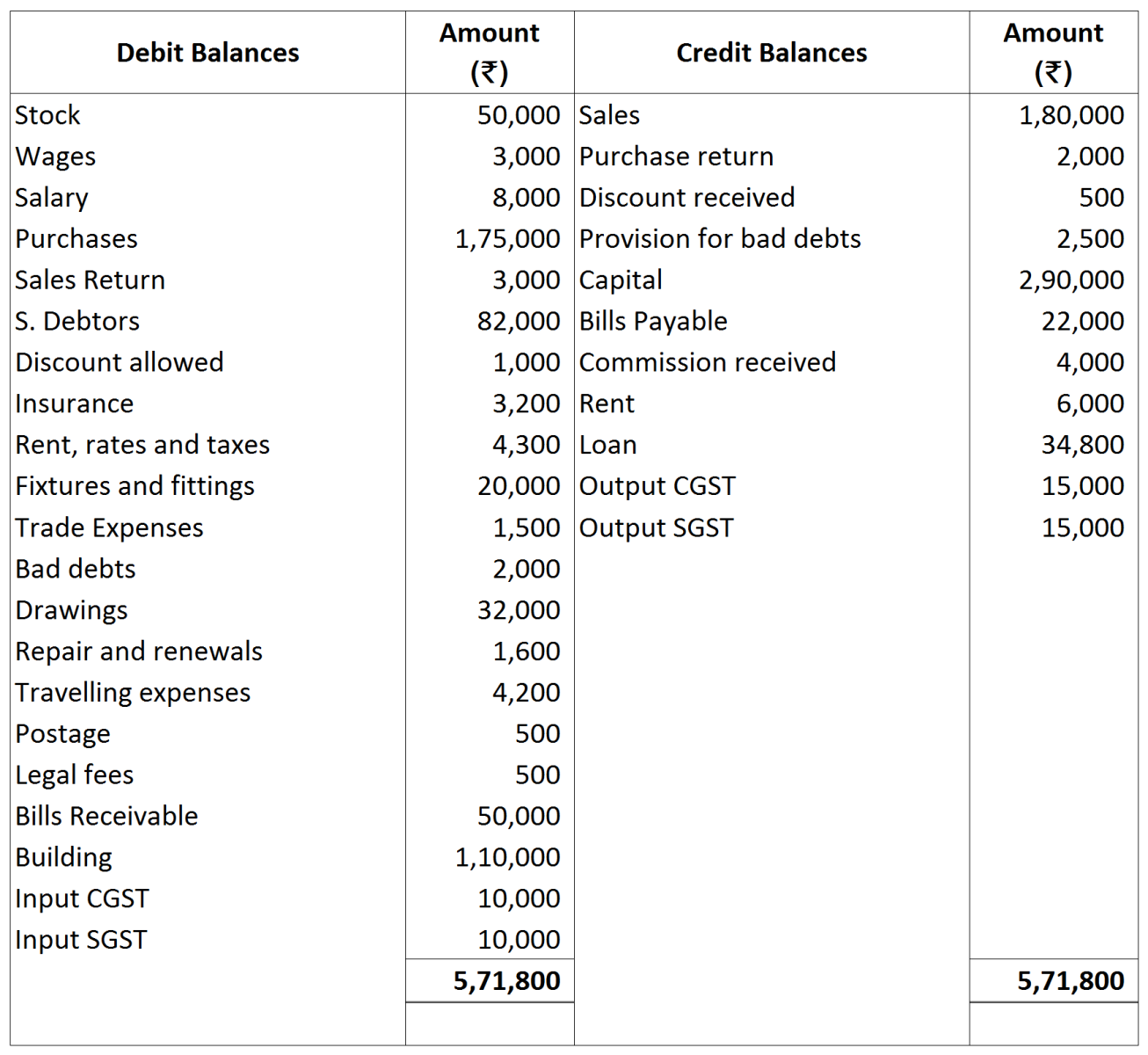
Prepare a Trading and Profit & Loss account for the year ending March 31, 2018, from the balances extracted of M/s Rahul Sons. Also prepare a balance sheet as at that date.

Adjustments:
  1. Commission received in advance ₹ 1,000.
  2. Rent receivable ₹ 2,000, subject to levy of CGST and SGST @ 9% each.
  3. Salary outstanding ₹ 1,000 and insurance prepaid ₹ 800.
  4. Further Bad-debts ₹ 1,000 and provision for Bad-debts @ 5% on debtors and provision for discount on debtors @ 2%.
  5. Closing Stock ₹ 32,000.
  6. Depreciation on Building @ 6% p.a.
Following balances are taken from the books of Niranjan. Prepare Trading and Profit and Loss Account and Balance Sheet for the year ended 31st March, 2019:
(iamge)
Adjustments:
  1. Closing Stock ₹ 7,50,000.
  2. Depreciate Machinery by 10% and Furniture by 20%.
  3. Wages ₹ 50,000 and salaries ₹ 20,000 are outstanding.
  4. Write off ₹ 50,000 as further Bad Debts and create 5% Provision for Doubtful Debts. Also, create a reserve for discount on Debtors @ 2%.
  5. Investments were made on 1st July, 2018 and no interest has been received so far.
Define Software. Explain different types of softwares used in a Computer System.
Ram Prashad maintains his books on Single Entry System, and from them and the particulars supplied, the following figures were gathered together on $31^{\text {st }}$ March 2023: Books Debts, ₹ 10,000 , Cash in Hand, ₹ 510 , Stock in Trade (Estimated) ₹ 6,000, Furniture and Fittings, ₹ 1,200 , Trade Creditors, ₹ 4,000 , Bank Overdraft, ₹ 1,000 . Ram Prashad stated that he started business on $1^{\text {st }}$ April, 2022 with Cash ₹ 6,000 paid into bank but stocks valued at ₹ 4,000 . During the year he estimated his drawings to be ₹ 2,400 . You are required to prepare the statement, showing the profit for the year, after writing off $10 \%$ for depreciation on furniture and fittings.
Define Trial Balance. Give any four functions of Trial Balance. What are the two methods of preparation of Trial Balance?
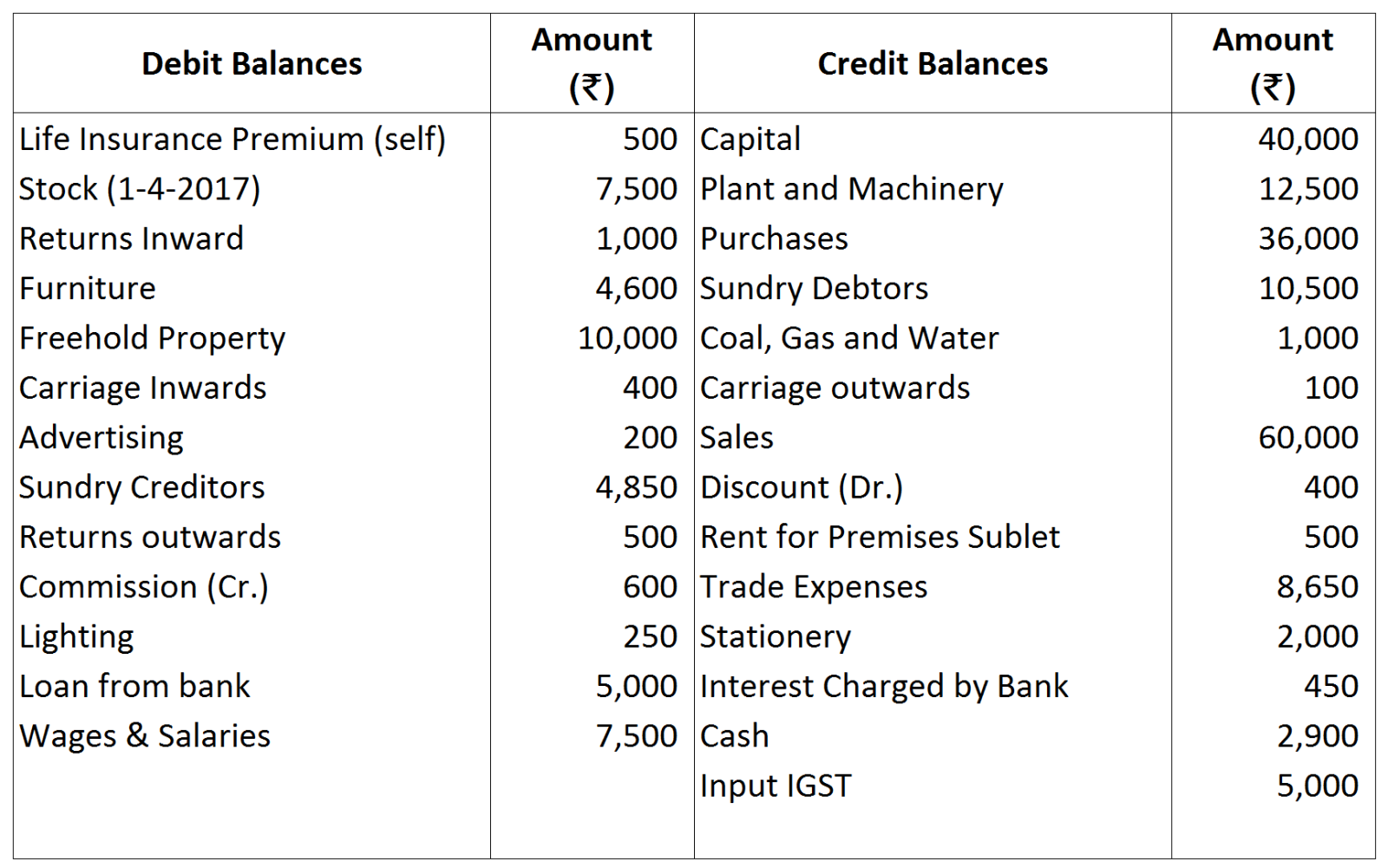
From the following balances, prepare Final Accounts of Mr. Bal Gopal:

Adjustments:
  1. Stock on 31st March, 2018 was ₹ 10,000 and stationery unused at the end was ₹ 400.
  2. Rent of Premises Sublet received in advance ₹ 100.
  3. Provision for Doubtful Debts is to be created @ 10% on Debtors.
  4. Provision for discount on Debtors is to be created @ 2%.
  5. Stock of the Value of ₹ 4,000 was destroyed by fire on 25th March, 2018. Stock was purchased paying IGST @ 12%. A Claim of ₹ 3,000 has been admitted by Insurance Co.
  6. Bank Loan has been taken at 12% p.a. interest.
​Record the following transactions of Prabhat Electric Co., Delhi in the proper subsidiary books:
Ram Prashad keeps his books on Single Entry System and from them and the particulars supplied, the following figures were gathered together on 31st March, 2019:
Book Debts ₹ 10,000; Cash in Hand ₹ 510; Stock-in-Trade (estimated) ₹ 6,000; Furniture and Fittings ₹ 1,200; Trade Creditors ₹ 4,000; Bank Overdraft ₹ 1,000; Ram Prashad stated that he started business on 1st April, 2018 with cash ₹ 6000 paid into bank but stocks valued at ₹ 4,000. During the year he estimated his drawings to be ₹ 2,400. You are required to prepare the statement, showing the profit for the year, after writing off 10% for Depreciation on Furniture and Fittings.
What integrity constraints are specified on database schema? Why is each considered important?