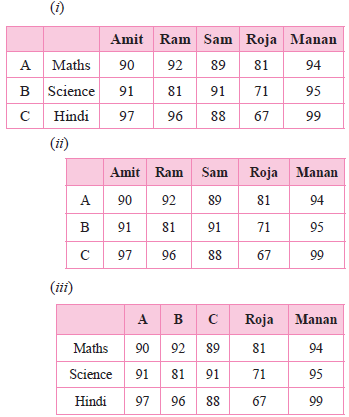
(c) Line 3 : Write = csv.writer(file)
(d) LST.append([ID1,Name1,Subject])
(e) Write.writerow(LST)
Generate a complete, print-ready paper with questions like this in minutes — across 16+ boards, with answer keys.
(i)It is written in double quotes only.
(ii)Its value can be changed.
(iii)It is enclosed in square brackets.
(iv)It is immutable data-type.
(b) Ms. Ragini is confused on the way to compare the strings. Help her in choosing the correct statement.
(i)equal() (ii)equals() (iii) == (iv)compare()
(c) Tejas is confused in the output of the following code. Help him to choose the correct option.
age = 12
txt = "My name is Tejas, I am " , age
print(txt)
(i)('My name is Tejas, I am ', 12)
(ii)My name is Tejas, and I am 12
(iii)(My name is Tejas, I am , 12)
(iv)[My name is Tejas, I am , 12]
(d) Help mini to choose the correct output of the following Python code.
rollno = 3
name = "Mini"
Average = 88.76
Txt = "My name is {1}, having roll no {0} and scored {2} percent."
print(Txt.format(rollno, name, Average))
(i)My name is ‘Mini’, having roll no 3 and scored 88.76 percent.
(ii)My name is Mini, having roll no 3 and scored 88.76 percent.
(iii)‘My name is Mini, having roll no 3 and scored 88.76 percent.’
(iv)(My name is Mini, having roll no 3 and scored 88.76 percent.)
(e) Help Gurnika to choose the correct option for the following Python code.
b = "Hello, World!"
print(b[-5:2])
(i)Hello, World! (ii)orl (iii) Error (iv) No Output
| a | b | c | d | |
| 0 | 1 | 2 | 3 | 4 |
| 1 | 100 | 200 | 300 | 400 |
| 2 | 1000 | 2000 | 3000 | 4000 |
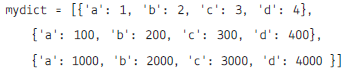
(i) To create the data frame for the above dictionary.
(ii) To print the dictionary.
(iii) To change the index of the above data frame 'a1','a2','a3'.
(iv) To change the columns headings to 'units','tens','hundred',' thousand'.
(v) To display the tens columns.
(vi) To create another datframe with values of thousand.
(vii) To use the iterrows() to display the complete records.
(viii) To display the column wise data using iteritems().
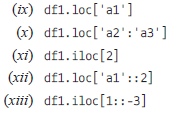
Write the output on the basis of the given data frame:
| units | tens | hundred | thousand | |
| a1 | 1 | 2 | 3 | 4 |
| a2 | 100 | 200 | 300 | 400 |
| a3 | 1000 | 2000 | 3000 | 4000 |
(i)URL (ii) Hyperlink(iii)Plugin(iv)Extension
(b) Web servers are:
(i)IP addresses
(ii)Computer systems
(iii)Webpages of a site
(iv)A medium to carry data from one computer to another.
(c) The _______ translates internet domain and host names to IP address.
(i)Domain name system
(ii)Routing information protocol
(iii)Google
(iv)Networktime protocol
(d) What does the webserver need to send back information to the user?
(i)Home address
(ii) Domain name
(iii)IP address
(iv)Both (ii) and (iii)
(e) What is the full form of HTTP?
(i)Hypertext Transfer Protocol
(ii)Hypertext Transfer Procedure
(iii)Hyperlink Transfer Protocol
(iv)Hyperlink Transfer Procedure
(a) Search engines are:
(i)Software systems that are designed to search for information on the world wide web
(ii)Used to search documents.
(iii)Used to search videos.
(iv)All of the above
(b) We get a list of sites after typing a word in search bar called:
(i)Single word(ii)Key phrase
(iii)Site(iv)All of the above
(c) The search results are shown in a line of results. This is called:
(i)Search engine pages
(ii)Categories
(iii)Search engine result pages
(iv)Tag list
(d) Search engines are able to search _____ type of information.
(i)Videos(ii)Images
(iii)Documents(iv)All of the above
(e) Web search engines store information about web pages with the help of:
(i)Web router(ii)Web crawler
(iii)Web indexer(iv)Web organizer
| City | Hospitals | Schools | |
| 0 | Delhi | 189 | 7916 |
| 1 | Mumbai | 208 | 8508 |
| 2 | Kolkata | 149 | 7226 |
| 3 | Chennai | 157 | 7617 |
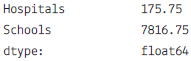
(a) Choose the right statement to get the given output:
(i) Df1.mean()
(ii) Df1.mean(axis=1)
(iii) Df1.average()
(iv) Df1.median()
(b) Write the command to get the given output:
| City | Hospitals | Schools | |
| 3 | Chennai | 157 | 7617 |
| 0 | Delhi | 189 | 7916 |
| 2 | Kolkata | 149 | 7226 |
| 1 | Mumbai | 208 | 8508 |
(i) Df1.sort(by=‘City’)
(ii) Df1.sort_values(‘City’)
(iii) Df1.sort_values(by=‘City’)
(iv) Df1.sort_values(by==‘City’)
(c) Choose the right statement to get given output:
| Hospitals | Schools | |
| count | 4,000000 | 4,000000 |
| mean | 175.750000 | 7816.750000 |
| std | 27.584718 | 540.543785 |
| min | 149.000000 | 7226.000000 |
| 25% | 155.000000 | 7519.250000 |
| 50% | 173.000000 | 7766.500000 |
| 75% | 193.000000 | 8064.000000 |
| max | 208.000000 | 8508.000000 |
(i) Df1.desc()
(ii) Df1.statistics()
(iii) Df1.desctibe()
(iv) Df1.showall()
(d) Chose the right function to fill in given statement to make the city as index value:
Df1._________________(‘City’,inplace=True)
(i) Df1.set_index(‘City’,inplace=True)
(ii) Df1.index('City',inplace=True)
(iii) Df1.new_index(‘City ‘,inplace=True)
(iv) Df1.reset_index(‘City’,inplace=True)
(e) Which Pandas command is used to rename the columns & index name of the above dataframe
(i) Df1.renamecolumns()
(ii) Df1.Rename()
(iii) Df1.rename()
(iv) Df1.indexrename()
Table: STORE
| SNo | SName | AREA |
| S01 | ABC Computronics | GK II |
| S02 | All Infotech Media | CP |
| S03 | Tech Shoppe | Nehru Place |
| S05 | Hitech Tech Store | CP |
Table: ITEM
| INo | IName | Price | SNo |
| T01 | Mother Board | 12000 | S01 |
| T02 | Hard Disk | 5000 | S01 |
| T03 | Keyboard | 500 | S02 |
| T04 | Mouse | 300 | S01 |
| T05 | Mother Board | 13000 | S02 |
| T06 | Key Board | 400 | S03 |
| T07 | LCD | 6000 | S04 |
| T08 | LCD | 5500 | S05 |
| T09 | Mouse | 350 | S05 |
| T10 | Hard disk | 4500 | S03 |
(a) Write the SQL queries (1 to 4):
(i) To display IName and Price of all the items in the ascending order of their Price.
(ii) To display the SNo and SName or all stores located in CP.
(iii) To display the minimum and maximum price of each IName from the table Item.
(iv) To display the IName, price of all items and their respective SName where they are available.
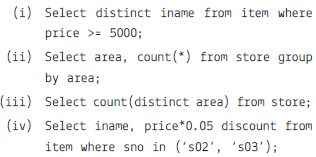
(b) Write the output of the following SQL commands (i) to (iv):
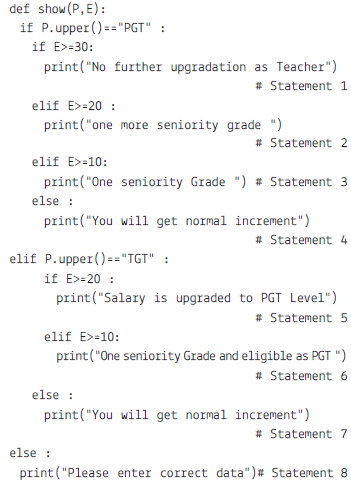
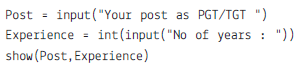
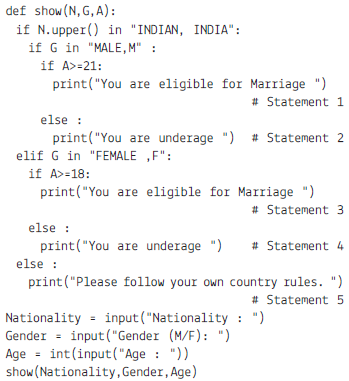
On the basis of above code, choose the best appropriate option.
(a) Which statement will be executed if Nationality is Indian, Gender is Male and Age is 19.
(i) Statement 1 (ii) Statement 2
(iii) Statement 3 (iv) Statement 4
(b) Which Statement will be executed, if Nationality is American, Gender is Female and Age is 27.
(i) Statement 1 (ii) Statement 2
(iii) Statement 4 (iv) Statement 5
(c) Which Statement is executed, if Nationality is Indian, Age is 25 and Gender if Female.
(i) Statement 1 (ii) Statement 2
(iii) Statement 3 (iv) Statement 4
(d) Which Statement is executed, if Nationality is Indian, Age is 17 and Gender is Female.
(i) Statement 1 (ii) Statement 2
(iii) Statement 3 (iv) Statement 4
(e) Which statement will be executed if Nationality is Indian, Gender is Male and Age is 29.
(i) Statement 1 (ii) Statement 2
(iii) Statement 3 (iv) Statement 4
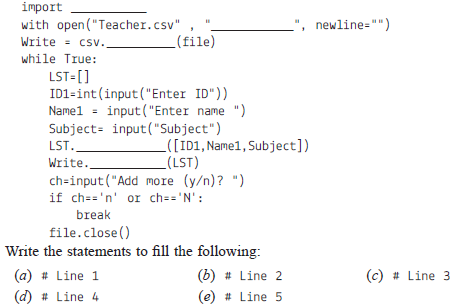
| Amit | Ram | Sam | Roja | Monan | |
| Maths | 90 | 92 | 89 | 81 | 94 |
| Science | 91 | 81 | 91 | 71 | 95 |
| Hindi | 97 | 96 | 88 | 67 | 99 |
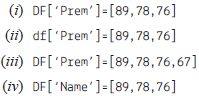
(a) He wants to add a new column with name of student ‘Prem’ in above data frame choose the right command to do so:
(b) He wants to set all the values to zero in data frame, choose the right command to do so:
| Amit | Ram | Sam | Roja | Monan | Prem | |
| Maths | 0 | 0 | 0 | 0 | 0 | 0 |
| Science | 0 | 0 | 0 | 0 | 0 | 0 |
| Hindi | 0 | 0 | 0 | 0 | 0 | 0 |
(i) DF=0 (ii) DF[]=0
(iii) DF[:]=0 (iv) DF[:]==0
(c) He want to delete the row of Science marks:
(i) DF.drop(‘Science’, axis=1)
(ii) Dfdrop(‘Science’, axis=0)
(iii) dfdrop(‘Science’, axis=-1)
(iv) dfdrop(‘Science’, axis==0)
(d) What will be the output of the given command?
DFindex=[‘A’,’B’,’C’]
(iv) Error, Index already exist cannot be overwrite
| Amit | Ram | Sam | Roja | Manan | |
| A | 90 | 92 | 89 | 81 | 94 |
| B | 91 | 81 | 91 | 71 | 95 |
| C | 97 | 96 | 88 | 67 | 99 |
(e) The given code is to create another data frame, which he want to add to existing Data Frame choose the right command to do so:
Sheet1={
‘Aaradhya’: pdSeries([90, 91, 97],
index=[‘Maths’,’Science’,’Hindi’])}
S1=pdDataFrame(Sheet1)
(i) Df.append(S1,axis=0)
(ii) Df.append(S1)
(iii) Df.insert(S1)
(iv) Df.join(S1)
| index | date | duration | item | month | network | network_type | |
| 0 | 0 | 15/10/14 06:58 | 34.429 | data | 2014-11 | data | data |
| 1 | 1 | 15/10/14 06:58 | 13.000 | call | 2014-11 | Vodafone | mobile |
| 2 | 2 | 15/10/14 14:46 | 23.000 | call | 2014-11 | Airtel | mobile |
| 3 | 3 | 15/10/14 14:48 | 4.000 | call | 2014-11 | data | mobile |
| 4 | 4 | 15/10/14 17:27 | 4.000 | call | 2014-11 | Airtel | mobile |
| 5 | 5 | 15/10/14 18:55 | 4.000 | call | 2014-11 | Airtel | mobile |
| 6 | 6 | 16/10/14 06:58 | 34.429 | call | 2014-11 | data | data |
| 7 | 7 | 16/10/14 15:01 | 602.000 | call | 2014-11 | Vodafone | mobile |
| 8 | 8 | 16/10/14 15:12 | 1050.000 | call | 2014-11 | Airtel | mobile |
| 9 | 9 | 16/10/14 15:30 | 19.000 | call | 2014-11 | voicemail | voicemail |
| 10 | 10 | 16/10/14 16:21 | 1183.000 | call | 2014-11 | Vodafone | mobile |
| 11 | 11 | 16/10/14 22:18 | 1.000 | sms | 2014-11 | Airtel | mobile |
| 12 | 12 | 16/10/14 22:21 | 1.000 | sms | 2014-11 | Vodafone | mobile |
| 13 | 13 | 17/10/14 06:58 | 34.429 | data | 2014-11 | data | data |
(i) To count the rows in the dataset
(ii) What was the longest phone call / data entry?
(iii) How many seconds of phone calls are recorded in total?
(iv) How many entries are there for each month?
(v) To print the group key
(vi) To count the group keys
(vii) Get the first entry for each month
(viii) Get the sum of the durations per month
(ix) Get the number of dates / entries in each month
(x) What is the sum of durations, for calls only, to each network
(xi) How many calls, sms, and data entries are in each month?
(xii) How many calls, texts, and data are sent per month, split by network_type?
(xiii) Group the data frame by month and item and extract a number of stats from each group
(xiv) Group the data frame by month and item and extract a number of stats from each group