Question
Write a python program using function to accept the list as parameter and print the odd element of the list.
Get the step-by-step solution for this question inside the Vidyadip app.
Get the answer in the appGenerate a complete, print-ready paper with questions like this in minutes — across 16+ boards, with answer keys.
Consider the following tables GAMES and PLAYER. Write SQL commands for the statements (a) to (d) and give outputs for SQL queries (e1) to (e4)
Relation: GAMES
| GCode | Game Name | Number | Prize Money | Schedule Date |
| 101 | Carom Board | 2 | 5000 | 23-Jan-2004 |
| 102 | Badminton | 2 | 12000 | 12-Dec-2003 |
| 103 | Table Tennis | 4 | 8000 | 14-Feb-2004 |
| 105 | Chess | 2 | 9000 | 01-Jan-2004 |
| 108 | Lawn Tennis | 4 | 25000 | 19-Mar-2004 |
Relation: PLAYER
| PCode | Name | Gcode |
| 1 | Nabi Ahmad | 101 |
| 2 | Ravi Sahai | 108 |
| 3 | Jatin | 101 |
| 4 | Nazneen | 103 |
(a) To display the name of all Games with their Gcodes
(b) To display details of those games which are having PrizeMoney more than 7000.
(c) To display the content of the GAMES table in ascending order of ScheduleDate.
(d) To display sum of PrizeMoney for each of the Number of participation groupings (as shown in column Number)
(e1) Select COUNT(DISTINCT Number) FROM GAMES;
(e2) Select MAX(ScheduleDate),MIN(ScheduleDate) FROM GAMES;
(e3) Select SUM(PrizeMoney) FROM GAMES;
(e4) Select DISTINCT Gcode FROM PLAYER;
Consider the following DEPT and WORKER tables. Write SQL queries for (i) to (iv) and find outputs for SQL queries (v) to (viii):
Table: DEPT
| DCODE | DEPARTMENT | CITY |
| D01 | MEDIA | DELHI |
| D02 | MARKETING | DELHI |
| D03 | INFRASTRUCTURE | MUMBAI |
| D05 | FINANCE | KOLKATA |
| D04 | HUMAN RESOURCE | MUMBAI |
Table: WORKER
| WNO | NAME | DOJ | DOB | GENDER | DCODE |
| 1001 | George K | 2013-09-02 | 1991-09-01 | MALE | D01 |
| 1002 | Ryma Sen | 2012-12-11 | 1990-12-15 | FEMALE | D03 |
| 1003 | Mohitesh | 2013-02-03 | 1987-09-04 | MALE | D05 |
| 1007 | Anil Jha | 2014-01-17 | 1984-10-19 | MALE | D04 |
| 1004 | Manila Sahai | 2012-12-09 | 1986-11-14 | FEMALE | D01 |
| 1005 | R SAHAY | 2013-11-18 | 1987-03-31 | MALE | D02 |
| 1006 | Jaya Priya | 2014-06-09 | 1985-06-23 | FEMALE | D05 |
Note: DOJ refers to date of joining and DOB refers to date of Birth of workers.
(i) To display Wno, Name, Gender from the table WORKER in descending order of Wno.
(ii) To display the Name of all the FEMALE workers from the table WORKER.
(iii) To display the Wno and Name of those workers from the table WORKER who are born between ‘1987-01-01 ’and ‘1991-12-01 ’.
(iv) To count and display MALE workers who have joined after ‘1986-01-01 ’.
(v) SELECT COUNT(*), DCODE FROM WORKER GROUP BY DCODE HAVING COUNT(*)>1;
(vi) SELECT DISTINCT DEPARTMENT FROM DEPT;
(vii) SELECT NAME, DEPARTMENT, CITY FROM WORKER W,DEPT D WHERE W.DCODE=D.DCODE AND WNO <1003;
(viii) SELECT MAX(DOJ), MIN(DOB) FROM WORKER;
Write SQL commands for the following queries on the basis of Club relation given below:
Relation: Club
| Coach-ID | CoachName | Age | Sports | date_of_app | Pay | Sex |
| 1 | Kukreja | 35 | Karate | 27/03/1996 | 1000 | M |
| 2 | Ravina | 34 | Karate | 20/01/1998 | 1200 | F |
| 3 | Karan | 34 | Squash | 19/02/1998 | 2000 | M |
| 4 | Tarun | 33 | Basketball | 01/01/1998 | 1500 | M |
| 5 | Zubin | 36 | Swimming | 12/01/1998 | 750 | M |
| 6 | Ketaki | 36 | Swimming | 24/02/1998 | 800 | F |
| 7 | Ankita | 39 | Squash | 20/02/1998 | 2200 | F |
| 8 | Zareen | 37 | Karate | 22/02/1998 | 1100 | F |
| 9 | Kush | 41 | Swimming | 13/01/1998 | 900 | M |
| 10 | Shailya | 37 | Basketball | 19/02/1998 | 1700 | M |
(a) To show all information about the swimming coaches in the club.
(b) To list the names of all coaches with their date of appointment (date_of_app) in descending order.
(c) To display a report showing coach name, pay, age, and bonus (15% of pay) for all coaches.
(d) To insert a new row in the Club table with ANY relevant data:
(e) Give the output of the following SQL statements:
(i) Select COUNT(Distinct Sports) from Club;
(ii) Select Min(Age) from Club where SEX = “F ”;
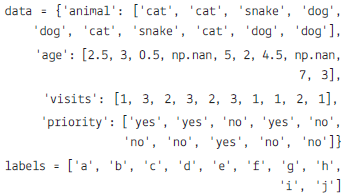
| animal | age | visits | priority | |
| a | cat | 2.5 | 1 | yes |
| b | cat | 3.0 | 3 | yes |
| c | snake | 0.5 | 2 | No |
| d | dog | NaN | 3 | yes |
| e | dog | 5.0 | 2 | No |
| f | cat | 2.0 | 3 | No |
| g | snake | 4.5 | 1 | No |
| h | cat | NaN | 1 | yes |
| i | dog | 7.0 | 2 | No |
| j | dog | 3.0 | 1 | No |
(a) To create the dataframe from the above dictionary and index is stored in label list.
(b) To display the Data frame.
(c) To calculate the sum of all visits (the total number of visits).
(d) Calculate the mean age for each different animal in df
(e) To Append a new row 'k' to df with your choice of values for each column.
(f) To delete the new entered row.
(g) To count the number of each type of animal in df.
(h) To sort df first by the values in the 'age' in descending order, then by the value in the 'visit' column in ascending order.
(i) To print the maximum values of each column.
(j) To display all the statistics.
(k) To sort the data according the index.
(i) To import the pandas
(ii) To create the series from the list
(iii) To print List.
(iv) To print the index of the series.
(v) To print the values of the series.