Question
Write a script to create a list of 10 random integers and display it. Then input an integer from the user and check whether it is present in the list (use in operator) and display an appropriate message.
Write a script to create a list of 10 random integers and display it. Then input an integer from the user and check whether it is present in the list (use in operator) and display an appropriate message.
Get the step-by-step solution for this question inside the Vidyadip app.
Get the answer in the appGenerate a complete, print-ready paper with questions like this in minutes — across 16+ boards, with answer keys.
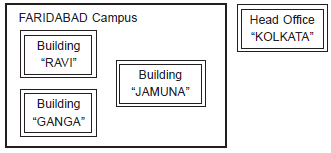
Distances between various buildings:
| Building “RAVI” to Building “JAMUNA” | 120m |
| Building “RAVI” to Building “GANGA” | 50m |
| Building “GANGA” to Building “JAMUNA” | 65m |
| Faridabad Campus to Head Office | 1460km |
Number of computers:
| Building “RAVI” | 25 |
| Building “JAMUNA” | 150 |
| Building “GANGA” | 51 |
| Head Office | 10 |
(a) Suggest the most suitable place (i.e. block) to house the server of this organization. Also give a reason to justify your suggested location.
(b) Suggest a cable layout of connections between the buildings inside the campus.
(c) Suggest the placement of the following devices with justification:
(i) Switch
(ii) Repeater
(d) The organization is planning to provide a high speed link with its head office situated in KOLKATA using a wired connection. Which of the following cable will be most suitable for this job?
(i) Optical Fiber
(ii) Co-axial cable
(iii) Ethernet cable
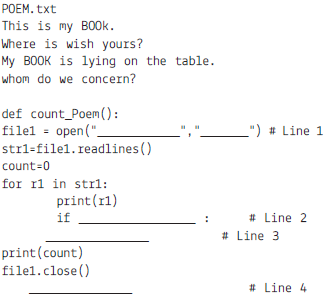
(a) # Line 1 : To open file POEM.txt in read mode
(b) # Line 2 : To check first character of every line is ‘W’ or ‘w’.
(c) # Line 3 : To increase the value of count by 1.
(d) # Line 4 : To call the function count_poem.
( i.e: student_name, roll_number, avg_marks )
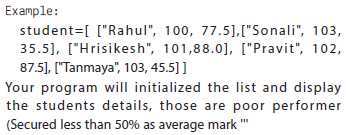

The program is to be implemented to sub plot
Table: DEPT
| DCODE | DEPARTMENT | LOCATION |
| D01 | INFRASTRUCTURE | DELHI |
| D02 | MARKETING | DELHI |
| D03 | MEDIA | MUMBAI |
| D05 | FINANCE | KOLKATA |
| D04 | HUMAN RESOURCE | MUMBAI |
Table: EMPLOYEE
| ENO | NAME | DOJ | DOB | GENDER | DCODE |
| 1001 | George K | 2013-09-02 | 1991-09-01 | MALE | D01 |
| 1002 | Ryma Sen | 2012-12-11 | 1990-12-15 | FEMALE | D03 |
| 1003 | Mohitesh | 2013-02-03 | 1987-09-04 | MALE | D05 |
| 1007 | Anil Jha | 2014-01-17 | 1984-10-19 | MALE | D04 |
| 1004 | Manila Sahai | 2012-12-09 | 1986-11-14 | FEMALE | D01 |
| 1005 | R SAHAY | 2013-11-18 | 1987-03-31 | MALE | D02 |
| 1006 | Jaya Priya | 2014-06-09 | 1985-06-23 | FEMALE | D05 |
Note: DOJ refers to date of joining and DOB refers to date of Birth of employees.
(i) To display Eno, Name, Gender from the table EMPLOYEE in ascending order of Eno.
(ii) To display the Name of all the MALE employees from the table EMPLOYEE.
(iii) To display the Eno and Name of those employees from the table EMPLOYEE who a born between ‘1987‐01‐01 ’and ‘1991‐12‐01 ’.
(iv) To count and display FEMALE employees who have joined after ‘1986‐01‐01 ’.
(v) Select count(*),dcode from employee group by dcode having count(*)>1;
(vi) Select distinct department from dept;
(vii) Select name, department from employee e, dept d where e.dcode=d.dcode and en0 <1003;
(viii) select max(doj), min(dob) from employee;