Question
Write SQL commands for the following queries based on the relation Teacher given below:

Table: Teacher

No Name Age Department Date_of_join Salary Sex
1 Jugal 34 Computer 10/01/97 12000 M
2 Sharmila 31 History 24/03/98 20000 F
3 Sandeep 32 Maths 12/12/96 30000 M
4 Sangeeta 35 History 01/07/99 40000 F
5 Rakesh 42 Maths 05/09/97 25000 M
6 Shyam 50 History 27/06/98 30000 M
7 Shiv Om 44 Computer 25/02/97 21000 M
8 Shalakha 33 Maths 31/07/97 20000 F

(a) To show all information about the teacher of Computer department.

(b) To list the names of female teachers who are in Maths department.

(c) To list the names of all teachers with their date of joining in ascending order.

(d) To display teacher’s name, salary, age for male teachers only.

(e) To count the number of teachers with Age>23.
Answer

Get the step-by-step solution for this question inside the Vidyadip app.

Get the answer in the app

Need a full question paper?

Generate a complete, print-ready paper with questions like this in minutes — across 16+ boards, with answer keys.

Start Generating Free

Similar questions

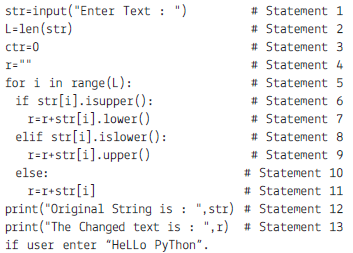
The Teacher wrote the following code. Sanya was absent on the day when the topic was taught. Help her to complete the assignment. Choose the output on the basis of the above code.
(a) Which statement is used to display “HeLLo PyThon”?
(i) Statement 1 (ii) Statement 12
(iii)Statement 13 (iv) No Statement will display.
(b) Which statement will check for capital letters?
(i) Statement 6 (ii) Statement 7
(iii) Statement 8 (iv) Statement 9
(c) Which statement will convert it into capital letters?
(i) Statement 6 (ii) Statement 7
(iii) Statement 8 (iv) Statement 9
(d) Which is iterative Statement?
(i) Statement 5 (ii) Statement 6
(iii) Statement 8 (iv)There is No iterative Statement.
(e) What will be the output of Python code (Statement 1 to Statement 13)
(i) HeLLo PyThon (ii) No Output
(iii) hEllO pYtHON (iv) Hello Python
What are the rules of Netiquettes?
With reference to the given data frame answer the questions given below:

id name host_id host_name neighbourhood_group neighbourhood latitude longitude
0 2539 Clean & quiet apt
home by the park
2787 John Brooklyn Kensignton 40.64749 -73.97237
1 2595 Skylit Midtown
Castle
2845 Jennifer Manhattan Midtown 40.75362 -73.98377
2 3647 The Village
Of Harlem ...
New York !
4632 Elisabeth Manhattan Harlem 40.80902 -73.94190
3 3831 Cozy Entire Floor
of Brownstone
4869 LisaRoxanne Brooklyn Clinton Hill 40.68514 -73,95976
4 5022 Entire Apt:
Spacious Studio/
Loft by central park
7192 Laura Manhattan East Harlem 40.79851 -73.94399
5 5099 Large Cozy 1BR
Apartment in
Midtown East
7322 Chris Manhattan Murray Hill 40.74767 -73.97500
6 5121 BlissArtsSpace! 7356 Garon Brooklyn Bedford-Stuyvesant 40.68688 -7395596
7 5178 Large Furnished
Room Near Bway
8967 Shunichi Manhattan Hell’s Kitchen 40.76489 -73.98493

Assuming that other file is stored in CSV format named “nysc.csv” Import pandas as pd

(i) To create the Data frame of the above data.

(ii) To print the first 10 records

(iii) To display the name and Id.

(a) Create the Dictionary Student with the following key and add the 5 values. Dictionary will be created from 4 different list:

Column Name Key
Student Number sno
Student Name sname
E-mail mail
Marks mark

(b) Create the data frame for the above specification containing index parameter along with column.

(c) Add a new column grade into above Data Frame with at least 3 methods.

(d) Insert the 2 rows.

(e) Create another Data Frame with two rows named DF2.

(f) Add this data frame to your existing data frame.

(g) Display the alternate rows.

(h) Display the name and marks of the students whose marks is greater than equal to 90.

(i) Fill all NaN in the data.

(j) Increase the marks by 10.

Given the following relation: STUDENT

Table: STUDENT

No. Name Age Department Dateofadm Fee Sex
1 Pankaj 24 Computer 10/01/97 120 M
2 Shalini 21 History 24/03/98 200 F
3 Sanjay 22 Hindi 12/12/96 300 M
4 Sudha 25 History 01/07/99 400 F
5 Rakesh 22 Hindi 05/09/97 250 M
6 Shakeel 30 History 27/06/98 300 M
7 Surya 34 Computer 25/02/97 210 M
8 Shikha 23 Hindi 31/07/97 200 F

Write SQL commands for the following queries

(a) To show all information about the students of History department.

(b) To list the names of female students who are in Hindi department.

(c) To list the names of all students with their date of admission in ascending order.

(d) To display student’s name, fee, age for male students only.

(e) To count the number of students with Age>23.

Answer the question given below:

Country Expenditure GrowthRate UpdataDate GDP_Growth_rate
0 Australia 1287600000 25.00 2016-07 21.0
1 United States 989300000 24.56 2016-09 19.6

(i) Create the above file in Excel and write the command to create the data frame.

(ii) To print the dataframe.

(iii) To set the index to the column country in the above data frame.

(iv) To add the new data frame in previous question data frame also sort the result.

(v) To change the first row date to 2016-01 for UpdateDate column.

Answer the following questions on the basis of given data set:

index date duration item month network network_type
0 0 15/10/14 06:58 34.429 data 2014-11 data data
1 1 15/10/14 06:58 13.000 call 2014-11 Vodafone mobile
2 2 15/10/14 14:46 23.000 call 2014-11 Airtel mobile
3 3 15/10/14 14:48 4.000 call 2014-11 data mobile
4 4 15/10/14 17:27 4.000 call 2014-11 Airtel mobile
5 5 15/10/14 18:55 4.000 call 2014-11 Airtel mobile
6 6 16/10/14 06:58 34.429 call 2014-11 data data
7 7 16/10/14 15:01 602.000 call 2014-11 Vodafone mobile
8 8 16/10/14 15:12 1050.000 call 2014-11 Airtel mobile
9 9 16/10/14 15:30 19.000 call 2014-11 voicemail voicemail
10 10 16/10/14 16:21 1183.000 call 2014-11 Vodafone mobile
11 11 16/10/14 22:18 1.000 sms 2014-11 Airtel mobile
12 12 16/10/14 22:21 1.000 sms 2014-11 Vodafone mobile
13 13 17/10/14 06:58 34.429 data 2014-11 data data

(i) To count the rows in the dataset

(ii) What was the longest phone call / data entry?

(iii) How many seconds of phone calls are recorded in total?

(iv) How many entries are there for each month?

(v) To print the group key

(vi) To count the group keys

(vii) Get the first entry for each month

(viii) Get the sum of the durations per month

(ix) Get the number of dates / entries in each month

(x) What is the sum of durations, for calls only, to each network

(xi) How many calls, sms, and data entries are in each month?

(xii) How many calls, texts, and data are sent per month, split by network_type?

(xiii) Group the data frame by month and item and extract a number of stats from each group

(xiv) Group the data frame by month and item and extract a number of stats from each group

Answer the question below based on given dataset:

DataFrame: dfzoo

animal uniq_id water_need
0 Elephant 1001 500
1 Elephant 1002 600
2 Elephant 1003 550
3 Tiger 1004 300
4 Tiger 1005 320
5 Tiger 1006 330
6 Tiger 1007 290
7 Tiger 1008 310
8 Zebra 1009 200
9 Zebra 1010 220
10 Zebra 1011 240
11 Zebra 1012 230
12 Zebra 1013 220
13 Zebra 1013 100
14 Zebra 1014 80
15 Lion 1015 420
16 Lion 1016 600
17 Lion 1017 500
18 Lion 1018 390
19 Kangaroo 1019 410
20 Kangaroo 1020 430
21 Kangaroo 1021 410

(i) Counting all the animals

(ii) Count the number of animals in zoo

(iii) To print the sum of the water need of an animals.

(iv) To print the sum of all values.

(v) To print the sum of only numeric values.

(vi) To print the minimum values of water need.

(vii) To print the mean values of water need.

(viii) To print the median values of water need.

(ix) To print the animal wise means value.

(x) To print the mean value water need of an each animal.

Consider the following Data Frame ‘‘emp’’ and answer any four questions from (i) – (v).

Ecode Name Age Fav_Color Salary
101 Rohit 20 Blue 45000
102 Mohanti 24 Red 36000
103 Tushar Koul 23 Green 42000
104 Rupali 22 Yellow 38000
105 Gurpreet 21 Pink 40000

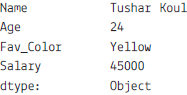
(a) Select the command from the given options that will give the following output:-

(i) print(emp.max)

(ii) print(emp.max(axis=1))

(iii) print(emp.max,axis=1)

(iv) print(emp.max())

(b) A manager wants to know the Favourite colour of the employee with the employee code 103. Help him to identify the correct set of statements from the given options:

(i) df1=emp[emp[‘Ecode’]==103]

print(df1)

(ii) df1=emp['Ecode'==103]

print(df1)

(iii) df1=emp[emp.Ecode=103]

print(df1)

(iv) df1=emp[emp.Ecode==103]

print(df1)

(c) Which of the following statement will give the names of the employees whose salary is more than 40000.

(i) print(emp.max())

(ii) print(emp[emp["Salary"]>40000])

(iii) print(emp["Salary"]>40000)

(iv) print(emp.max()>40000)

(d) Which of the following command will list only the columns Ename and Salary using loc:

(i) print(emp.loc[:,[0,2]]

(ii) print(emp.loc[:,["Ename","Salary"]])

(iii) print(emp.loc(:["Ename","Salary"]))

(iv) print(emp.loc[["Ename","Salary"]])

(e) Mr. Singh, the manager wants to add a new column, the Rank with the values ‘IV’, ‘II’, ‘III’, ‘IV’, ‘I’, to the data frame Help him to identify the right command from the followings to do so :

(i) emp.column=[‘IV’, ‘II’, ‘III’, ‘IV’, ‘I’ ]

(ii) emp.iloc["Rank"] =[‘IV’, ‘II’, ‘III’, ‘IV’, ‘I’]

(iii) emp["Rank"] =[‘IV’, ‘II’, ‘III’, ‘IV’, ‘I’ ]

(iv) None of the above

Mr. Sharma is working with an IT company and he was provided with some data. On which he wants to do some operations but he is facing some problem, help him in resolving:

Amit Ram Sam Roja Monan
Maths 90 92 89 81 94
Science 91 81 91 71 95
Hindi 97 96 88 67 99

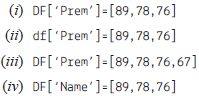
(a) He wants to add a new column with name of student ‘Prem’ in above data frame choose the right command to do so:

(b) He wants to set all the values to zero in data frame, choose the right command to do so:

Amit Ram Sam Roja Monan Prem
Maths 0 0 0 0 0 0
Science 0 0 0 0 0 0
Hindi 0 0 0 0 0 0

(i) DF=0 (ii) DF[]=0

(iii) DF[:]=0 (iv) DF[:]==0

(c) He want to delete the row of Science marks:

(i) DF.drop(‘Science’, axis=1)

(ii) Dfdrop(‘Science’, axis=0)

(iii) dfdrop(‘Science’, axis=-1)

(iv) dfdrop(‘Science’, axis==0)

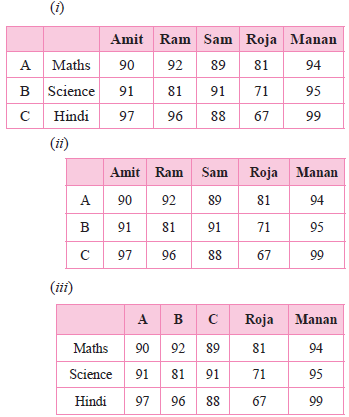
(d) What will be the output of the given command?

DFindex=[‘A’,’B’,’C’]

(iv) Error, Index already exist cannot be overwrite

Amit Ram Sam Roja Manan
A 90 92 89 81 94
B 91 81 91 71 95
C 97 96 88 67 99

(e) The given code is to create another data frame, which he want to add to existing Data Frame choose the right command to do so:

Sheet1={

‘Aaradhya’: pdSeries([90, 91, 97],

index=[‘Maths’,’Science’,’Hindi’])}

S1=pdDataFrame(Sheet1)

(i) Df.append(S1,axis=0)

(ii) Df.append(S1)

(iii) Df.insert(S1)

(iv) Df.join(S1)