Questions

4 Marks Each

🎯

Test yourself on this topic

8 questions · timed · auto-graded

Question 14 Marks
Answer the following questions based on dataset given below:

TNO Tname Tadd Salary
0 T01 Amit 123 Paschim Vihar 23000
1 T02 Rajesh 6/11 Ramesh Nagar 34000
2 T03 Binny 5 West Punjabhi Bagh 12000
3 T04 Charu 23Malviya Nagar 45000
4 T05 Meenakshi 19 Meera Bagh 34000

(i) To write the statement to import the required library.

(ii) To create the data frame from the above dictionary.

(iii) To print the data frame.

(iv) To print the name columns.

(v) To print the complete information of the data frame.

(vi) To print the index of data frame.

(vii) To print the various attributes of the data frame i.e Shape, Dimensions, Columns and number of records.

(viii) To print the records whose salary is greater than 5000.

(ix) To create another data frame which will store all the records of the teacher whose salary is greater than 5000.

(x) To display the Salary.

(xi) To set the index to the column 'Tname'.

(xii) To display the record of 'Amit'.

(xiii) To display the record fo 'Amit' and 'Binny'

(xiv) To display the Salary and Address of 'Amit' and 'Binny'.

(xv) To display the records of the teachers whos are earning salary more than 10000.

(xvi) To display the records of the teachers whos are earning salary less than 40000.

(xvii) To add new column Dearness Allowance with any values.

(xviii) To add new column "HRA" using .loc().

(xix) To add new column tax using assign().

(xx) To display the HRA column.

(xxi) To display the records of the Teachers who have HRA of more than 500.

(xxii) To add a new column Total Salary which is to be calculated as Salary + HRA - Tax.

(xxiii) To fill all NaN values with 5000.

(xxiv) To replace all the NaN with space.

(xxv) To Update the new colum with values as Salary + HRA + Dearness Allowance - Tax

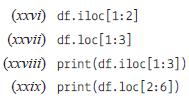
Write the output of the given commands:
View full question & answer
Question 24 Marks
Describe Data Operations in Pandas.
Answer
In Pandas, there are different useful data operations for DataFrame, which are as follows:

• Row and column selection:

We can select any row and column of the DataFrame by passing the name of the rows and columns. When you select it from the DataFrame, it becomes one-dimensional and considered as Series.

• Filter Data:

We can filter the data by providing some of the boolean expressions in DataFrame.

• Null values:

A Null value occurs when no data is provided to the items. The various columns may contain no values, which are usually represented as NaN.

View full question & answer
Question 34 Marks
Answer the questions related to pandas Series which will perform:

(i) To import the pandas

(ii) To create the series from the list

(iii) To print List.

(iv) To print the index of the series.

(v) To print the values of the series.

Answer
(i) Import pandas as pd

(ii) l=[20,30,50,70,80]

s=pd.Series(l)

(iii) print(s)

(iv) s.index

(v) s.values

View full question & answer
Question 44 Marks
What is Pandas NumPy array?
Answer
Numerical Python (Numpy) is defined as a Python package used for performing the various numerical computations and processing of the multidimensional and single-dimensional array elements. The calculations using Numpy arrays are faster than the normal Python array.
View full question & answer
Question 54 Marks
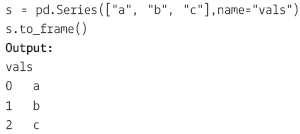
How can we convert a Series to DataFrame?
Answer
The Pandas Series.to_frame() function is used to convert the series object to the DataFrame.

Series.to_frame(name=None)

name: Refers to the object. Its Default value is None.

If it has one value, the passed name will be substitutedfor the series name.

View full question & answer
Question 64 Marks
How to Rename the Index or Columns of a Pandas DataFrame?
Answer
You can use the .rename method to give different values to the columns or the index values of DataFrame.
View full question & answer
Question 74 Marks
How to Delete Indices, Rows or Columns From a Pandas Data Frame?
Answer
Deleting an Index from Your DataFrame

If you want to remove the index from the DataFrame, you should have to do the following:

Step 1: Reset the index of DataFrame.

Step 2: Executing del df.index.name to remove the index name.

Step 3: Remove duplicate index values by resetting the index and drop the duplicate values from the index column.

Step 4: Remove an index with a row.

Deleting a Column from Your DataFrame

You can use the drop() method for deleting a column from the DataFrame.

The axis argument that is passed to the drop() method is either 0 if it indicates the rows and 1 if it drops the columns.

You can pass the argument inplace and set it to True to delete the column without reassiging the DataFrame.

You can also delete the duplicate values from the column by using the drop_duplicates() method.

Removing a Row from Your DataFrame

By using df.drop_duplicates(), we can remove duplicate rows from the DataFrame.

You can use the drop() method to specify the index of the rows that we want to remove from the DataFrame.

View full question & answer
Question 84 Marks
How to add an Index, row, or column to a Pandas DataFrame?
Answer
Adding an Index to a DataFrame:

Pandas allow adding the inputs to the index argument if you create a DataFrame. It will make sure that you have the desired index. If you don’t specify inputs, the DataFrame contains, by default, a numerically valued index that starts with 0 and ends on the last row of the DataFrame.

Adding Rows to a DataFrame:

We can use .loc, iloc, and ix to insert the rows in the DataFrame.

The loc basically works for the labels of our index. It can be understood as if we insert in loc[4], which means we are looking for that values of DataFrame that have an index labeled 4.

The iloc basically works for the positions in the index. It can be understood as if we insert in iloc[4], which means we are looking for the values of DataFrame that are present at index '4`.

The ix is a complex case because if the index is integerbased, we pass a label to ix. The ix[4] means that we are looking in the DataFrame for those values that have an index labeled 4. However, if the index is not only integer-based, ix will deal with the positions as iloc.

Adding Columns to a DataFrame

If we want to add the column to the DataFrame, we can easily follow the same procedure as adding an index to the DataFrame by using loc or iloc.

View full question & answer
4 Marks Each - Computer Science STD 12 Commerce Questions - Vidyadip