Delete command is used to remove table.
Question types
Database Management – SQL question types
85 questions across 8 question groups — pick any mix to generate a Computer Science paper with step-by-step answer keys.
85
Questions
8
Question groups
5
Question types
01
True-False
5 Q→02M.C.Q
10 Q→03Fill In The Blanks
10 Q→041 Marks Each
14 Q→052 Marks Each
15 Q→063 Marks Each
15 Q→075 Marks Each
3 Q→084 Marks Each
13 Q→Sample Questions
Database Management – SQL questions
One sample from each question group in this chapter. Select any group above to see the full set with answer keys.
View full solution →
Number of columns in a table is known as Degree.
SQL stands for Structured Query Language.
COUNT() will count NULL values.
DELETE is DDL command.
A Table customer contains 5 rows and 7 columns. What will be its cardinality and degree?
- ✓Degree 7, Cardinality 5.
- BDegree 5, Cardinality 7.
- CDegree 5, Cardinality 7.
- DCardinality 7, Degree 7.
Answer: A.
View full solution →Which clause is used to group the column(s) with aggregate function?
- AOrder by
- BLike
- CWhere
- ✓Group by
Answer: D.
View full solution →Number of rows in a relation is known as
- ADegree
- ✓Cardinality
- CCartesian Product
- DAttribute
Answer: B.
View full solution →Which command is used to modify rows in a table.
- ADelete
- ✓Update
- CAlter
- DModify
Answer: B.
View full solution →Which command is used to close the MySQL Software/application?
- ✓exit();
- BClose();
- CClose;
- Dexit;
Answer: A.
View full solution →____________ is undefined/ unavailable/ missing value/ No value.
____________ command is used to view the structure of the table.
Select * from student where state ___________ (‘Delhi’,’MP’,’Tamil Nadu’);.
Select * from student where admno between 1101 _______ 1199;.
Alter is _______________ command.
Name the two wild card characters.
A table course has its degree as 7 and cardinality as 18. Write the number rows and columns in the table.
Write the full form of SQL.
A table student consists of 5 rows and 7 columns. Later on 3 columns added and 2 rows deleted. After some time 5 new students added. What will be the degree and cardinality?
A table Item and Store have one common column Item-Id. Item table consists of 5 rows and 3 columns while the store table consists of 7 rows and 5 columns. What will be the degree and cardinality of these tables in the cartesian product?
Differentiate between Candidate Key and Primary Key in context of RDBMS.
What is the importance of a Primary Key in a table? Explain with a suitable example.
Differentiate between the terms primary key and alternate key.
Write the full form of DDL and DML?
What is an Alternate Key?
Differentiate between cardinality and degree of a table with the help of an example.
Observe the following table and answer the parts (i) and (ii) accordingly
Table: Product
| Pno | Name | Qty | PurchaseDate |
| 101 | Pen | 102 | 12-12-2011 |
| 102 | Pencil | 201 | 21-02-2013 |
| 103 | Eraser | 90 | 09-08-2010 |
| 109 | Sharpener | 90 | 31-08-2012 |
| 113 | Clips | 900 | 12-12-2011 |
(a) Write the names of most appropriate columns, which can be considered as candidate keys.
(b) What is the degree and cardinality of the above table?
What are candidate keys in a table? Give a suitable example of candidate keys in a table.
Differentiate between DDL &DMLcommands. Identify DDL &DML commands from the following:
(UPDATE, SELECT, ALTER, DROP)
Differentiate between Candidate Key and Alternate Key in context of RDBMS.
“IT Tech ”Company conducts workshops for employees of organizations. The company requires data of workshops that are organize(d) As a database administrator you have decided that:
Name of the Database: IT
Name of the Table: WORKSHOP
Attributes of Table ‘Workshop ’are as follows.
| Field | Type | Constraint |
| Workshopld | integer | Primary Key |
| Title | Varchar(50) | |
| DateWorkshop | Date | |
| NumSpeakers | Integer |
Table : WORKSHOP
| WorkshopId | Title | Date Workshop | NumSpeakers |
| 1001 | Robotics | 2020-02-21 | 3 |
| 1002 | AI | 2020-05-24 | 4 |
| 1003 | Humanoids | 2020-07-15 | 3 |
| 1004 | Block Chain | 2020-04-25 | 5 |
| 1005 | Cloud | 2020-03-03 | 4 |
(a) Which attribute can be the primary key.
(i) Title (ii) WorkshopID
(iii) NumSpeaker (iv) DateWorkshop
(b) Which command will display the structure of the table:
(i) Use workshop (ii) Desc
(iii) Desc workshop (iv) Show tables
(c) Command to display all the record in descending order of number of speakers.
(i) Select * from Workshop reverse by NumSpeakers;
(ii) Select * from workshop order by descNumSpeakers;
(iii) Select * from workshop order by NumSpeakersdesc;
(iv) Select * from workshop group by NumSpeakersdesc;
(d) What will be the cardinality and degree of the table: WORKSHOP
(i) Cardinality = 5, Degree =4
(ii) Cardinality = 4, Degree =5
(iii) Cardinality = 6, Degree =4
(iv) Cardinality = 5, Degree =5
(e) Choose the right command which will delete the record of 1004 WorkshopId
(i) Delete * from workshop where workshopid==1004;
(ii) Delete from workshop where workshopid=1004;
(iii) Drop from workshop where workshopid=1004;
(iv) Delete table from workshop where workshopid=1004;
Consider the SchoolBus table given below:
(a) State the command that will give the output as:
Area_covered
Yamuna Vihar
Krishna Nagar
Vasundhara
(i) select area_covered from schoolbus where transporter Yadav Co.'and transporter='Bhalla Co.';
(ii) select area_covered from schoolbus where not transporter-Yadav Co.'and transporter=Bhaila Co.';
(iii) select area_covered from schoolbus where transporter - Yadav Co.'
OR transporter'Bhalla Co.';
(iv) select area_covered from schoolbus where transporter IN("Yadav co.", -Bhalla co."):
Choose the correct option:
(i) Both (i) and (ii). (ii) Both (iii) and (iv).
(iii) Any of the options (i), (ii) and (iv) (iv) Only (iii)
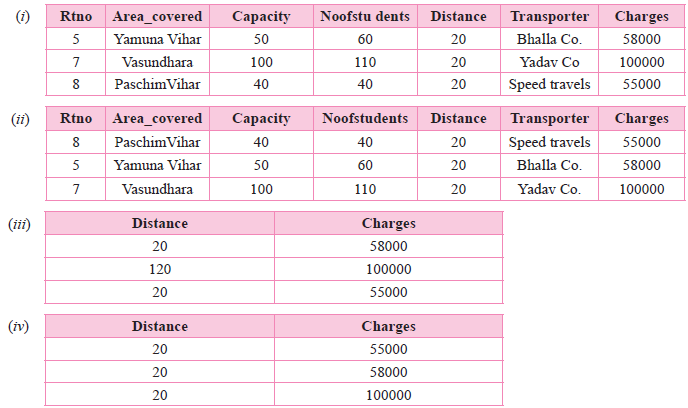
(b) What will be the output of the following command?
Select * from schoolbus where distance=20 order by charges;
(c) Ravi has given the following command to obtain the Longest distance Select max(distance) from schoolbus where group by transporter;
But he is not getting the desired result.
Help him by writing the correct command.
(i) select max(distance) from schoolbus where group by transporter;
(ii) select transporter, max(distance) from schoolbus group by distance;
(iii) select transporter, max(distance) group by transporter from schoolbus;
(iv) select transporter, max(distance) from schoolbus group by transporter;
(d) Help Saumya to write the command to display the name of the transporter who is having lowest capacity in his schoolbus?
(i) select transporter.min(capacity) from schoolbus;
(ii) select transporter.max(capacity) from schoolbus:
(iii) select transporter.min(capacity) from schoolbus group by transporter:
(iv) select transporter.maximum(capacity)
(e) Choose the appropriate primary key.
(i) Transporter (ii) Area_covered (iii) Rtno (iv) Charges
Table: School Bus
| Rtno | Area_covered | Capacity | Noofstudents | Distance | T ransporter | Charges |
| 1 | Vasantkunj | 100 | 120 | 10 | Shivamtravels | 100000 |
| 2 | HauzKhas | 80 | 80 | 10 | Anand travels | 85000 |
| 3 | Pitampura | 60 | 55 | 30 | Anand travels | 60000 |
| 4 | Rohini | 100 | 90 | 35 | Anand travels | 100000 |
| 5 | Yamuna Vihar | 50 | 60 | 20 | Bhalla Co. | 58000 |
| 6 | Krishna Nagar | 70 | 80 | 30 | Yadav Co. | 80000 |
| 7 | Vasundhara | 100 | 110 | 20 | Yadav Co. | 100000 |
| 8 | Paschim Vihar | 40 | 40 | 20 | Speed travels | 55000 |
Area_covered
Yamuna Vihar
Krishna Nagar
Vasundhara
(i) select area_covered from schoolbus where transporter Yadav Co.'and transporter='Bhalla Co.';
(ii) select area_covered from schoolbus where not transporter-Yadav Co.'and transporter=Bhaila Co.';
(iii) select area_covered from schoolbus where transporter - Yadav Co.'
OR transporter'Bhalla Co.';
(iv) select area_covered from schoolbus where transporter IN("Yadav co.", -Bhalla co."):
Choose the correct option:
(i) Both (i) and (ii). (ii) Both (iii) and (iv).
(iii) Any of the options (i), (ii) and (iv) (iv) Only (iii)
(b) What will be the output of the following command?
Select * from schoolbus where distance=20 order by charges;
(c) Ravi has given the following command to obtain the Longest distance Select max(distance) from schoolbus where group by transporter;
But he is not getting the desired result.
Help him by writing the correct command.
(i) select max(distance) from schoolbus where group by transporter;
(ii) select transporter, max(distance) from schoolbus group by distance;
(iii) select transporter, max(distance) group by transporter from schoolbus;
(iv) select transporter, max(distance) from schoolbus group by transporter;
(d) Help Saumya to write the command to display the name of the transporter who is having lowest capacity in his schoolbus?
(i) select transporter.min(capacity) from schoolbus;
(ii) select transporter.max(capacity) from schoolbus:
(iii) select transporter.min(capacity) from schoolbus group by transporter:
(iv) select transporter.maximum(capacity)
(e) Choose the appropriate primary key.
(i) Transporter (ii) Area_covered (iii) Rtno (iv) Charges
Consider the table LOANS given below:
Table: LOANS
| AccNo | Name | Loan Amt | EMI | IntRate | Start Date | Interest |
| 1001 | R.K. Gupta | 300000 | 36 | 12.00 | 19-07-2009 | 1200 |
| 1002 | S. P. Shanna | 500000 | 48 | 10.00 | 22-03-2008 | 1800 |
| 1003 | K.P. Jain | 300000 | 36 | NULL | 08-03-2007 | 1600 |
| 1004 | M.P. Yadav | 800000 | 60 | 10.00 | 06-12-2008 | 2250 |
| 1005 | S.P. Sinlia | 200000 | 36 | 12.50 | 03-01-2010 | 4500 |
| 1006 | P. Shanna | 700000 | 60 | 12.50 | 05-06-2008 | 3500 |
| 1007 | K.S. Dhall | 500000 | 48 | NULL | 05-03-2008 | 3800 |
(a) State the command that will give the output as:
| Name |
| S. P. Shanna |
| K.S. Dhall |
| M.P. Yadav |
| P. Shanna |
| K.S. Dhall |
(i) Select name from LOANS where Name >‘D ’;
(ii) Select name from LOANS where AccNo >1001;
(iii) Select name from LOANS where Loan_Amt >= 500000;
(iv) Select name from LOANS where Loan_Amt >500000 order Loan_AmtDESC;
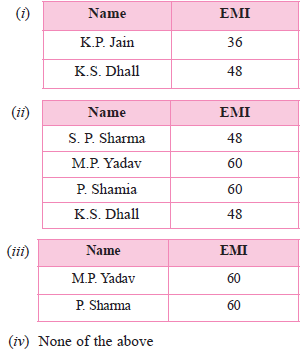
(b) What will be the output of the following command:
Select name, EMI from LOANS where Loan_Amt >500000 and Int_Rate is NULL;
(c) John has given the following command to display the count of all loan holders whose name ends with “Sharma ”:
Select count() from LOANS where Name like ‘Sharma%’;
But he is not getting the desired result. Help him by finding out the correct command fromthe followings:
(i) Select count(*) from LOANS where name Like ‘Sharma%’;
(ii) Select count(*) from LOANS where name Like ‘%Sharma ’;
(iii) Select count( ) from LOANS where name like ‘%sharma ’;
(iv) Select count(Name) from LOANS where name ‘Sharma%’;
(d) State the command to display the maximum Loan_Amt and Cust_Name :-
(i) Select Max(Cust_Name, Loan_Amt) from LOANS;
(ii) Select Cust_Name, max(LoanAmt) from LOANS;
(iii) Select Cust_Name, max(Loan_Amount) from LOANS;
(iv) Select Cust_name, max(Loan_Amt) from LOANS;
(e) Help Ramesh to display the count of all loan holders whose interest is NULL.
(i) Select Count(*) from LOANS where Int_Rate is NULL.
(ii) Select Count() from LOANS where Interest is NULL.
(iii) Select Count(*) from LOANS where Int_rate = NULL;
(iv) Select Count( ) from LOANS where Interest = NULL;
Write SQL queries for (i) to (iv) and find outputs for SQL queries (v) to (viii), which are based on the tables.
Table: VEHICLE
| Code | VTYPE | PERKM |
| 101 | VOLVO BUS | 160 |
| 102 | AC DELUXE BUS | 150 |
| 103 | ORDINARY BUS | 90 |
| 105 | SUV | 40 |
| 104 | CAR | 20 |
Note:
•PERKM is Freight Charges per kilometer
•VTYPE is Vehicle Type
| NO | NAME | TDATE | KM | CODE | NOP |
| 101 | Janish Kin | 2015-11-13 | 200 | 101 | 32 |
| 103 | Vedika sahai | 2016-04-21 | 100 | 103 | 45 |
| 105 | Tarun Ram | 2016-03-23 | 350 | 102 | 42 |
| 102 | John Fen | 2016-02-13 | 90 | 102 | 40 |
| 107 | AhmedKhan | 2015-01-10 | 75 | 104 | 2 |
| 104 | Raveena | 2015-05-28 | 80 | 105 | 4 |
| 106 | Kripal Anya | 2016-02-06 | 200 | 101 | 25 |
Note:
•NO is Traveller Number
•KM is Kilometer travelled
•NOP is number of travellers travelled in vehicle
•TDATE is Travel Date
(i) To display NO, NAME, TDATE from the table TRAVEL in descending order of NO.
(ii) To display the NAME of all the travellers from the table TRAVEL who are travelling by vehicle with code 101 or 102.
(iii) To display the NO and NAME of those travellers from the table TRAVEL who travelled between ‘2015-12-31 ’and ‘2015-04-01 ’.
(iv) To display all the details from table TRAVEL for the travellers, who have travelled distance more than 100 KM in ascending order of NOP.
(v) SELECT COUNT (*), CODE FROM TRAVEL GROUP BY CODE HAVING COUNT(*)>1;
(vi) SELECT DISTINCT CODE FROM TRAVEL;
(vii) SELECT A.CODE,NAME,VTYPE FROM TRAVEL A,VEHICLE B WHERE A.CODE=B. CODE AND KM <90;
(viii) SELECT NAME,KM*PERKM FROM TRAVEL A, VEHICLE B WHERE A.CODE=B.CODE AND A.CODE=‘105 ’;
Consider the following DEPT and EMPLOYEE tables. Write SQL queries for (i) to (iv) and find outputs for SQL queries
(v) to (viii).
(v) to (viii).
Table: DEPT
| DCODE | DEPARTMENT | LOCATION |
| D01 | INFRASTRUCTURE | DELHI |
| D02 | MARKETING | DELHI |
| D03 | MEDIA | MUMBAI |
| D05 | FINANCE | KOLKATA |
| D04 | HUMAN RESOURCE | MUMBAI |
Table: EMPLOYEE
| ENO | NAME | DOJ | DOB | GENDER | DCODE |
| 1001 | George K | 2013-09-02 | 1991-09-01 | MALE | D01 |
| 1002 | Ryma Sen | 2012-12-11 | 1990-12-15 | FEMALE | D03 |
| 1003 | Mohitesh | 2013-02-03 | 1987-09-04 | MALE | D05 |
| 1007 | Anil Jha | 2014-01-17 | 1984-10-19 | MALE | D04 |
| 1004 | Manila Sahai | 2012-12-09 | 1986-11-14 | FEMALE | D01 |
| 1005 | R SAHAY | 2013-11-18 | 1987-03-31 | MALE | D02 |
| 1006 | Jaya Priya | 2014-06-09 | 1985-06-23 | FEMALE | D05 |
Note: DOJ refers to date of joining and DOB refers to date of Birth of employees.
(i) To display Eno, Name, Gender from the table EMPLOYEE in ascending order of Eno.
(ii) To display the Name of all the MALE employees from the table EMPLOYEE.
(iii) To display the Eno and Name of those employees from the table EMPLOYEE who a born between ‘1987‐01‐01 ’and ‘1991‐12‐01 ’.
(iv) To count and display FEMALE employees who have joined after ‘1986‐01‐01 ’.
(v) Select count(*),dcode from employee group by dcode having count(*)>1;
(vi) Select distinct department from dept;
(vii) Select name, department from employee e, dept d where e.dcode=d.dcode and en0 <1003;
(viii) select max(doj), min(dob) from employee;
Consider the following DEPT and WORKER tables. Write SQL queries for (i) to (iv) and find outputs for SQL queries (v) to (viii):
Table: DEPT
| DCODE | DEPARTMENT | CITY |
| D01 | MEDIA | DELHI |
| D02 | MARKETING | DELHI |
| D03 | INFRASTRUCTURE | MUMBAI |
| D05 | FINANCE | KOLKATA |
| D04 | HUMAN RESOURCE | MUMBAI |
Table: WORKER
| WNO | NAME | DOJ | DOB | GENDER | DCODE |
| 1001 | George K | 2013-09-02 | 1991-09-01 | MALE | D01 |
| 1002 | Ryma Sen | 2012-12-11 | 1990-12-15 | FEMALE | D03 |
| 1003 | Mohitesh | 2013-02-03 | 1987-09-04 | MALE | D05 |
| 1007 | Anil Jha | 2014-01-17 | 1984-10-19 | MALE | D04 |
| 1004 | Manila Sahai | 2012-12-09 | 1986-11-14 | FEMALE | D01 |
| 1005 | R SAHAY | 2013-11-18 | 1987-03-31 | MALE | D02 |
| 1006 | Jaya Priya | 2014-06-09 | 1985-06-23 | FEMALE | D05 |
Note: DOJ refers to date of joining and DOB refers to date of Birth of workers.
(i) To display Wno, Name, Gender from the table WORKER in descending order of Wno.
(ii) To display the Name of all the FEMALE workers from the table WORKER.
(iii) To display the Wno and Name of those workers from the table WORKER who are born between ‘1987-01-01 ’and ‘1991-12-01 ’.
(iv) To count and display MALE workers who have joined after ‘1986-01-01 ’.
(v) SELECT COUNT(*), DCODE FROM WORKER GROUP BY DCODE HAVING COUNT(*)>1;
(vi) SELECT DISTINCT DEPARTMENT FROM DEPT;
(vii) SELECT NAME, DEPARTMENT, CITY FROM WORKER W,DEPT D WHERE W.DCODE=D.DCODE AND WNO <1003;
(viii) SELECT MAX(DOJ), MIN(DOB) FROM WORKER;
Answer the (a) and (b) on the basis of the following tables STORE and ITEM:
Table: STORE
| SNo | SName | AREA |
| S01 | ABC Computronics | GK II |
| S02 | All Infotech Media | CP |
| S03 | Tech Shoppe | Nehru Place |
| S05 | Hitech Tech Store | CP |
Table: ITEM
| INo | IName | Price | SNo |
| T01 | Mother Board | 12000 | S01 |
| T02 | Hard Disk | 5000 | S01 |
| T03 | Keyboard | 500 | S02 |
| T04 | Mouse | 300 | S01 |
| T05 | Mother Board | 13000 | S02 |
| T06 | Key Board | 400 | S03 |
| T07 | LCD | 6000 | S04 |
| T08 | LCD | 5500 | S05 |
| T09 | Mouse | 350 | S05 |
| T10 | Hard disk | 4500 | S03 |
(a) Write the SQL queries (1 to 4):
(i) To display IName and Price of all the items in the ascending order of their Price.
(ii) To display the SNo and SName or all stores located in CP.
(iii) To display the minimum and maximum price of each IName from the table Item.
(iv) To display the IName, price of all items and their respective SName where they are available.
(b) Write the output of the following SQL commands (i) to (iv):
(i) Select distinct iname from item where price >= 5000;
(ii) Select area, count(*) from store group by area;
(iii) Select count(distinct area) from store;
(iv) Select iname, price*0.05 discount from item where sno in (‘s02 ’, ‘s03 ’);
Write SQL queries for (a) to (f) and write the outputs for the SQL queries mentioned shown in (g1) to (g4) parts on the basis of tables ITEMS and TRADERS:
Table: ITEMS
| CODE | INAME | QTY | PRICE | COMPANY | TCODE |
| 1001 |
DIGITAL PAD 12i |
120 | 11000 | XENITA | T01 |
| 1006 |
LED SCREEN 40 |
70 | 38000 | SANTORA | T02 |
| 1004 |
CAR GPS SYSTEM |
50 | 21500 | GEOKNOW | T01 |
| 1003 |
DIGITAL CAMERA 12X |
160 | 8000 | DIGICLICK | T02 |
| 1005 |
PEN DRIVE 32GB |
600 | 1200 | STOREHOME | T03 |
Table: TRADERS
| TCode | TName | CITY |
| T01 | ELECTRONIC SALES | MUMBAI |
| T03 | BUSY STORE CORP | DELHI |
| T02 | DISP HOUSE INC | CHENNAI |
(a) To display the details of all the items in the ascending order of item names (i.e. INAME).
(b) To display item name and price of all those items, whose price is in range of 10000 and 22000 (both values inclusive).
(c) To display the number of items, which are traded by each trader. The expected output of this query should be:
T01 2
T02 2
T03 1
(d) To display the price, item name and quantity (i.e. qty) of those items which have quantity more than 150.
(e) To display the names of those traders, who are either from DELHI or from MUMBAI.
(f) To display the names of the companies and the names of the items in descending order of company names.
(g1) Select max(price), min(price) from items;
(g2) Select price*qty amount from items where code=1004;
(g3) Select distinct tcode from items;
(g4) Select iname, tname from items i, traders t where i.tcode=t.tcode and qty <100;
Generate a Database Management – SQL paper free
Pick question groups from the list above, set marks and difficulty, and export a branded PDF with step-by-step answer keys. First 3 chapters free — no signup.