A series is a one-dimensional array which is labelled and can hold any data type.
Question types
Data Handling Using Pandas – I question types
61 questions across 7 question groups — pick any mix to generate a Computer Science paper with step-by-step answer keys.
61
Questions
7
Question groups
5
Question types
01
True-False
1 Q→02M.C.Q
16 Q→031 Marks Each
11 Q→042 Marks Each
7 Q→053 Marks Each
8 Q→065 Marks Each
10 Q→074 Marks Each
8 Q→Sample Questions
Data Handling Using Pandas – I questions
One sample from each question group in this chapter. Select any group above to see the full set with answer keys.
View full solution →
Which of the following library is similar to Pandas?
- ✓NumPy
- BRPy
- COutPy
- DNone of the mentioned
Answer: A.
View full solution →Point out the wrong statement.
- ASeries is $1D$ labeled homogeneously$-$typed array
- BDataFrame is general $2D$ labeled, size$-$mutable tabular structure with potentially heterogeneouslytyped columns
- ✓Panel is generally $2D$ labeled, also size$-$mutable array
- DNone of the mentioned
Answer: C.
View full solution →Which of the following object you get after reading $\text{CSV}$ file?
- ✓DataFrame
- BCharacter Vector
- CPanel
- DAll of the mentioned
Answer: A.
View full solution →Point out the correct statement.
- APandas consist of set of labeled array data structures
- BPandas consist of an integrated group by engine for aggregating and transforming data sets
- CPandas consist of moving window statistics
- ✓All of the mentioned
Answer: D.
View full solution →All pandas data structures are $........$ mutable but not always $........$ mutable.
- Asize, value
- Bsemantic, size
- ✓value, size
- Dnone of the mentioned
Answer: C.
View full solution →Mention the different Types of Data structures in pandas.
How will you append new rows to a pandas DataFrame?
Define ReIndexing.
How will you create an empty DataFrame in pandas?
How will you create a series from dict in Python?
What is a DataFrame in pandas?
What is pandas used for ?
Define Series in Pandas.
Mention the different types of Data Structures in Pandas.
Define the Pandas/Python pandas.
Explain the concept indexing operator [] :
How to iterate over a Pandas DataFrame? Explain any one with help of an example.
Write a program using pandas to do the following task
(a) To create the, Data Frame with columns Name, Occupation, Date of join, Age. The datafrme should contain only 2 rows.
(b) Add the index Emp001 and Emp002.
(c) Print the data
(d) Add a new row [Emp003]
Explain Reindexing in pandas.
How will you add a column to a pandas DataFrame?
Mr. Sharma is working with an IT company and he was provided with some data. On which he wants to do some operations but he is facing some problem, help him in resolving:
| Amit | Ram | Sam | Roja | Monan | |
| Maths | 90 | 92 | 89 | 81 | 94 |
| Science | 91 | 81 | 91 | 71 | 95 |
| Hindi | 97 | 96 | 88 | 67 | 99 |
(a) He wants to add a new column with name of student ‘Prem’ in above data frame choose the right command to do so:
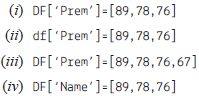
(b) He wants to set all the values to zero in data frame, choose the right command to do so:
| Amit | Ram | Sam | Roja | Monan | Prem | |
| Maths | 0 | 0 | 0 | 0 | 0 | 0 |
| Science | 0 | 0 | 0 | 0 | 0 | 0 |
| Hindi | 0 | 0 | 0 | 0 | 0 | 0 |
(i) DF=0 (ii) DF[]=0
(iii) DF[:]=0 (iv) DF[:]==0
(c) He want to delete the row of Science marks:
(i) DF.drop(‘Science’, axis=1)
(ii) Dfdrop(‘Science’, axis=0)
(iii) dfdrop(‘Science’, axis=-1)
(iv) dfdrop(‘Science’, axis==0)
(d) What will be the output of the given command?
DFindex=[‘A’,’B’,’C’]
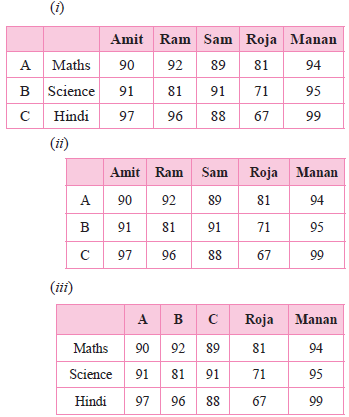
(iv) Error, Index already exist cannot be overwrite
| Amit | Ram | Sam | Roja | Manan | |
| A | 90 | 92 | 89 | 81 | 94 |
| B | 91 | 81 | 91 | 71 | 95 |
| C | 97 | 96 | 88 | 67 | 99 |
(e) The given code is to create another data frame, which he want to add to existing Data Frame choose the right command to do so:
Sheet1={
‘Aaradhya’: pdSeries([90, 91, 97],
index=[‘Maths’,’Science’,’Hindi’])}
S1=pdDataFrame(Sheet1)
(i) Df.append(S1,axis=0)
(ii) Df.append(S1)
(iii) Df.insert(S1)
(iv) Df.join(S1)
Mr. Naveen is working as data analyst. He was facing some problem related to panda’s library, help him in answering the given questions: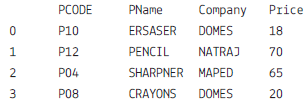
(a) He wants to display only 2 columns i.e. PNAME and Company, choose the right comman(d)
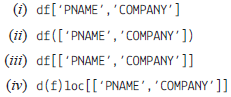
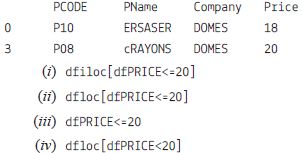
(b) He wants the given output, choose the right command:
(c) What will be the output of the given command? print(df.size)
(i) 20 (ii) 4
(iii) 24 (iv) 16
(d) Choose the command which will display the number of rows and columns of the above Dataframe
(i) print(dfshape)
(ii) print(dfshape()
(iii) print(dfrows,dfcolumns)
(iv) print(dfloc[],dfiloc[])
(e) What will be the output of the following command?
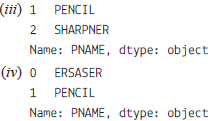
print(dfloc[2:4,’PNAME’])
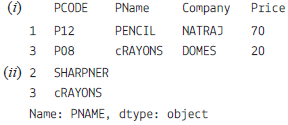
(a) He wants to display only 2 columns i.e. PNAME and Company, choose the right comman(d)
(b) He wants the given output, choose the right command:
(c) What will be the output of the given command? print(df.size)
(i) 20 (ii) 4
(iii) 24 (iv) 16
(d) Choose the command which will display the number of rows and columns of the above Dataframe
(i) print(dfshape)
(ii) print(dfshape()
(iii) print(dfrows,dfcolumns)
(iv) print(dfloc[],dfiloc[])
(e) What will be the output of the following command?
print(dfloc[2:4,’PNAME’])
Mr. Sharma is working on pandas series and he is facing some problem while working on Series. Help him with few concepts by answering the given question:
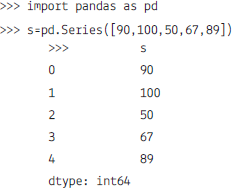
(a) He wanted the given output, which command will be appropriate to do the sam(e)
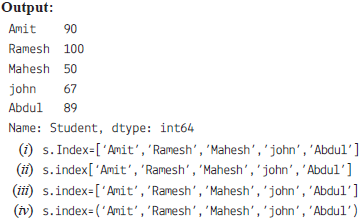
(b) Which command will give him the output as 5.
(i) s.index
(ii) s.size
(iii) s.values
(iv) None of the mentioned
(c) Assuming the changed structure, answer the question.
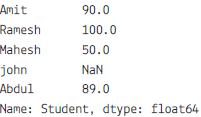
Which command will display the given output?
(i) s.head (2) (ii) s.top(2)
(iii) s.head() (iv) s.first(2)
(d) Choose the write output for the given command:
>>>print(stud1.count())
(i) 4 (ii) 3
(iii) 5 (iv) Error
(e) What is the name of the above Series?
(i) Student (ii) s
(iii) int64 (iv) float64
He has created the series:
(a) He wanted the given output, which command will be appropriate to do the sam(e)
(b) Which command will give him the output as 5.
(i) s.index
(ii) s.size
(iii) s.values
(iv) None of the mentioned
(c) Assuming the changed structure, answer the question.
Which command will display the given output?
(i) s.head (2) (ii) s.top(2)
(iii) s.head() (iv) s.first(2)
(d) Choose the write output for the given command:
>>>print(stud1.count())
(i) 4 (ii) 3
(iii) 5 (iv) Error
(e) What is the name of the above Series?
(i) Student (ii) s
(iii) int64 (iv) float64
(a) Create the Dictionary Student with the following key and add the 5 values. Dictionary will be created from 4 different list:
| Column Name | Key |
| Student Number | sno |
| Student Name | sname |
| Marks | mark |
(b) Create the data frame for the above specification containing index parameter along with column.
(c) Add a new column grade into above Data Frame with at least 3 methods.
(d) Insert the 2 rows.
(e) Create another Data Frame with two rows named DF2.
(f) Add this data frame to your existing data frame.
(g) Display the alternate rows.
(h) Display the name and marks of the students whose marks is greater than equal to 90.
(i) Fill all NaN in the data.
(j) Increase the marks by 10.
Answer the following question on the basis of given dataset:
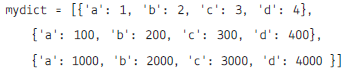
| a | b | c | d | |
| 0 | 1 | 2 | 3 | 4 |
| 1 | 100 | 200 | 300 | 400 |
| 2 | 1000 | 2000 | 3000 | 4000 |
(i) To create the data frame for the above dictionary.
(ii) To print the dictionary.
(iii) To change the index of the above data frame 'a1','a2','a3'.
(iv) To change the columns headings to 'units','tens','hundred',' thousand'.
(v) To display the tens columns.
(vi) To create another datframe with values of thousand.
(vii) To use the iterrows() to display the complete records.
(viii) To display the column wise data using iteritems().
Write the output on the basis of the given data frame:
| units | tens | hundred | thousand | |
| a1 | 1 | 2 | 3 | 4 |
| a2 | 100 | 200 | 300 | 400 |
| a3 | 1000 | 2000 | 3000 | 4000 |
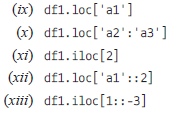
Answer the following questions based on dataset given below:

| TNO | Tname | Tadd | Salary | |
| 0 | T01 | Amit | 123 Paschim Vihar | 23000 |
| 1 | T02 | Rajesh | 6/11 Ramesh Nagar | 34000 |
| 2 | T03 | Binny | 5 West Punjabhi Bagh | 12000 |
| 3 | T04 | Charu | 23Malviya Nagar | 45000 |
| 4 | T05 | Meenakshi | 19 Meera Bagh | 34000 |
(i) To write the statement to import the required library.
(ii) To create the data frame from the above dictionary.
(iii) To print the data frame.
(iv) To print the name columns.
(v) To print the complete information of the data frame.
(vi) To print the index of data frame.
(vii) To print the various attributes of the data frame i.e Shape, Dimensions, Columns and number of records.
(viii) To print the records whose salary is greater than 5000.
(ix) To create another data frame which will store all the records of the teacher whose salary is greater than 5000.
(x) To display the Salary.
(xi) To set the index to the column 'Tname'.
(xii) To display the record of 'Amit'.
(xiii) To display the record fo 'Amit' and 'Binny'
(xiv) To display the Salary and Address of 'Amit' and 'Binny'.
(xv) To display the records of the teachers whos are earning salary more than 10000.
(xvi) To display the records of the teachers whos are earning salary less than 40000.
(xvii) To add new column Dearness Allowance with any values.
(xviii) To add new column "HRA" using .loc().
(xix) To add new column tax using assign().
(xx) To display the HRA column.
(xxi) To display the records of the Teachers who have HRA of more than 500.
(xxii) To add a new column Total Salary which is to be calculated as Salary + HRA - Tax.
(xxiii) To fill all NaN values with 5000.
(xxiv) To replace all the NaN with space.
(xxv) To Update the new colum with values as Salary + HRA + Dearness Allowance - Tax
Write the output of the given commands:
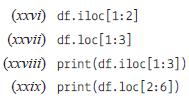
Describe Data Operations in Pandas.
Answer the questions related to pandas Series which will perform:
(i) To import the pandas
(ii) To create the series from the list
(iii) To print List.
(iv) To print the index of the series.
(v) To print the values of the series.
What is Pandas NumPy array?
How can we convert a Series to DataFrame?
Generate a Data Handling Using Pandas – I paper free
Pick question groups from the list above, set marks and difficulty, and export a branded PDF with step-by-step answer keys. First 3 chapters free — no signup.