Question
WAP to generate n lines of the following pattern on the computer screen: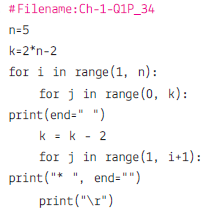
Get the step-by-step solution for this question inside the Vidyadip app.
Get the answer in the appGenerate a complete, print-ready paper with questions like this in minutes — across 16+ boards, with answer keys.
Consider the following tables CARHUB and CUSTOMER and answer (a) and (b) parts of this question:
Table: CARHUB
| Vcode | VehicleName | Make | Color | Capacity | Charges |
| 100 | Innova | Toyota | WHITE | 7 | 15 |
| 102 | SX4 | Suzuki | BLUE | 4 | 14 |
| 104 | C Class | Mercedes | RED | 4 | 35 |
| 105 | A-Star | Suzuki | WHITE | 3 | 14 |
| 108 | Indigo | Tata | SILVER | 3 | 12 |
Table: CUSTOMER
| CCode | CName | VCode |
| 1 | Hemant Sahu | 101 |
| 2 | Raj Lal | 108 |
| 3 | Feroza Shah | 105 |
| 4 | Ketan Dhal | 104 |
(a) Write SQL commands for the following statements:
(i) To display the names of all white colored vehicles
(ii) To display name of vehicle, make and capacity of vehicles in ascending order of their sitting capacity
(iii) To display the highest charges at which a vehicle can be hired from CARHUB.
(iv) To display the customer name and the corresponding name of the vehicle hired by them.
(b) Give the output of the following SQL queries:
(i) Select count(distinct make) from cabhub;
(ii) Select max(charges), min(charges) from carhub;
(iii) Select count(*), make from carhub;
(Iv) Select vehiclename from carhub where capacity = 4;
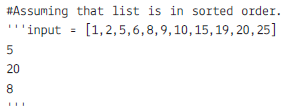
Write the output for the following commands:
Table- Loan_accounts
| account | cust_name | loan_amount | installment | int_rate | start_rate | interest |
| 1 | R.K. Gupta | 300000 | 36 | 12.00 | 2009-07-19 | Null |
| 2 | S.P. Sharma | 500000 | 48 | 10.00 | 2008-03-22 | Null |
| 3 | K.P. Jain | 300000 | 36 | Null | 2007-08-03 | Null |
| 4 | M.P. Yadav | 800000 | 60 | 10.00 | 2008-12-06 | Null |
| 5 | S.P. Sinha | 200000 | 36 | 12.50 | 2010-01-03 | Null |
| 6 | P. Sharma | 700000 | 60 | 12.50 | 2008-06-05 | Null |
| 7 | K.S. Dhall | 500000 | 48 | Null | 2008-03-05 | Null |
(a) 
(b) 
(c) 
(d) 
(e) 
(a) To insert a new row in the HOSPITAL table with the following data: 11,’ Kasif’, 37,’ENT’,’2018-02-25’, 300, ’M’.
(b) To set charges to NULL for all the patients in the Surgery department.
(c) To display patient details who are giving charges in the range 300 and 400 (both inclusive).
(d) To display the details of that patient whose name second character contains ‘a’.
(e) To display total charges of ENT Department.
(f) To display details of the patients who admitted in the year 2019.
(g) To display the structure of the table hospital.
(h) Write the command to create the above table.