Question
Write the function Change(), to double the even elements and triple the odd elements present in a list. The function will take and list as parameter and also return the list.
Get the step-by-step solution for this question inside the Vidyadip app.
Get the answer in the appGenerate a complete, print-ready paper with questions like this in minutes — across 16+ boards, with answer keys.
Table: HOSPITAL
| PNo | Name | Age | Department | DateofAdm | Charges | Sex |
| 1 | Mayank | 65 | Surgery | 23/02/2018 | 600 | M |
| 2 | Babita | 24 | ENT | 01/01/2019 | 400 | F |
| 3 | Kashish | 45 | Orthopaedic | 19/12/2018 | 400 | M |
| 4 | Tarun | 12 | Surgery | 01/10/2018 | 600 | M |
| 5 | Manisha | 36 | ENT | 12/01/2018 | 400 | F |
| 6 | Imran | 16 | ENT | 24/02/2018 | 400 | M |
| 7 | Ankita | NULL | Cardiology | 20/08/2018 | 800 | F |
| 8 | Zoya | 45 | Gynecology | 22/02/2018 | 500 | F |
| 9 | Kush | 19 | Cardiology | 13/01/2019 | 800 | M |
| 10 | Shalini | 31 | Medicine | 19/02/2018 | 300 | F |
Note: PNo is the primary key in the above table.
Write SQL commands for the statements (a) to (g) on the table HOSPITAL.
(a) To show all the information about the patients of the cardiology department.
(b) To list the names of female patients who are either in the orthopaedic or surgery department.
(c) To list the name of all the patients with their date of admission in ascending order.
(d) To display the patient’s name, charges, the age for female patients only.
(e) To count the number of patients with age > 30.
(f) To display various departments.
(g) To display the number of patients in each department.
(i) To import the pandas
(ii) To create the series from the list
(iii) To print List.
(iv) To print the index of the series.
(v) To print the values of the series.

| TNO | Tname | Tadd | Salary | |
| 0 | T01 | Amit | 123 Paschim Vihar | 23000 |
| 1 | T02 | Rajesh | 6/11 Ramesh Nagar | 34000 |
| 2 | T03 | Binny | 5 West Punjabhi Bagh | 12000 |
| 3 | T04 | Charu | 23Malviya Nagar | 45000 |
| 4 | T05 | Meenakshi | 19 Meera Bagh | 34000 |
(i) To write the statement to import the required library.
(ii) To create the data frame from the above dictionary.
(iii) To print the data frame.
(iv) To print the name columns.
(v) To print the complete information of the data frame.
(vi) To print the index of data frame.
(vii) To print the various attributes of the data frame i.e Shape, Dimensions, Columns and number of records.
(viii) To print the records whose salary is greater than 5000.
(ix) To create another data frame which will store all the records of the teacher whose salary is greater than 5000.
(x) To display the Salary.
(xi) To set the index to the column 'Tname'.
(xii) To display the record of 'Amit'.
(xiii) To display the record fo 'Amit' and 'Binny'
(xiv) To display the Salary and Address of 'Amit' and 'Binny'.
(xv) To display the records of the teachers whos are earning salary more than 10000.
(xvi) To display the records of the teachers whos are earning salary less than 40000.
(xvii) To add new column Dearness Allowance with any values.
(xviii) To add new column "HRA" using .loc().
(xix) To add new column tax using assign().
(xx) To display the HRA column.
(xxi) To display the records of the Teachers who have HRA of more than 500.
(xxii) To add a new column Total Salary which is to be calculated as Salary + HRA - Tax.
(xxiii) To fill all NaN values with 5000.
(xxiv) To replace all the NaN with space.
(xxv) To Update the new colum with values as Salary + HRA + Dearness Allowance - Tax
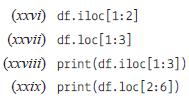
Write the output of the given commands:
Create the following table named "Charity "and write SQL queries for the tasks that follow:
Table: Charity
| P_Id | LastName | FirstName | Address | City | Contribution |
| 1 | Bindra | Jaspreet | 5B, Gomti Nagar | Lucknow | 3500.50 |
| 2 | Rana | Monica | 21 A, Bandra | Mumbai | 2768.00 |
| 3 | Singh | Jatinder | 8, Punjabi Bagh | Delhi | 2000.50 |
| 4 | Arora | Satinder | K/1, Shere Punjab Colony | Mumbai | 1900.00 |
| 5 | Krishnan | Vineeta | A-75, Adarsh Nagar |
(i) Display all first names in lowercase.
(ii) Display all last names of people of Mumbai city in uppercase.
(iii) Display Person Id along with First 3 characters of his/her name.
(iv) Display first name concatenated with last name for all the employees.
(v) Display length of address along with Person Id.
(vi) Display last 2 characters of City and Person ID.
(vii) Display Last Names and First names of people who have "at "in the second or third position in their first names.
(viii) Display the position of 'a' in Last name in every row.
(ix) Display Last Name and First name of people who have "a "as the last character in their First names.
(x) Display the first name and last name concatenated after removing the leading and trailing blanks.
(xi) Display Person Id, last names and contribution rounded to the nearest rupee of all the persons.
(xii) Display Person Id, last name and contribution with decimal digits truncated of all the persons.
(xiii) Display Last name, contribution and a third column which has contribution divided by 10. Round it to two decimal points.
Write a program to create the list and ask user whether you want to delete an element if say yes then delete the element and print the new list else print the entered list.