Questions

6 Marks Question

🎯

Test yourself on this topic

16 questions · timed · auto-graded

Question 16 Marks
What are the advantages of Tally?
Answer
ADVANTAGES OF TALLY:Following are the advantages of Tally software:
  1. The reports generated by Tally software are accurate and reliable.
  2. It is very simple to use. A person with basic knowledge of accounts can easily operate it.
  3. It does not matter that business is big or small. It can be adopted by any kind of business organisation.
  4. Various reports can be generated very easily at any point of time.
  5. It can store huge volume of transactions. It can manage not only one company but is also able to manage accounts of multiple companies.
  6. Its security feature keeps the data confidential. The data is generally password protected and it facilitates data vault and data audit feature to secure the data.
View full question & answer
Question 26 Marks
State the four basic requirements of a database applications.
Answer
The use of computers in any database oriented application has four basic requirements as mentioned below;
  1. Front-end Interface: It is an interactive link or a dialog between the user and database-oriented software through which the user communicates to the back-end database. For example, a transaction relating to purchase of goods may be dealt with the accounting system through a purchase voucher, which appears on the computer’s monitor of data entry operator and when entered into the system is stored in the database. The same data may be queried through reporting system say purchase analysis software programme.
  2. Back-end Database: It is the data storage system that is hidden from the user and responds to the requirement of the user to the extent the user is authorised to access.
  3. Data Processing: It is a sequence of actions that are taken to transform the data into decision useful information.
  4. Reporting System: It is an integrated set of objects that constitute the report.
View full question & answer
Question 36 Marks
Explain any five type of accounting vouchers in Tally.
Answer
Receipt Voucher: All inflow of money is recorded through receipt voucher. In other words the transactions in which Cash or Bank A/c are Debited come under this voucher. Cash received from debtors or capital A/c, loan and advance taken from another party are recorded in receipt voucher.Payment Voucher: This voucher is used to record all outflow of money. Payment towards any expenses, creditors and advances are to be recorded in Payment Voucher. For payment voucher we use F5 key and press F12 Key for any changes in configuration of Voucher.
Contra Voucher: This voucher is used for transferring fund between Cash and Bank Accounts only. Withdrawal of Cash from bank and deposit of Cash into Bank are the transactions recorded under contra voucher. For contra voucher we use F4 Key.
Journal Voucher: Journal Voucher is used to record Non-Cash transactions. It is an adjusting voucher. Adjustment between the ledgers are recorded under Journal Voucher.
Purchase Voucher: In Purchase Voucher we record all transactions related to Purchase. When a Company buys goods on credit or cash, purchase voucher is used. To pass a Purchase Voucher.
Sales Voucher: Sales Vouchers are used to record Cash sale or Credit sale. In this voucher Party's name & reference no., details are filled by the user. All details of goods to be sold have to be entered by user which helps to keep record of available units. To Pass a sale voucher F8 key is used.
View full question & answer
Question 46 Marks
Define a computerised accounting system. Distinguish between a manual and computerised accounting system.
Answer
computerised accounting system: A computerised accounting system is that accounting information system that helps in processing the financial transactions and event as per the Grenerally Accepted Accounting principles (GAAP) and leads to the generation of reports as per the requirements of the users.
  Basis of Distinction Manual Accounting Compurised Accounting
1. Identifying financial transactions In this system, identification of in financial transactions is done manually by applying the principles of accounting. In this system also identification of financial transaction is done manually byapplying the principles of accounting.
2. Recording In this system, the recording of transactions in the books of original entryand related calculations such as adding subtraction and totalling are done manually. In this system,the recording of transaction i.e., storing of data in database is done manually and all other calculations are done by computers.
3. Classification In this system, classification i.e. posting to ledger accounts and the preparation of trial balance is done manually. In this, the stored data are processed automatically by the software to give us ledger accounts.
4. Summarising In this system, summarising i.e., balancing of ledger accounts and the prepration of trial balance is done manually. In this, transactions once recorded are stored in the database which will produce trial balance automatically.
5. Adjustment Entries The identification. recording and posting of adjustment entries is done manually. In the identification and recording of adjustment entries is done manually and thier posting etc. is done by software.
View full question & answer
Question 56 Marks
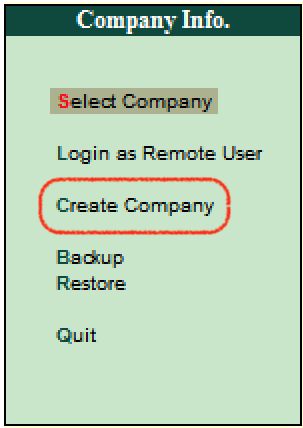
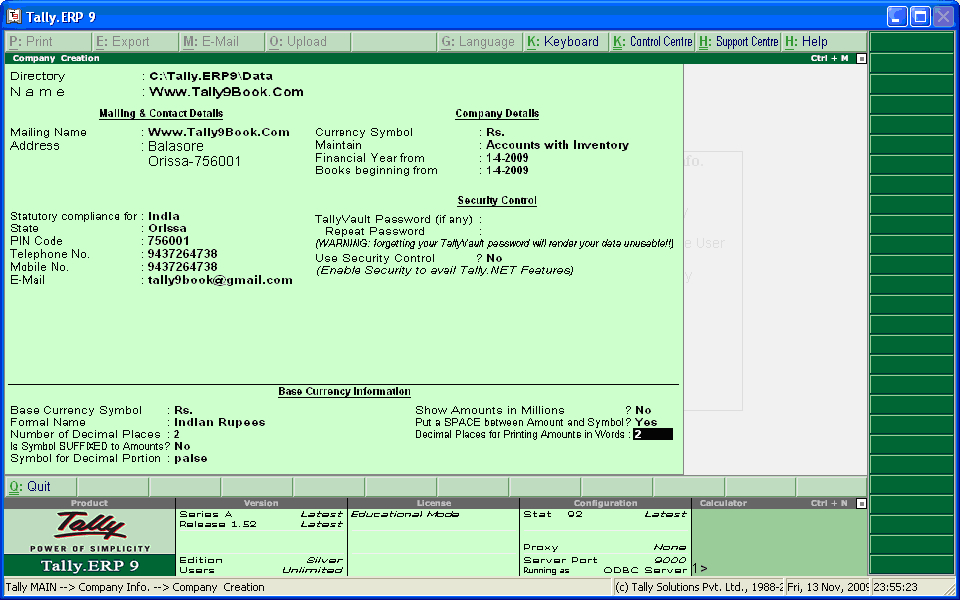
Explain the process of Company Creation.
Answer


Fill the necessary fields with the information taken from internal and external documents of the Company:
  • Company Name: Enter the Name of the Company in this field.
  • Company's Mailing Address: Mailing Address of the Company which is printed in all external documents.
  • IT Number: Enter the Income Tax number allotted by Income Tax Deptt.
  • Accounting Module: If user wants to maintain Financial Accounts only select Accounts only and if he wants to maintain accounts with inventory select other option.
  • Financial Year: Specify financial year of the Company and enter beginning date of the financial year.
Other Details: If the user wants to specify other information he can fill in these fields. For example, he can specify the currency symbol that will be used to maintain the books of accounts. The symbol already appears for India and SAARC Companies and the field is left blank for other nations currency.
Saving the Profile: Finally when all Company details are filled save the Company Profile by accepting Yes.
View full question & answer
Question 66 Marks
Define Software. Explain different types of softwares used in a Computer System.
Answer
Software: It is a general term for the various kind of programs used to operate computer and related devices. Software is a set of instructions on the basis of which a computer operates. Unlike computer hardware, computer software cannot be seen or touched. The hypothetical or imaginary part of the computer which is used with hardware to perform computer applications is known as Software. Computer software can be divided into following three categories
  1. Operating Software: Operating Software is a set of specialised programs that makes interface between the user and the computer hardware. Operating Software is essential for a computer system as through it the computer accepts command for operation. It is a set of number of programs put together that are used for controlling the resources and the devices attached to the computer so that they can work under one central control for their better and effective use. Operating System is essential to run a computer. In simple words, an Operating System acts as the government of a computer system to manage its resources for their better and effective use. Alternatively, the Operating System can be defined as a set of programs, active all the time in the memory of the computer, to manage the resources of the computer for their better and effective use. Example of Operating Software is Windows Software.
  2. Utility Software: Utility Software is a set of computer programs used to perform supporting operations in a computer. Utility Software usually focuses on how the computer infrastructure (including the computer hardware, operating system, application software and data storage) operates. Due to this focus, utilities are often technical and targeted at people with an advanced level of computer knowledge. Most Utility Softwares are highly specialised and designed to perform only a single task or a small range of tasks. However, there are also some Utility Softwares which combine several features in one piece of software. Most major operating systems come with several pre-installed utilities. Like: Disk storage, Disk defragmenters, Disk checkers, Disk cleaners, Disk space analysers, Disk partitions, Backup, Disk compression, File nianagers, Anti-virus, Data compression, etc.
  3. Application Software: Application Software is the user-oriented program which is designed and developed for performing certain jobs, such as accounting, word processing and designing. For example, if an enterprise has to maintain its books of account, it will install an accounting software such as Tally or Busy. Similarly, if a person has to design, he will install PageMaker or CorelDRAW And, similarly, for database operation one will install Oracle, SQL-server or My-SQL or Access in Microsoft Office. Accounting software or program used in a business depends on the size and requirements of the organisation. Softwares available off-the-shelf are Tally, Busy and many others. But Tally and Busy are the most commonly used accounting softwares. The available accounting softwares are data based and designed for use with Windows as the Operating System.
View full question & answer
Question 76 Marks
What are the salient features in Tally?
Answer
SALIENT FEATURES OF TALLY:
Tally 9 is very popular Accounting software. A person who just knows basics of Accounts can operate Tally Software easily and can generate instant reports which help the management in taking quick decisions. Its latest version 9 makes it very unique as it has various features as follows:
  1. In Tally, inventory management is possible. Once the available units are entered in it, updated stock summary after each transaction can be obtained.
  2. There is no need of keeping record of salary and wages separately as Payroll feature facilitates the same.
  3. Preparation of Tax reports and tax filing work becomes very easy in Tally as Balance Sheet, P & L statement, TDS returns, Excise forms, VAT forms, Service Tax returns etc. can be generated easily in Tally at any point of time.
  4. To find out the cost of a particular job is very easy as Tally provides cost centre facility in it.
  5. Syncronization of data is another main feature of Tally which facilitates to manage the data over different locations.
  6. Various MIS reports can be generated easily and Budget can be maintained in Tally.
  7. It also calculates interest on outstanding amount.
View full question & answer
Question 86 Marks
Computerised accounting system is the best form of accounting system. Do you agree? Comment.
Answer
Yes, Computerised accounting system is the best form of accounting system Advantages of Computerised Accounting System:
  1. High Speed: The accounting speed of a computer is much faster than that of a human being.
  2. High Reliability: The extent of reliability of the information generated by a computer is immense. The reliability remains the same despite the volume of the work whereas the reliability of a human work can be doubtful in case of voluminous work.
  3. Accuracy: The accuracy of a computer cannot be doubted once a particular program is fed. All the results based on such program would be 100% accurate whereas the results produced by a human being can vary due to fatigue, carelessness, etc.
  4. Updation of Information: All the related records in a computer get automatically updated once any information is punched in, whereas in case of manual accounts all the records will have to be altered one by one.
  5. Efficiency: The computer based accounting systems ensure better and efficient use of resources and time.
  6. Legibility: The data displayed on a computer screen is clear and legible thus avoiding errors caused by untidy writing in a manual accounting system.
  7. Lower Cost: The cost of maintaining accounts under the computerised system is much lower as compared to the manual system.
View full question & answer
Question 96 Marks
Briefly list the generic considerations before sourcing an accounting software.
Answer
The following factors are usually taken into consideration before sourcing an accounting software:
  1. The cost of installation and maintenance: The cost of installation and maintenance: A simple cost benefit analysis is done before installing any software. The cost of its aquisition, installation and maintenance are the factors of deep consideration before sourcing any software.
  2. Flexibility: It is one of the important considerations before sourcing an accounting software. The software should be easily upgradable and must have the feature of easy modifications.
  3. Adaptability and Training needs: Adaptabits and framing needs: The accounting software should be easily understandable and adaptable. It must not require extensive training.
  4. Size of the orgnisation: The size of the organisation and the volume of its accounting transactions determine the requirements of the type of accounting software.
  5. The Level of MIS reporting: Thilak u s reporting The level of use and utility of MIS reporting in an organisation determine the acquisition of software to a lot of extent.
  6. Level of Secrecy: The level of secrecy should be high. It should be impossible for any unauthorised user to access the data.
  7. Vendors Reputation and Capability: Another very important consideration to be made before sourcing any software is the various information about the vendor -- like since when the vendor is in the business of software development? Whether there are other users of the same software or not? What is the after sale service the vendor is offering and how quick is his service? etc.
View full question & answer
Question 106 Marks
Briefly explain three advantages and three disadvantages of computerised accounting.
Answer
Advantages: Advantages of Computerised Accounting A Computerised Accounting System has many advantages, as discussed below:
  1. Large Volume of Transactions: In the present-day business environment, the transactions of a business are normally large in volume. The computerised accounting system can store and process such voluminous transactions with speed and accuracy.
  2. Scalability: A computerised accounting system is scalable to handle the growing transactions.
  3. Security: The accounting data under the computerised environment is safer than the accounting data under the manual system. The data can be kept secure by using a password, i.e., allowing only authorised users to access the data.
  4. Timely Reporting: Availability of reports on time enables the management to take quick decisions, which is an important element for the success of an enterprise. A computerised accounting system makes these reports available as and when required.
Disadvantages: Disadvantages of Computerised Accounting However, computerised accounting suffers from the following disadvantages:
  1. Controls: If adequate controls are not built and, where built, are not followed, it can lead to loss of data. It is important to take back-ups at regular intervals to avoid such a situation.
  2. Data Corruption: The data can get corrupted through viruses that may come in through the internet or the use of external input devices without scanning them for viruses.
  3. Trained Computer Operators: Untrained computer operators can lead to loss of data.
  4. Limitations of Software: The software is developed on the basis of the experiences of the team of developers. As such, it may not be able to deal with a specific problem that may arise.
View full question & answer
Question 116 Marks
Explain briefly any five advantages of computerised accounting system over the manual system.
Answer
The computerised accounting system has various advantages over the manual system which are given below:
  1. High Speed: The accounting speed of a computer is much faster than that of a human being.
  2. High Reliability: The extent of reliability of the information generated by a computer is immense. The reliability remains the same despite the volume of the work whereas the reliability of a human work can be doubtful in case of voluminous work.
  3. Accuracy: The accuracy of a computer cannot be doubted once a particular program is fed. All the results based on such program would be 100% accurate whereas the results produced by a human being can vary due to fatigue, carelessness, etc.
  4. Updation of Information: All the related records in a computer get automatically updated once any information is punched in, whereas in case of manual accounts all the records will have to be altered one by one.
  5. Effieciency: The computer based accounting systems ensure better and efficient use of resources and time.
  6. Legibility: The data displayed on a computer screen is clear and legible thus avoiding errors caused by untidy writing in a manual accounting system.
  7. Lower Cost: The cost of maintaining accounts under the computerised system is much lower as compared to the manual system.
View full question & answer
Question 126 Marks
Explain the following along with their advantages:
  1. Ready to use accounting software.
  2. Customised accounting software.
  3. Tailored accounting software.
Answer
  1. ​​​​​​Ready to use accounting software.
A variety of readymade softwares is available in the market. These softwares are for users at large and are not developed according to the requirements of any specific user. Most popular ready made softwares available in the market are Tally, Ex. Busy etc.
Advantages:
  1. These softwares are developed by a group of highly experienced group of professionals. Hence, they take care of the problems areas which may be overlooked if a particular software is developed for some specific user.
  2. Since these softwares are used by a large number of users, accounting personnel well versed with these softwares are easily available.
  3. They are easy to learn and their training is sometimes offered free by the vendor.
  4. Because of their use by a large number of users, they have better after sales maintenance service.
  5. Because they are available off-the-shelf, time required in developing a tailor made software is saved.
  6. The cost of installation is low.
  1. Customised accounting software.
The term 'Customised Software' means making changes in the ready to use software so as to suit the specific requirements of the user. Any readymade software can be changed according to the needs and specifications of the user. However, the cost of installation of customised softwares are high because the cost of change is to be paid by the user.
Advantages:
  1. These softwares are designed to suit the specific requirements of the users. Hence, they are used by a large number of large and medium size business enterprises.
  2. Level of secrecy for the data is higher.
  3. Linkage to other information systems is available on the basis of need of the enterprise.
  4. Tailored accounting software.
The term “tailor-made software means developing a software according to the needs and specifications of the user. These softwares are not available off-the-shelf.
Advantages:
  1. It being developed according to the specifications of the user, takes care of the specific needs of the enterprise.
  2. The level of secrecy of data and authenticity checks are robust in such softwares.
  3. They can be effectively linked to some other information systems.
View full question & answer
Question 136 Marks
'Accounting software is an integral part of the computerised accounting system' Explain. Briefly list the generic considerations before sourcing an accounting software.
Answer
The accounting software does form an integral part of the Computerised Accounting Systems. The accounting software should be selected after considering the level of skill and proficiency of the accounting professionals. This is one of the important aspects that should be taken care of before introducing Computerised Accounting Systems, as the accounting professionals are responsible for accounting and the not computers.
The following are some of the important points that should be taken into consideration before introducing accounting software in an organisation.
  1. Flexibility: This is the most important factor that should be considered before sourcing accounting software. The accounting software should be flexible in terms of data entry, retrieval of data and generating design of reports. The software should be able to run on different computers having different operating systems and having different configurations. It should provide some flexibility among its users. It should also provide easy switch over between users, operating system and hardware.
  2. Cost of Installation and Maintenance: The selection of accounting software largely depends upon its cost to the organisation. The cost of accounting software includes cost of installing the related components and hardware, maintenance and alteration costs, cost of training the staff and cost involved in recovering data in case of data failure. An organisation needs to evaluate the benefits of the software against its costs. Based on its evaluation, an organisation will introduce the software if the benefits are more than the cost and if it is in the affordable range of the organisation.
  3. Size of Organisation: The size of an organisation also determines the selection of accounting software. The small-sized organisations, where the volume of business transactions is not so large, usually opt for simple and single user oriented software. On the other hand, large scale organisations, where the volume of business transactions is very large choose the latest and sophisticated software for meeting the multi-user requirements.
  4. Training Needs: Another factor that affects the choice of software is the training needs. There are some accounting software that requires comparatively lesser training and are more user-friendly. While, there are some other complicated software that requires continuous and thorough training.
  5. Level of Secrecy: The level of expected security is one of the important factors that an organisation bears in mind before sourcing accounting software. Software should be able to prevent the unauthorised access and manipulation of data. It should have in-built features of security. For example, in tailored software the user rights may be restricted according to their work or responsibility criteria.
  6. Exchanging Data Facility: The capability of accounting software to transfer data is another important factor to be considered for its selection. The accounting software should be able to provide an easy and safe transfer of data from one system to another system and during migration of database.
  7. Utilities/ MIS Reports: Another factor which helps in determining the software selection is the MIS reports and the extent to which they are used in the organisation.
  8. Vendor Reputation and Capability: The selection of software is also affected by the capability and competence of the vendor. It depends upon the reputation of the vendor in the market, the user-reviews of the similar software, the extent of post sales support services from the vendors, etc.
View full question & answer
Question 146 Marks
Describe the various types of accounting software along with their advantages and limitations.
Answer
Ready-to-Use: Ready-to-Use accounting software is suited to organisations running small/ conventional business where the frequency or volume of accounting transactions is very low. This is because the cost of installation is generally low and number of users is limited. Ready-to-use software is relatively easier to learn and people (accountant) adaptability is very high. This also implies that level of secrecy is relatively low and the software is prone to data frauds. The training needs are simple and sometimes the vendor (supplier of software) offers the training on the software free. However, these software offer little scope of linking to other information systems.
Customised: Accounting software may be customised to meet the special requirement of the user. Standardised accounting software available in the market may not suit or fulfil the user requirements. For example, standardised accounting software may contain the sales voucher and inventory status as separate options. However, when the user requires that inventory status to be updated immediately upon entry of sales voucher and report be printed, the software needs to be customised.
Tailored: The accounting software is generally tailored in large business organisations with multi users and geographically scattered locations. These software requires specialised training to the users. The tailored software is designed to meet the specific requirements of the users and form an important part of the organisational MIS. The secrecy and authenticity checks are robust in such softwares and they offer high flexibility in terms of number of users.
Advantages of Ready-made Accounting Software:
  • This software is easily available in the market.
  • It is less expensive, as it comes with basic and standard features.
  • It involves a lesser need for training.
  • It is less sophisticated.
  • Its adaptability is very high as it is relatively easier to learn and operate.
  • It is suitable for small-size business enterprises.
Disadvantages of Ready-made Accounting Software:
  • It has limited number of users.
  • It is not suitable for medium and large business organisation, where the number of transactions is very large.
  • It fails to cater the specific needs of the users.
  • It suffers from the low level of data secrecy.
  • It does not have a wide scope to link it with other information systems.
Advantages of Customised and Tailor-made Accounting Software:
This software is suitable for medium and large business organisation.
  • It caters the specific requirements and needs of the users.
  • It can be modified as per the needs of the organisation.
  • It has high level of security and minimises the loss and unauthorised access of data.
  • It cannot be easily imitated or duplicated in the market due to difference in the needs and requirements of different users.
  • It does not involve high cost of training as the training can be imparted within the organisation by the experienced personnel.
  • It can be easily linked to the other information systems.
  • It forms an integral part of the organisational MIS.
Disadvantages of Customised and Tailor-made Accounting Software:
  • It involves high cost of installation and maintenance.
  • Developing customised software is a time-consuming process and involves high cost of development.
  • Maintenance of this software is difficult as there exists limited availability of knowledge to the developers.
  • It lacks standard training module.
View full question & answer
Question 156 Marks
‘Computerised Accounting Systems are best form of accounting system’. Do you agree? Comment.
Answer
Yes, we agree with this statement that ‘Computerised Accounting Systems are best form of accounting system’. It becomes very easier to work with Computerised Accounting Systems leading to reduction in the accounting errors. Moreover, the computerised accounting reports are highly reliable, thereby enhances the overall efficiency. Yes, we agree with this statement that ‘Computerised Accounting Systems are best form of accounting system’. It becomes very easier to work with Computerised Accounting Systems leading to reduction in the accounting errors. Moreover, the computerised accounting reports are highly reliable, thereby enhances the overall efficiency.
Due to the following positive aspects, the Computerised Accounting Systems certainly enjoy an edge over the Manual Accounting Systems.
  • Speed: Accounting data is processed faster by using a computerised accounting system than it is achieved through manual efforts. This is because computers require far less time than human beings in performing a task.
  • Accuracy: The possibility of error is eliminated in a computerised accounting system because the primary accounting data is entered once for all the subsequent usage and processes in preparing the accounting reports. Normally, accounting errors in a manual accounting system occur because of repeated posting of same set of original data by several times while preparing different types of accounting reports.
  • Reliability: The computer system is well-adapted to performing repetitive operations. They are immune to tiredness, boredom or fatigue. As a result, computers are highly reliable compared to human beings. Since computerised accounting system relies heavily on computers, they are relatively more reliable than manual accounting systems.
  • Up-to-Date Information: The accounting records, in a computerised accounting system are updated automatically as and when accounting data is entered and stored. Therefore, latest information pertaining to accounts get reflected when accounting reports are produced and printed. For example, when accounting data pertaining to a transaction regarding cash purchase of goods is entered and stored, the cash account, purchase account and also the financial statements (trading and profit and loss account) reflect the impact immediately.
  • Real Time User Interface: Most of the automated accounting systems are inter-linked through a network of computers. This facilitates the availability of information to various users at the same time on a real time basis (that is spontaneously).
  • Automated Document Production: Most of the computerised accounting systems have standardised, user defined format of accounting reports that are generated automatically. The accounting reports such as Cash book, Trial balance, Statement of accounts are obtained just by click of a mouse in a computerised accounting environment.
  • Scalability: In a computerised accounting system, the requirement of additional manpower is confined to data entry operators for storing additional vouchers. The additional cost of processing additional transactions is almost negligible. As a result the computerised accounting systems are highly scalable.
  • Legibility: The data displayed on computer monitor is legible. This is because the characters (alphabets, numerals, etc.) are type written using standard fonts. This helps in avoiding errors caused by untidy written figures in a manual accounting system.
  • Efficiency: The computer based accounting systems ensure better use of resources and time. This brings about efficiency in generating decisions, useful informations and reports.
View full question & answer
Question 166 Marks
Discuss the advantages of computerised accounting system over the manual accounting system.
Answer
Computerised accounting offers several advantages vis-a-vis manual accounting, these are summarised as follows;
  • Speed: Accounting data is processed faster by using a computerised accounting system than it is achieved through manual efforts. This is because computers require far less time than human beings in performing a task.
  • Accuracy: The possibility of error is eliminated in a computerised accounting system because the primary accounting data is entered once for all the subsequent usage and processes in preparing the accounting reports. Normally, accounting errors in a manual accounting system occur because of repeated posting of same set of original data by several times while preparing different types of accounting reports.
  • Reliability: The computer system is well-adapted to performing repetitive operations. They are immune to tiredness, boredom or fatigue. As a result, computers are highly reliable compared to human beings. Since computerised accounting system relies heavily on computers, they are relatively more reliable than manual accounting systems.
  • Up-to-Date Information: The accounting records, in a computerised accounting system are updated automatically as and when accounting data is entered and stored. Therefore, latest information pertaining to accounts get reflected when accounting reports are produced and printed. For example, when accounting data pertaining to a transaction regarding cash purchase of goods is entered and stored, the cash account, purchase account and also the financial statements (trading and profit and loss account) reflect the impact immediately.
  • Real Time User Interface: Most of the automated accounting systems are inter-linked through a network of computers. This facilitates the availability of information to various users at the same time on a real time basis (that is spontaneously).
  • Automated Document Production: Most of the computerised accounting systems have standardised, user defined format of accounting reports that are generated automatically. The accounting reports such as Cash book, Trial balance, Statement of accounts are obtained just by click of a mouse in a computerised accounting environment.
  • Scalability: In a computerised accounting system, the requirement of additional manpower is confined to data entry operators for storing additional vouchers. The additional cost of processing additional transactions is almost negligible. As a result the computerised accounting systems are highly scalable.
  • Legibility: The data displayed on computer monitor is legible. This is because the characters (alphabets, numerals, etc.) are type written using standard fonts. This helps in avoiding errors caused by untidy written figures in a manual accounting system.
  • Efficiency: The computer based accounting systems ensure better use of resources and time. This brings about efficiency in generating decisions, useful informations and reports.
View full question & answer
6 Marks Question - Account STD 11 Commerce Questions - Vidyadip